
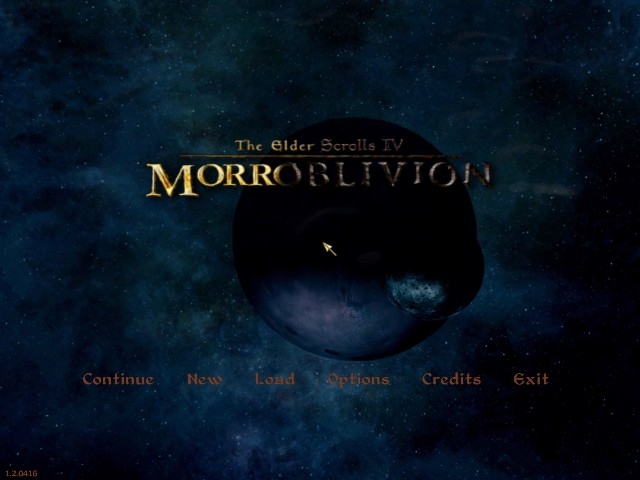
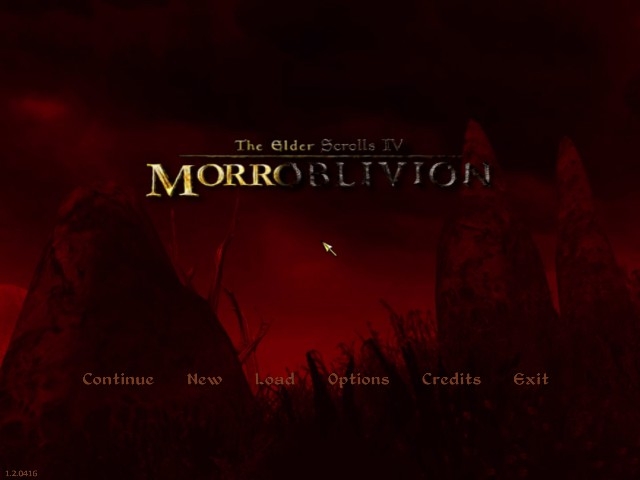
A while back Seferoth found this sweet Morrowind Intro Cinematics. About the same time I found a thread where people were working on a Morroblivion website logo. Meanwhile, I had changed my map loop (menu background) and startup music quite a few times and was getting bored with seeing "The Elder Scrolls IV Oblivion" every time I started my game. I set out to change the title, and ended up working with Chesko (who made the Intro Cinematics) to create an entirely new Morroblivion Themed Menu.
Grab the map loop and the rest of the files.
It uses a map loop that Chesko edited for that purpose, from his Intro movie. Find that here: http://www.tesnexus.com/downloads/file.php?id=39329
It replaces the load symbol with the morroblivion logo that I created for the website. It also replaces the Oblivion title with words from my logo. (Find that thread here: http://morroblivion.com/forums/morroblivion/general/1653 )
I also edited the Elder Scrolls 3 theme with some sound effects from oblivion and Morrowind so that it went with the map loop. (You can hear thunder striking, the wind, etc).
Morroblivion now has its own main menu!
Enjoy!
Iceburg
----------------------------------------------------------
Long Description
This mod replaces the vanilla loading symbol, title, title
music, and title background with Morroblivion equivalents.
The music is an edited Elder Scrolls 3 theme that adds sound effects from
Oblivion and Morrowind that match the map loop. (You can hear thunder striking,
the wind, etc).
MAKE SURE YOU FOLLOW THE INSTALL INSTRUCTIONS, OR IT WON'T WORK RIGHT.
Check out the images tab to see some pictures.
A really low quality video that gives you an idea of what this mod looks like
is found here:
http://www.youtube.com/watch?v=PQDt0Hxvmts
To see a much higher quality video, check out the video that the Morroblivion
Map loop was edited from. Chesko's HD Intro Cinematic for Morrowind, found
here: http://www.tesnexus.com/downloads/file.php?id=39329
NOTE: I DID NOT MAKE OR EDIT THE MAP LOOP.BIK. THAT WAS DONE BY CHESKO, AND HE
DID A DARN GOOD JOB.
The sample video and the screenshots were made while using Darnified UI, which
affects the font. (And maybe also the makes the options vertical instead of
horizontal?) Check that mod out here:
http://www.tesnexus.com/downloads/file.php?id=10763
________________________________________________________________________________________________________________________
INSTALATION:
1) Unzip the Morroblivion Menu zip and the Morroblivion Map Loop zip.
2) Copy the folder 'Data' from the 'Morroblivion Menu Zip' folder into your
oblivion directory.
3) Go to Oblivion\Data\Video and rename 'Map loop.bik' to anything you like.
You are backing up your map loop up in case you want to uninstall this mod. I
do not provide a backup of this file (though you can get it by reinstalling
your whole game, but who wants to do that? So back it up!
4) Copy the video 'Map loop' from your extracted 'Morroblivion Map Loop.zip'
folder. Paste the video in your Oblivion\Data\Video folder. This video is
replacing your old map loop video.
5) Delete the following two files:
Oblivion\Data\Textures\menus80\loading 'loading_symbol'
And
Oblivion\Data\Textures\menus50\loading 'loading_symbol'
6) Go into Oblivion\Data\video and rename "oblivion iv logo" to
anything else you want. I renamed it "oblivion iv logo2".
________________________________________________________________________________________________________________________
UNINSTALLING:
To uninstall copy the folder 'Data' from the 'Vanilla-use to uninstall' folder
into your oblivion directory.
Rename your backed up map loop to 'Map loop'. Find the file that you renamed
from "oblivion iv logo" in step #6 and rename it back to "oblivion
iv logo".
FAQ:
Q: My loading symbol is cut off at the right.
A: You forgot step 5. Delete the following two files:
Oblivion\Data\Textures\menus80\loading 'loading_symbol'
And
Oblivion\Data\Textures\menus50\loading 'loading_symbol'
Q: I've done the above and my textures still looked messed up.
A: Double check the above answer. Also, try unpacking your "Oblivion -
Textures - Compressed.bsa" in your data folder. OBMM is what I use to
unpack .bsa files. And if you need help with that there should be great guides
on that site: http://www.tesnexus.com/downloads/file.php?id=2097
Q: The video is in the right place, but the background didn't show up.
A: Try checking the ini file. Its located at: C:\Users\[your user name
here]\Documents\My Games\Oblivion
its called "oblivion.ini". Open it in notepad. Do you have a line
that says this: "SMainMenuMovie=Map Loop.bik".
Q: I see the Oblivion title fade in and then it changes to the Morroblivion
title.
A: Go into Data\video and rename "oblivion iv logo" to anything else
you want. I renamed it "oblivion iv logo2".
Q: My fonts and menu setup look different than the ones in your screenshots and
preview video.
A: I am using Darnified UI, which makes my text a different font. Here's the
link to it: http://www.tesnexus.com/downloads/file.php?id=10763
Q: Is there a way I can view the .bik files to see which one I have in the
video folder?
A: Go here to install a tool that lets you view .bik files just by double
clicking them: http://www.radgametools.com/bnkdown.htm. It's free and I believe
it's also official.
CREDITS:
Loading symbol, title, and sound by Iceburg.
Video by Chesko.
If you liked Chesko's great map loop video, check out the video it came from.
Chesko's HD Intro Cinematic for Morrowind, found here:
http://www.tesnexus.com/downloads/file.php?id=39329
Thanks to Lynx for testing and finding a bug for me.
ok all fine but at first
ok all fine but at first loading the Morroblivion logo is cutted from right side... :P and also first Menu movie telling still its oblivion but then suprisingly game changes to morroblivion!!!!