
Just...help

Submitted by Garnerius on

Hello everyone!

I'm new here and I apologize if this is the wrong thread. I first got introduced to TES when I was in Iraq at Camp Adder and Oblivion had just come out. I've stuck with TES since and I just bought the Anthology specifically so I could play the Morroblivion version of Morrowind. Well, I am having huge issues with installing it. I feel as if I'm over my head by leaps and bounds and have been trying to knock it out for a couple of days now. I thought I knew enough about computers to do it but I'm having significant issues with it. Can anyone please help me on this? Or at least point in the right direction? I've downloaded everything that I think I have to, but beyond that I'm honestly stuck.

Thank you so much in advance!
Karma: 0 (0 votes)

  1. 1.Download OBSE http://obse.silverlock.org       (Extract contents to C:\Program Files\Bethesda Softworks\Oblivion)
  2. Download Silent Voices v93.  http://www.nexusmods.com/oblivion/mods/16622/? (Copy Elys_USV.dll, Elys_USV.mp3 and Elys_USV.lip to your "\DATA\OBSE\Plugins\") ( by default "C:\Program Files\Bethesda Softworks\Oblivion\Data\OBSE\Plugins\" )
  3. Download Master File via Installer (featured on the download page) Set-up install directories.  
  4. Download Resources (featured on the download page) proceed to manually or refer to guide to use wyre bash or other mod management, which I personally don't use for reasons.    

-----------------------------------------  

Manually

-----------------------------------------  

  1. Open Morroblivion resource archive. You'll see several folders inside it, named as follows:    
  • 00 Core    
  • 01 Better Map
  • 01 Voiced Conversation
  1. ​​Open '00 Core' folder and unpack all of its contents (several files and folders) into Oblivion/Data
  2. Repeat the above step for all optional mods you would like to install. 

-----------------------------------------  

  1. Load Order Oblivion -DLC's Morrowind.esm 
  • Morrowind.esp
  • Morrowind_ob 
  • UCWUS.esp
  • Morrowind_ob  
  • Conversation.esp
  • Morrowind_o
  • MorroblivionTreeReplacer.esp  
  • [optional] Morrowind_ob
  • [optional] Morroblivion Maps.esp 


  1. Now I use Nexus Mod Manager to change my Load order but that is up to you. This is my load order and it has worked perfectly for me. (* means not required plugins)
  •   Oblivion.esm=1
  • Morrowind_ob.esm=1
  • Unofficial Oblivion Patch.esp=1
  • Oblivion Citadel Door Fix.esp=1
  • UOP Vampire Aging & Face Fix.esp=1
  • DLCShiveringIsles.esp=1
  • *Unofficial Shivering Isles Patch.esp=1
  • Knights.esp=1
  • *Knights - Unofficial Patch.esp=1
  • DLCHorseArmor.esp=1
  • *DLCHorseArmor
  • Unofficial Patch.esp=1
  • DLCOrrery.esp=1 *DLCOrrery 
  • Unofficial Patch.esp=1
  • DLCFrostcrag.esp=1
  • *DLCFrostcrag 
  • Unofficial Patch.esp=1
  • DLCThievesDen.esp=1
  • *DLCThievesDen
  • Unofficial Patch.esp=1
  • *DLCThievesDen 
  • Unofficial Patch
  • SSSB.esp=1
  • DLCVileLair.esp=1
  • *DLCVileLair 
  • Unofficial Patch.esp=1
  • DLCMehrunesRazor.esp=1
  • *DLCMehrunesRazor
  • Unofficial Patch.esp=1
  • DLCSpellTomes.esp=1
  • *DLCSpellTomes 
  • Unofficial Patch.esp=1
  • DLCBattlehornCastle.esp=1
  • *DLCBattlehornCastle 
  • Unofficial Patch.esp=1
  • Morrowind_ob.esp=1
  • Morrowind_ob UCWUS.esp=1
  • Morrowind_ob Conversation.esp=1
  • *Morrowind_ob MorroblivionTreeReplacer.esp=1
  • *Morrowind_ob Morroblivion Maps.esp=1
  • *Morrowind_ob - Chargen and Transport Mod.esp=1   
  1. And that's really all. P.S I would suggest running Oblivion right after putting in OBSE, and/or running oblivion after each step to test before proceeding to the next steps. Also here is the official install guide 

https://tesrenewal.com/forums/oblivion/morroblivion-mod-releases/8114


Karma: 1 (1 votes)

Thank you for your response! I really do appreciate it.

Now, on one of the programs that it said I needed (Wyre Bash) it said that I needed to put my copies of the games in something other than Program Files. So, I reinstalled and did that. Do I need to put OBSE just wherever they are, or HAVE TO put them into Program Files? Also, what do you mean Copy Elys_USV.dll, Elys_USV.mp3 and Elys_USV.lip to your "\DATA\OBSE\Plugins\"? 

Karma: 0 (0 votes)

Ok so You don't need Wyre Bash it is an optional step, see my manual version. Question are you currently using STEAM? If you are then the games will be under C:\Program Files\steam\steamapps/common and C:\Program Files\Bethesda Softworks\Oblivion for disc version. When the Morroblivion installer asks for game locations chose them dependent on which version of the games you use. As for OBSE the contents need to be in the Oblivion directory then run Oblivion once to get the Oblivion/OBSE/plugins folder to put the contents of Elys files into.

Karma: 0 (0 votes)

No, I went ahead and ordered the hard copy of the Anthology so I could get all of the maps. Since I don't need Wyre Bash do I need to uninstall and reinstall the games themselves into Program Files? 

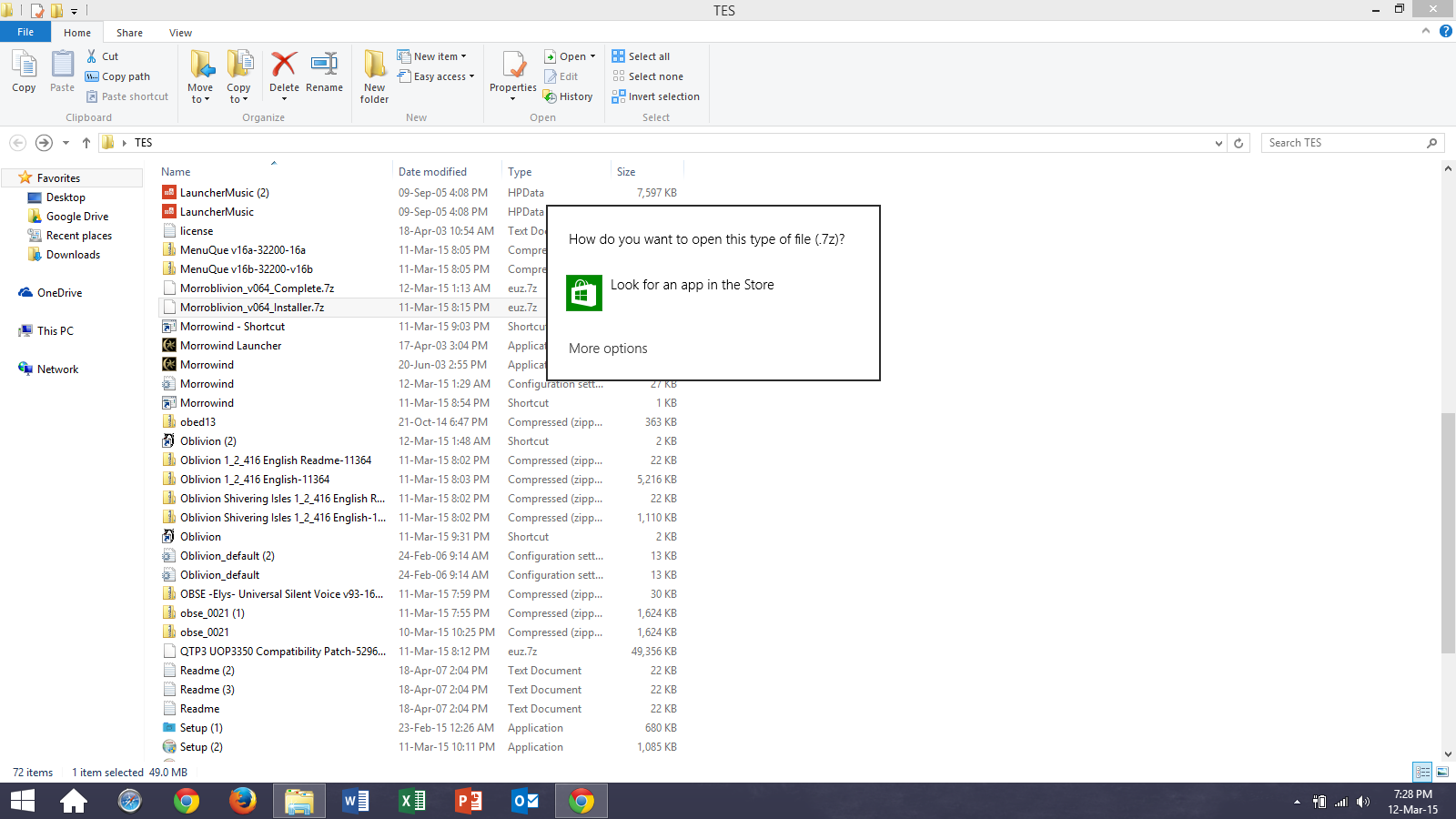
I'm including a screen grab of what it tells me whenever I click on the Morrowblivion installer, because it's caused me to be lost as well. I can't thank you enough for continuing to help me with this. 

Attachment Size
screenshot_18.png 198.37 KB
Karma: 0 (0 votes)

So both Oblivion and Morrowind must be in there original locations aka program files.

Karma: 0 (0 votes)

Since I don't need Wyre Bash do I need to uninstall and reinstall the games themselves into Program Files? 

NO! Leave them outside the Program Files, this will save you a lot of headache.

I'm including a screen grab of what it tells me whenever I click on the Morrowblivion installer, because it's caused me to be lost as well.

File you're trying to open in screenshot is an archive, not the actual installer. Download 7-zip and extract it.

From there follow the instructions provided here.


Karma: 0 (0 votes)

But where does the morrowblivion resource archive come from that's all I'm having trouble with

Karma: 0 (0 votes)

The Resource Archives are the .bsa Files
Karma: 0 (0 votes)