
Balmoran Interiors Won't Load

Submitted by Danish Destroyer on

So ever since I heard about TESRenewal, I've been so hyped. I'm a newcomer to the project, but I've been playing es games since Morrowind. I say all this to illustrate that I really do love all the work the community has put in. Well done!

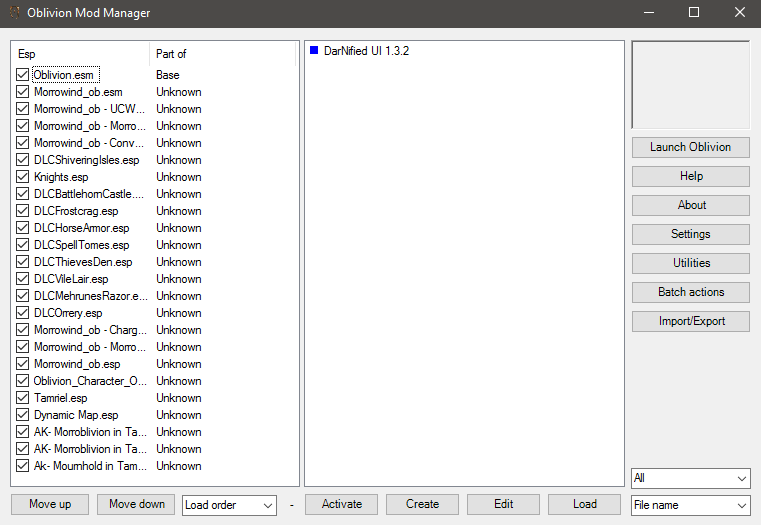
That said, I have not been able to play much of Morroblivion. Seyda Neen works like a charm, but whenever I attempt to enter a building in Balmora (Caius Cosades' House or the Cornerclub, for example), the loading screen appears and then freezes. I still hear the music, but no progress is made on the load. Alt+Tabbing doesn't get me out, nor can i access task manager; this forces me to restart my pc.

Any suggestions or assistance would be greatly appreciated. Thanks!
Karma: 0 (0 votes)

Because the main questline starts in Balmora, I really can't enjoy the game until this is resolved.

Karma: 0 (0 votes)

Use BOSS and make sure your load order is correct. If the problem continues then post your load order in a spoiler.

Karma: 0 (0 votes)

Thanks, i'll try that out

Karma: 0 (0 votes)

Could you post your load order again, but with the heading fully expanded? It would help to see the full names of each mod.

Karma: 0 (0 votes)

Hi, I tried reproducing something similar to your load order (as much as I could without being able to see the full names of the plugins) and it still seems to work for me without crashing.  In any case, your symptoms of a game freeze during a Load screen that is significant enough to require you to hard-reset your computer could be due to a few things --  I'm assuming when you say that you "can't access task manager" that you mean CTRL-ALT-DEL is unresponsive.  And, assuming you're using Windows 7 or above, this probably means it's not a typical memory access violation which would have been be caught by the OS and only cause a crash to desktop rather than a system wide issue. 

In my personal experience, the most common culprit which can cause a system wide crash is a graphics enhancer / DirectX wrapper doing things that a graphics driver doesn't like.  What graphics enhancers are you using with your setup?  ENB? OBGE? Oblivion Reloaded?  Are you using the steam version of Oblivion?  Is the overlay active?  Also, what is your hardware setup?  Graphics card(s)?  Driver version?  CPU? Ram? Are you overclocking?

Aside from issues with graphics drivers / enhancers, some other issues could be hardware related like CPU and RAM, although if it was that low-level of a problem, one would think it would be crashing other places too rather than just Balmora interiors.  I would check the CRC of your downloaded files: BSA corruption or corruption of other files might be a problem if it leads to the game passing bad commands to the graphics subsystem.

Hope some of this is helpful to you.  Get back to us with your full hardware configuration, OS, graphics card, graphics drivers and graphics enhancement addons (ENB/OBGE/etc). Good luck!

Karma: 0 (0 votes)

Processor: Quad-core Intel i7

Ram: 16 GB (and i'm not using much of it)

Graphics card: AMD Radeon R9 200 series

OS: Windows 10 64-bit

Steam version of Oblivion, overlay ENABLED

I'm pretty sure i only used only the Oblivion Character Overhaul for graphics enhancement. (my SSD failed, and i had to factory reset my PC, so i'm not completely sure). So i'm going to have to reinstall Oblivion and any mods. I guess this means it's a fresh start :')

Edit: I also won't be able to repost my load order, as it no longer exists...


Karma: 0 (0 votes)

Failed SSD is probably the reason why you crashed when going into Balmora Interiors.  I would download fresh copies of install files (when possible) rather than trusting any files that were recovered from the SSD.  Hopefully everything will work now that the bad hardware is out of the picture.
Karma: 0 (0 votes)

Also, you may want to consider installing mods with Wrye Bash or Mod Organizer to make conflicts easier to track down. Or maybe move to TESMM.

Karma: 0 (0 votes)


Post a Save File can Get Load Order out of it. in Morrowind

Karma: 0 (0 votes)