
I have downloaded
Latest Masterfile
Skywind Weapon Textures 1 & 2
Skywind weapon meshes
Main texture archive
Updated archive No2 (textures)
LostTexturesList
Main Meshes Archive
Updated Archive No8 (meshes)
LostmeshesList
and all 3 LOD files and extracted everything to my Skyrim data folder.
I'm running through NMM with Skywind ticked, and it still says invalid parameter after trying to spawn in Morrowind.
Picture of data file.
Thanks.
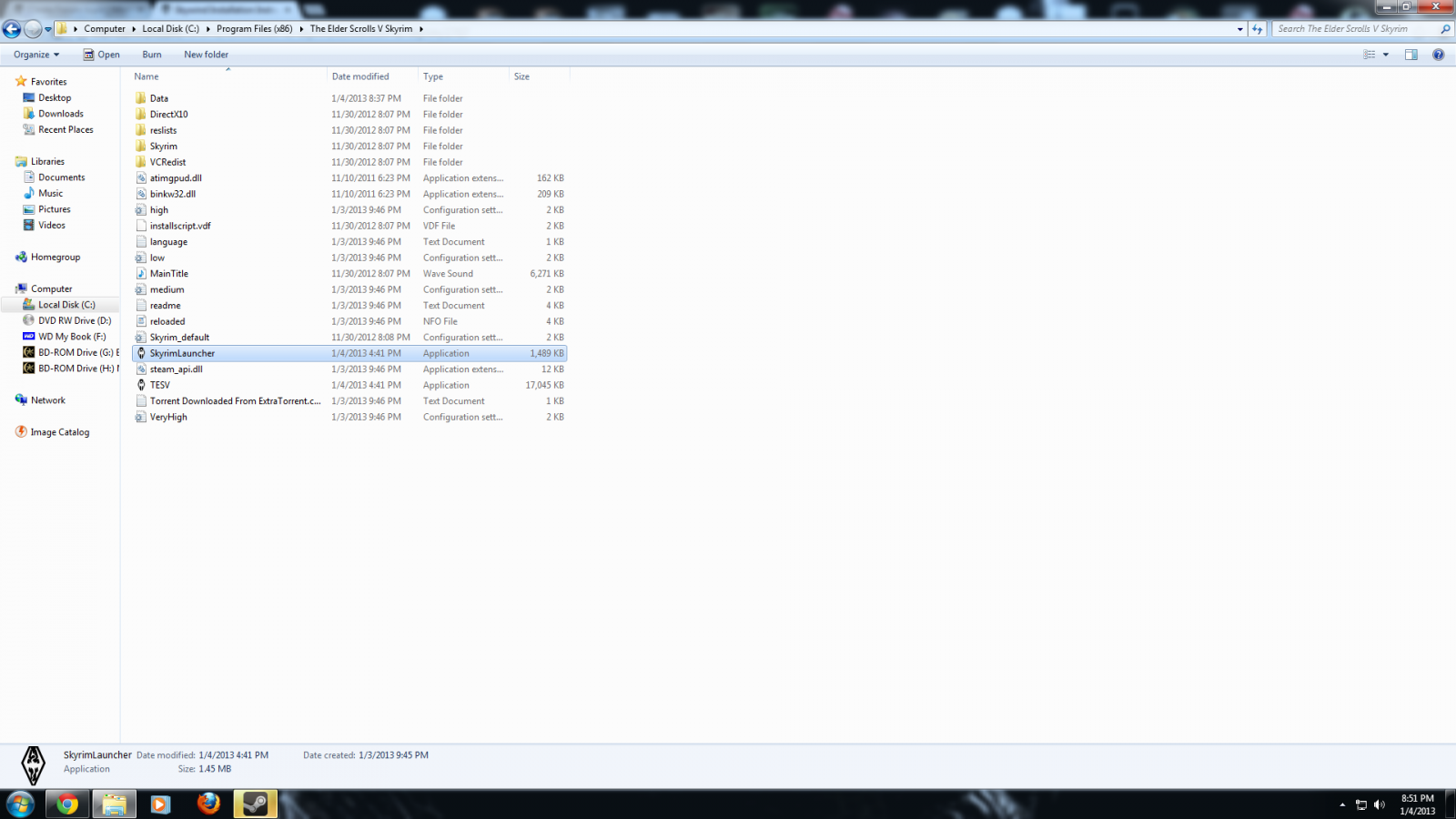

Real data file picture
Sounds like you just typed the cow command in incorrectly.
cow WrldMorrowind x x
cow wrldmorrowind -5 -5
None of it works.
What is the error it gives you? The only reasons that happens are if you type the command incorrectly, or Skywind.esm is not enabled.
Try cow wrldmorrowind -5,-5
Hey Gothryd. I haven't seen you in awhile. Would you be interested in helping out somehow with Skywind development? I can get you into our kind of not really super-secret chat area.
Item "wrldmorrowind" not found for parameter WorldSpace.
Compiled script not saved!
have you made sure you have skywind.esm ticked in the launcher?
lol. yeah. I'm just going to reinstall everything and try again.
Same thing happens to me, hey willis if you find out the problem tell us where we went wrong, thanks!
Go to
C:\Users\*YourUserName*\AppData\Local\Skyrim\plugins.txt , DLClist.txt, loadorder.txt
Check to make sure Skywind.esm is on all of those lists. If it is not, then add it.
Note: AppData is a hidden folder
Reinstalled to no avail. Don't want to spend the hours downloading all the files again so I'll keep trying stuff andynev.
I've noticed in my data>meshes>skywind folder, all of the folders are empty. Is this normal?
I feel like the problem has to be with the worldspace. It's just not getting the wrldmorrowind reference.
But did you try my suggestion? The ONLY reason for that error is Skywind.esm not being enabled!
Well, I guess that or you typed the command in wrong. Either one.
Yes, the Skywind folder can just be deleted.
Yo Shadow. Those two things are very easy to do right and very hard to get wrong. There is a third problem. I saw it detailed in another thread about advising against Nexus. It actually advised that we use the Skyrim launcher. My first thought is to use application entitled "skyrimlauncher," which didn't work.
But the answer was so simple it wasn't even tried. This is not really a mod and more a complete overhaul correct?
Well if I launch the game from the application "TESV" from the Skyrim folder, VOILA!
Now my obligatory apology for the stupid computer world mistake of not trying the easiest thing first. I thought I would post before I got into the game, but the 3 minutes I spent in Vvardenfell looked great.
Thanks for creating this guys and thanks for the help. You got me to spend $35 on a Steam sale to relive the Morrowind days. (Not to mention buying a game I already own for a different system)
Oh, sorry 3 reasons. :)
I forgot about that one. I ran into that problem when creating my "Skywind Exchanger" program. It wouldn't load any of the data files if launched from an external application.
But I'm happy you got it working!
About that overhaul thing, this isn't really an overhaul as much as a gigantically massive mod. It should, in theory, behave in much the same way as any other mod.
Ok! Well thanks again. Now to figure everything else out, like why everyone's naked and has the same voice.
Can't wait to see the finished project!
Oh and one more thing! I saw someone else posted but never go an answer. To which ini do we put the LOD fix? The skyrimprefs? That's where I added and it didn't seem to fix.
The armors and clothing are in the process of being converted over still. Then outfits need to be created for each NPC, so that could be awhile.
And all NPCs were given a default voicetype during conversion. This will be changed a little bit later I think.
Skyrim.ini. But that fix may no longer work. If it doesn't I posted a mod in the Installation thread that provides blank world map cloud meshes and textures just yesterday.
Ok I'll check that out. Oddly I don't have a Skyrim.ini. I have a skyrim_default.ini and a few others.
Anyway, killing the thread now.
skyrim.ini is in your documents/mygames/skyrim
maybe this should be added to instructions about LOD, It also took me some time to find it
ok guys, I'm so so sorry...but I was so happy about the fact that I thought you knew what was happening, but my struggle with being new to the mod world in general is overwhelming to me...so please, help me out. The error is the same for the "cow" command, it says: Item "wrldmorrowind" not found for parameter WorldSpace.
Compiled script not saved!
My problem now stands on the fact that even loading the game from TESV is not working out...please, help me out, I've been on this thing for TWO DAYS and I really wanna play morrowind. LET ME TELL YOU YOU DID THE AWESOME JOB I THINK YOU DID!!!
I know you'll help me out, thanks!
Try this http://morroblivion.com/forums/skyrim/skywind-mod-releases/3306
First let me apologize in advance for a necro post (I thought it might be better than a new topic), and second for a lack of knowledge.
Alright, I started with following the install directions and making it to the step where I try starting up the game. After using the cow wrldMorrowind x x comand I got the error:
'Item "wrldmorrowind" not found for parameter WorldSpace.
Compiled script not saved!'
From there I installed the fixes in the Skywind Reborn Quests Hub thread. After doing all that and starting a new game, still getting the same error.
I checked the launcher and made sure that everything was checked and appearing.
From there I tried launching it from just TESV and still the same error.
I then went to my C:\...\application data\skyrim and found that I was missing the loadorder.txt. Checking online I found if you didn't have one you could just copy the plugins.txt and rename it.
After trying that now when I select 'New Game' it seems to freeze with the Skyrim logo, and play the theme, which would make a cool screen saver, but wasn't the result for which I was hoping. I can however still load a game, and when I do the cow command I still get the Item "wrldmorrowind" not found for parameter WorldSpace. Compiled script not saved!' error. Same with -5 -5.
Is there maybe a certain load order that I'm just missing and messing up?
I'm also still running windows XP if that makes a difference.
Thanks in advance for any help offered! I really do appreciate the hard work.
~Apostrophe
Sorry, I really don't know why so many people are having this problem. I've listed the only 3 reasons I could think of this happening above.
Did you make sure Machine's chargen mod was enabled before pressing new game?
Yeah, but I am just enabling them though extracting them into the right folders. (and checking them off in the launcher)
Should I be using a mod loader program? Like nexus or whatever?
I'd suggest trying NMM and seeing if that makes any difference.
Alrighty, Imma call it a night for tonight. I'll fiddle with it some more in the morning and let y'all know what I can figure out.
Thank you very much for the quick and helpful replies, it seems there is a good community on this site!
Mmmmk try this.
Go to the following directory, documents/mygames/skyrim
Look for a file called Skyrim.ini and be sure to back it up before you do the following changes to it. Add the following line to your Skyrim.ini file under [General] "SStartingCell=SeydaSNeen01"
Start up Skyrim and you should instantly teleport to Seyda Neen. You might not be able to access the race menu, if that happens just open the console and type "showracemenu"