
This replaces the default Morroblivion Map with your choice of two much higher resolution maps.
To install, make sure to check the proper esp and make sure that it loads dead last in your load order.
This file replaces the original 2048X2048 texture with another of the same size. The difference? The original uses about a fourth of the texture to display Vvardenfell and Solstheim . This new map uses the entire texture to display the map.
Map load time should remain unaffected.
This is the high definition version of the original mod. It replaces the 2048X2048 texture with one that is 3400X3400. (It's the full size of the original pictures.) I think that while lining up the icons for this map, I saw places in Morrowind I've never seen before. It's 1.6 times larger than the Standard Map, and about 3x the hard drive space. So it may take you longer to load, but boy is it nice. (I don't believe I noticed a difference in load time, but that's bound to differ from computer to computer. At least try it. If it's no good for you, switch to the standard.)
More PICTURES OF THE MAPS FOUND HERE
NOTE: The High Definition Version Map is 1.6 times larger than the Standard Version Map, which is about 3 times larger than the map that currently comes with Morroblivion. So if you find you have a longer load time with the High Definition Version, you should still try the standard version, which is still much clearer than the original Morroblivion map.
NESIN'S ALTERNATIVE BLUE WATER MAP
Nesin has altered the color levels on the map. See comparison pictures here and here.


I was playing the great Morroblivion Mod and really enjoying seeing my GOTY Morrowind through the Oblivion lenses. Unfortunately, I was taken out of the moment by the low resolution default map, so I decided to change that problem.
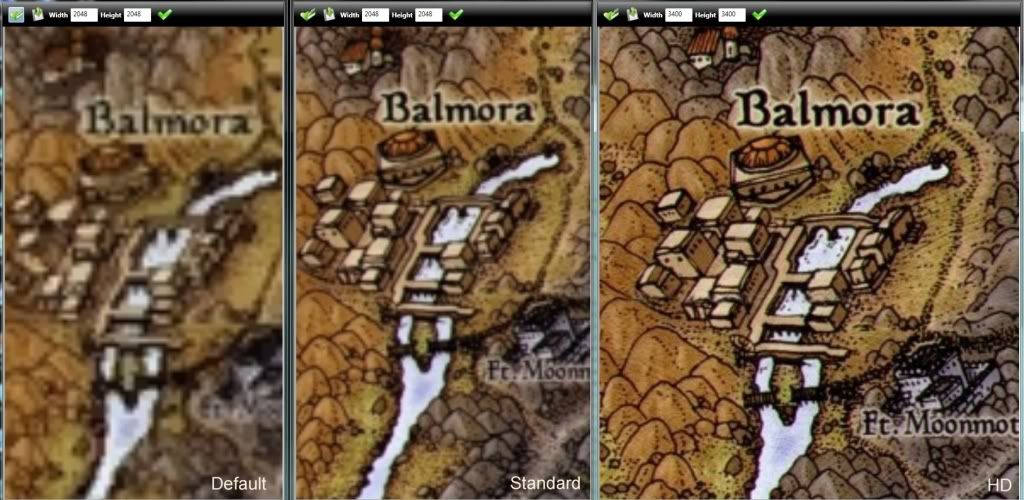
I just googled for higher definition maps. Then I stitched them together and blended them so they look like one map. After that I added a border and then aligned the map icons. (Which took forever!) I got the images from google and so didn't 'ask permission'. I have, however, given credit to the parties whose recourses I used in the credits section. If one of these parties wants me to remove the mod, please let me know so that I can do so.
Otherwise, if you're playing Morroblivion and are tired of a map you can barely read, check this out. It doesn't replace any files and should be fine to run with other map mods such as Dynamic Map and Map Marker Overhaul, both of which I use in conjunction with this map.
I believe it is impossible to line up the icons exactly (you'll notice neither mine, nor the original are lined up perfectly) I believe this is because Morrwind was meant for that horrid map we all used on xbox, and not the beautiful painted map we're using in Morroblivion. A smaller map hides this error better; zooming way in makes the icons look more off. However, I think the icons are lined up pretty well (after spending about two hours trying to make them as perfect as I could). (On each map version). See for yourself and if you think you can do better, fiddle with the 'cell coordinates' of the 'map data' section of 'world spaces' under the 'world' tab. If you get it any better, let me know!
Both versions also add a Mournhold world map the Mournhold area. At this point the map is just for looks. Since Mournhold doesn't use map markers/ isn't made to have a world map associated with it, yourself and your marker don't move in that area, but it's nice to have the map anyway, instead of staying in Ebonheart.
No map files are replaced with either version. So you should be safe. To uninstall, just uncheck the esp file.
Both Versions are now Clean and have been Hex-Fix Updated.
Both Versions include the island of Solstheim.
NOTE: Check only 1 esp at a time, otherwise the version that loads later will probably take precedence.
REQUIRMENTS:
Morroblivion
UPDATING:
Upon transferring the original mod file to my laptop I couldn't see the map. This should be solved with the new files, but if you have this problem or if the game crashes on bringing up the mod, download the hex update file and copy its esp to the data folder, replacing the original esp. This fixed the problem for my laptop.
USING WITH MINIMAP MOD
Red Stapler brought to my attention that people other than myself may want to use this in conjunction with the minimap mod. If so, find "MiniMap - Worlds.ini" in your data folder and paste one of the following settings into it.
Standard:
";Morroblivion
set MiniMapIni.sWorldID to sv_Construct "WrldMorrowind"
set MiniMapIni.iDimensionX to 2048
set MiniMapIni.iDimensionY to 2020
set MiniMapIni.iWorldNwX to -59
set MiniMapIni.iWorldNwY to 59
set MiniMapIni.iWorldSeX to 46
set MiniMapIni.iWorldSeY to -42
set MiniMapIni.sMapFile to sv_Construct "map\world\map-morr-enormous.dds"
SetStage MiniMapIni 10"
HD:
";Morroblivion
set MiniMapIni.sWorldID to sv_Construct "WrldMorrowind"
set MiniMapIni.iDimensionX to 3400
set MiniMapIni.iDimensionY to 3390
set MiniMapIni.iWorldNwX to -58
set MiniMapIni.iWorldNwY to 63
set MiniMapIni.iWorldSeX to 46
set MiniMapIni.iWorldSeY to -38
set MiniMapIni.sMapFile to sv_Construct "map\world\map-morr-enormous-HD.dds"
SetStage MiniMapIni 10"
Credits:
This file is a bit sneaky. I was playing the great Morroblivion Mod and really enjoying seeing my GOTY Morrowind through the Oblivion lenses. Unfortunately, I was taken out of the moment by the low resolution default map, so I decided to change that problem. I did this just for myself originally. Hence the sneaky part:
I just googled for higher definition maps, stitched them together, and then aligned the map icons. I got the images from google and so didn't 'ask permission'. (I figure this is okay considering the images were found on google images.) Also, these maps are for Morroblivion and I didn't ask their permission to make a mod either. (I didn't use their resources, it's just this mod is for their mod, if that makes sense). So I will now give credit to the parties whose recourses I used, but if one of these parties wants me to remove the mod, please let me know so I can do so.


I give the people at Morroblivion my permission to use this mod to benefit the cause of Morroblivion.
Wilford Brimley may use it as well, if he likes.
Also, a special thanks to Clean Quit. Without this mod, I would not have been able to quit and restart oblivion so effortlessly to check coordinates. Thanks for this huge time saver!
And a thanks to the Silgrad Tower team who gave me some good tips on making a world map:
Thank you!
Here are some pictures comparing the icon alignments of the origional map and my'standard map'.
I am surprised this has not gotten more attention! The pictures on Nexus are fabulous! I need to try and see the HD version in game, but it looks fantastic in the pictures.
Thanks for your hardwork, iceburg33. Hope this can be incorporated in the actual esm the next time! :)
in Vivec not correct shows quarters
I think they should make a vanilla map ^_^ it would be kewl to see morrowind have a related map and maybe combine it with cyrodiils after morrowind is added to the world space? :P
Thanks anitkinks! I think it hasn't gotten as much attention because like Bim said, the icons arn't perfectly aligned (neither is the default map, but hd is a TON bigger, so the errors are much more exagerated. The 'Standard' version is still a ton bigger than the default, and the icons are nearly just as well aligned as the default. (Worse in some parts and better in others). So if icons bother you, try the standard.
Bim: Good call. If you notice, the map itself is not drawn with direct proportion to the map makers, so you really have to choose which icons you want to line up and which don't. I sort of like the errors because I can see the picture of the town unobstructed, and then travel to it by clicking next to it, but to each their own. ;)
Calvindo: You mean like a map of Morroblivion that is sepia (aka colored yellowish- brownish)? I tried a sepia map, a clothy looking map, and both. I don't think sepia looks very good, but if you really want one, I could just make you a dds of one (let me know if you want standard or HD), and you could just use that dds instead of whatever one in my mod your using now. But if you want to do that, we should talk about it on the tes nexus site (visit the comments page of the map file), so that we don't take up space here. I'd be happy to help you out ;)
Hi there,
dont you know how can I set World map bigger in game? I have it just half-windowed but in your screens it is bigger..
Thanx
Right, having a bigger map is what my mod does. To get a bigger map window, install Darnified UI.
http://www.tesnexus.com/downloads/file.php?id=10763
Darnified has a ton of options and is really nice.
I went back to the smaller map window because for some reason the bigger window takes longer to load for me.
Hi there... I apologize if I am posting this in the wrong place. I am having no luck getting the updated map to appear in Darn's DarkUI. I've installed, and reinstalled, I've toggled Archive Invalidation repeatedly. It is the only morrobliv map esp that is active and it loads next to last in the list. Only my Bashed patch loads after it, created by wrye bash, and specifically excluding the map mods from incorporation when creating the bashed patch.
Thanks to you and really everyone here. I about wet myself when I found myself playing morrowind in oblivion. *squee*
Cheers!
Have you tried loading it after the Bashed patch.?
Nope... and that did seem to solve the problem. Weird. Thanks for the assist! This community and this mod are, basically, teh pwn.
edit: also, yeah, the HD map reminds me of the big printed map I had ten years ago that came with the game/strat guide. Super duper awesome. Thanks again!
Any way to make this compatible with minimap as well? Ofc it works well with dynamic map and darnui. I use minimap as well and while the local maps will show properly in the minimap, the worldspace maps show a non-moving icon over the spot in the IC where I pick up the boat to go to Vvard.
Ironman: Good work! That's exactly what I was going to suggest!
Red Stapler: Thanks man! My best friend used to have that map hanging in his bedroom when we were kids, so it brings back memories!
Ya, the people on this site have done a wonderful job!
Regarding minimap: This is what my settings are for the "MiniMap - Worlds" config file in the data section. Copy this to the end of the config file:
";Morroblivion
set MiniMapIni.sWorldID to sv_Construct "WrldMorrowind"
set MiniMapIni.iDimensionX to 2048
set MiniMapIni.iDimensionY to 2020
set MiniMapIni.iWorldNwX to -59
set MiniMapIni.iWorldNwY to 59
set MiniMapIni.iWorldSeX to 46
set MiniMapIni.iWorldSeY to -42
set MiniMapIni.sMapFile to sv_Construct "map\world\map-morr-enormous.dds"
SetStage MiniMapIni 10
"
Now, that's for the standard map, I think. If you're using the high def version, I'll have to look up what the settings should be for it, so let me know if this doesn't work for you. Either way, let me know if it doesn't work for you and then I'll investigate more thoughoughly. Happy morroblivion-ing!
I am using the HD map. I had already come by the .dds name, and used that instead, which is of course map-morr-enormous-HD.dds, and while that does put the correct map into the minimap, the location is way off, so the offsets must be quite diff. If you know what they are and can share that with me, I'd be much obliged. Again, you guys are just the best!
PS - Thanks for the tip, too, about how to add worlds to the minimap. I realize that's in the documentation for the mod now, but it's been just SO long since I installed it, I had long forgotten it. Anyway, shame on me. I should have been able to figure that one out on my own... at least how to get it to appear in the mod. >.<
So I just opened the Ak- Morroblivion Maps HD mod and went to world>worldspaces and selected wrldmorrowind. Then I replaced the ini settings with what was in that section. (Plus changed the map filepath).
Let me know if this works / doesn't!
";Morroblivion
set MiniMapIni.sWorldID to sv_Construct "WrldMorrowind"
set MiniMapIni.iDimensionX to 3400
set MiniMapIni.iDimensionY to 3390
set MiniMapIni.iWorldNwX to -58
set MiniMapIni.iWorldNwY to 63
set MiniMapIni.iWorldSeX to 46
set MiniMapIni.iWorldSeY to -38
set MiniMapIni.sMapFile to sv_Construct "map\world\map-morr-enormous-HD.dds"
SetStage MiniMapIni 10
Hey man, that worked as perfectly as I could have hoped. Thank you one more time!
You know... I was comparing the difference between the world and local maps and noticed that you know... the drawn image does not actually match the layout from the world. I don't mean the issue already discussed here, where the icon is slightly off. I mean the drawn image is not proportionally correct in relation to the actual worldspace. For this reason, I dont' see how you could *ever* get the icons to line up exactly without undertaking some kind of Herculean effort to totally recreate the entire map so that it was proportionally correct. Does that make sense? Anyway, the long and the short of all this is that I think you have done as good a job with this as anyone could have ever done given the tools available and again, I really appreciate your effort. :P
Peace!
Thanks man! I really do appreciate the positive feedback! And I'm stoked it worked for you!
Ya, I hear what you're saying. It is basically impossible to get the icons to line up exactly right because the map is more of a concept art then an exact depiction of locations, so not only is it different proportions x, and y, it's probably also got some areas drawn too big and some drawn to small, so to make every icon match you'd basically have to tear the map apart. I think the icons are close enough the way they are and we can still see a beautiful map, so it works.
Peace!
:D
Yeah, that's what I've noticed as well. That it's a concept drawing and thusly yeah, you'd have to totally redo the map, taking each little representation of a POI and moving it to a new map, then blending the in-between parts. And I am sure it wouldn't look as good as this one once finished, so yeah. *excellent* job!!
@iceburg333
I started using the map about a week ago and it works finr for me. Thanks for making it, Ice ..
Hey, no prob Steph. :D
Thanks for letting me know!
Ice wrote:
Hi Ice,
Firstly, thanks for the mod, it looks absolutely excellent. Nice work.
I've been having some trouble getting it to work, though. I'm probably just being thick...
I've downloaded the standard map .zip, extracted everything from /data/ to /data/ in my Oblivion installation directory, launched the Oblivion Mod Manager and checked 'Ak- Morrowind Maps.esp', then run BOSS to ensure the load order's correct. I get no errors, but the map doesn't change. The same is true when I deactivated the standard-size mod and installed the HD map set. Everything loads, but the old map is used in-game.
If I temporarily remove Vvardenfell.dds from \Data\Textures\Menus\map\world\ and rename map-morr-enormous.dds to Vvardenfell.dds, it uses the new map in-game, but still keeps markers in their old positions (so the markers only cover about a quarter of the map).
There's a good chance I'm just being an idiot, but do you have any ideas? I use the OBSE launcher, and I don't have any other map mods installed. Here's my mods in load order: http://i.imgur.com/Dcwax.png.
Thanks for your time.
Edit: spelling.
Hey Amosharper!
Man, its been a while, so it may take a try or two for me to warm up. But thank you for providing all of that info right off, that's super helpful!
The esp file does two things: 1 - change map markers, 2- display the right map. You're seeing neither of these things happen. That says that the esp is doing absolutely nothing.
I believe that the fix is to make the map load dead last in your load order. If that works I'll amend the first post with that instruction, if it doesn't, I'll take off the gloves and take an in-depth look at it with you.
Thanks again for an informed post; you've already made my job a lot easier. :D Let me know; I hope it works for you!
Whoa, thanks for the quick response!
That actually worked perfectly, and looks beautiful. I feel like a moron for not trying that to begin with.
Thanks again for jumping on this so quickly man.
Haha, no problem and you're welcome. It was a lot easier with all the info you gave me, it lead me right to the solution.
Glad it worked, I'll amend the first post! :D
Downloaded and installed today standard worked first go,handy for ash-storms..
Finished Urshilaku Nereverine walked accross top world, could find my way in ash-storm, did Ahemmusa Nereverine in,out Yurts no problems,swin down as far as landscape allows to Erabenimsun camp to do Nereverine Quet..
Go into Wisewoman's Yurt get quest on way out Crashes on Door,,Did this 2 times Ended up Deleting Distant Lod Got out Door Went to Ranabi's Yurt took care of him went to leave Crashed on Door. Reload went to Go through door Crashed, redid lod Got out Door..
Went to Ashu-Ahhe's Yurt took care of him Crashed trying to go through door did it 2 times load up OBMM Untick mini-Map Redid LOD Went through Door..
Went and did Ashkhan's Yurt, Came out door no Problem. Went back to Wisewonan's yurt For Counsel, Came out door no Problem..
Went into Han-Ammu's Yurt, did that stage of Quest Came out door no Problem. Went Back to Wisewoman's Yut Finished Quest Came out Door no Problem.
Looking for Help Would like Mini-Map back..
Thanks..
Wayne..
I went back and got Mini_Map to work, has Been running a week hasnot crashed comming out doors...I took off Map-Morro-enormous.dds and put in MorrowMap_50 by Niemitis..My game just does not like Map-Morro-enormous
Working still
Thanks Wayne
So I installed this mod and it works great, just having one issue with it. It seems that using player house mods (for example, this one; http://tesrenewal.com/forums/morroblivion/mods/2030) in conjunction replaces your larger map with the original map. I've tried changing the load order to load this one before the house mod and vice versa, and it doesn't help.
Any ideas?
Load order issue. Map esp should always be last.