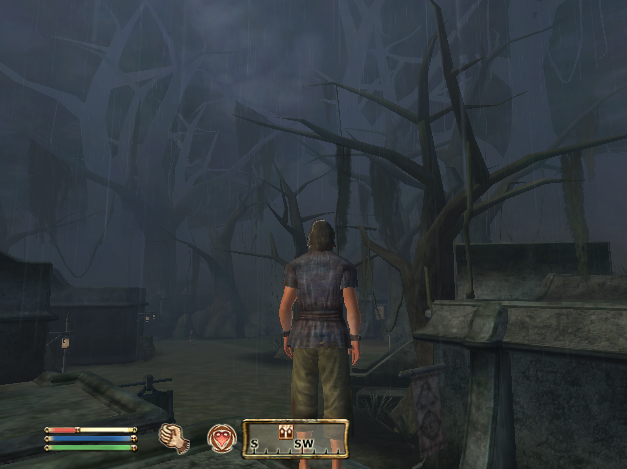
Where is the beef? I mean my grass and leaves?

Submitted by Spadra on
Attachment Size
Screen shot 2010-06-29 at 9.07.46 PM.png 361.01 KB
Hi all! Recently I was having an issue getting a few mods to work. I have since overcome that obstacle and am now enjoying the fruits of my labor in Morroblivion. That is outside of 1 tiny issue. The mods I used added grass and trees to Morrowind and sure enough when I load Morrowind it looks like a jungle. Morroblivion however has the added trees but no leaves and no grass. Any thoughts? I attached images showing the difference. Here are the mods I used. Mod 0=Vality's Ascadian Isles Addon.esp Mod 1=Vality's Bitter Coast addon.esp Mod 2=Vality's Balmora Addon.esp Any insight would be appreciated thanks all!
Karma: 0 (0 votes)
Last edited by Spadra on 29 Jun 2010 - 18:18.

Did you tinker with the ini files in OblivionReplace before converting? If you did not then do the following: 1) Go to the folder \OblivionReplace\ in the ESPConverter directory. 2) Open Statics.ini 3) Search for and delete the following lines: flora_bc_tree_01=0x22C57 (0.0,0.0,-520.0) 0.7 tree flora_bc_tree_02=0x3CED0 (0.0,0.0,-490.0) 0.8 tree and save the file. 4) Go to your Oblivion\Data directory: delete the file named: Morrowind_ob.esm as well as any .esp files relating to Vality's mods (if they exist). 5) Finally Re-run the ESP-Converter. ------------------------------------------------------ If this does not help OR if you had already done this OR if you used my alternate converter inis ... then do the following: 1) Go to your Oblivion directory: Oblivion\Data|meshes\morro\f and COPY the files: floraUbcUtreeU01.NIF floraUbcUtreeU02.NIF and email\PM me these two files.
Karma: 0 (0 votes)

Alright so I had a look at your problem there. Actually the leaves DO load ... the problem is that they all (100 of them) load right on top of each other and they have the texture path messed up. I fixed the texture path ... now ... See this ... notice the leaf here: [External image] Now if I move it aside ... there is another leaf underneath ... [External image] ... and another and another ... [External image] There are around 100 leaves stacked right on top of each other ... the converter seems to have messed up their orientation.
Karma: 0 (0 votes)

Alright ... so I have made a few tweaks. However it seems that it can not be fixed. If you want to try it out: Copy this file back to Oblivion\Data\meshes\morro\f basically the same place you got it from and overwrite the original (back up the original first ... this does not look pretty). http://www.mediafire.com/?iy4kvnt2lev or http://www.esnips.com/doc/208d717a-6542-4308-a55b-d1d02846e015/floraUbcUtreeU02 The leaves should come back although they look ugly ... very ugly. Maybe you should try replacing it with an oblivion tree ... maybe retex it to match the bitter coast.
Karma: 0 (0 votes)

Regarding the grass ... I am not sure but I think that the grass is animated ... and the converter has problem with animated objects. But then why do you even need to convert morrowind grass from a mod when oblivion has its own really good grass.
Karma: 0 (0 votes)

Thanks for looking into this and that explains a lot. I would like to use Oblivion grass I just went with the Grass mod as a result of it being set to cover everything. I would need to write my own script for a mod utilizing Oblivion grass within Morroblivion, no?
Karma: 0 (0 votes)

I dont know what you mean by 'cover everything'. In morroblivion grass automatically covers everything it is supposed to cover. (so ... obviously not the ashlands :p ) ... but you should find it in every green place. The grazelands (shown iin the pic above) , suran, vivec, Sadrith Mora, Pelagiad and any more ... does that not happen with your installation ??? oh ...wait a minute ... damn! You used my converter inis? Ok, so I remember I wiped the textures due to some reason. Alright do this: 1) Open land.ini in the folder OblivionReplace of your ESPConverter 2) Copy in the following lines as such and save: AI_Grass_Dirt=0x17845 AI_Grass=0x1C8BB AI_Grass_02=0x48B50 AI_Grass_Cobbles=0x175FD AI_Grass_Rocky=0x9DAC4 ;Sand=0x9DA24 ;Sand_02=0x4F9E3 WG_Scrub Plain=0x9C719 AC_darkstone01=0x35FC6 AC_darkstone_grass=0x27363 Scrub Plain=0x9C71D GL_Dirt_Grass_01=0x2506D GL_Dirt_Grass_02=0x1C7B7 GL_Grass_01=0xE7824 GL_Grass_02=0x48B51 GL_Grass_03=0x9C6F7 GL_Grass_03=0x8C27E GL_Grass_05=0x1C8BA GL_Grass_05=0x1C8BA lavacrust01.tga=0x33479 lavacrust02.tga=0x9BE19 MA_lava=0x15711 MA_lava02=0x68762 MA_lava03=0x2C9E5 MA_lava04=0x2749E MA_lava05=0x2CC9A MA_lava06=0x2749F Tx_BM_grass_01.dds=0x17843 Tx_BM_grass_02.dds=0xB9EE0 Tx_BM_grass_03.dds=0xC853B Tx_BM_grass_dirt_01.dds=0x17845 Tx_BM_grass_snow_01.dds=0x48B54 Tx_BM_grass_snow_02.dds=0xCF4C Tx_BM_grass_snow_02a.dds=0x48B53 Tx_BM_snow_03.dds=0x34808 Tx_BM_rock_snow_01.dds=0x9C51A 3) Delete the folder Oblivion\Data\Textures\Landscape\morro\ (in your oblivion directory) and delete the file Morrowind_ob.esm in the Data folder. 4) Re-run the converter. That should definitely bring the grass back.
Karma: 0 (0 votes)