
[WIPz] Skywind Reborn

Submitted by zilav on

Skywind Reborn v0.3

A total reconversion project of Morroblivion to Skyrim using TES4Edit and TES5Edit.

https://docs.google.com/open?id=0B4rR0C-Bcx_JNVd0R0ZqLTZQUTQ

Loads and saves in CK!

Almost all errors were fixed.

Has water now in exteriors.

I'm using only meshes and textures packed by Iniquity, paths in esp are the same as in morroblivion, except eloth's ground textures that have 'landscape\' added.

Still quite a lot of missing textures and meshes. Entering interiors usually crashes the game, I think it is because of some meshes and furniture (it shows errors in EditorWarnings.txt when loading in CK). Maybe because of borked havok, object bounds are off for all objects in game (oblivion engine used only object radius), I don't know how to properly reassign them all in CK.

I've used a glazed cup as a placeholder for references from oblivion.esm, so if you see a cup - there was a replaced oblivion reference.

I've used dead pine tree as a replacer for trees from oblivion.esm, you'll see a lot of those.

I've used skeletons as a placeholder for spawning points, Skyrim can't use leveled lists LVLN directly in references REFR (you need to create a new NPC and use LVLN as a template), so I was forced to replace them.

!!!!! Working with Skywind in CK !!!!!

Due to a large size of Skywind.esm, Creation Kit can't load all of its records together with Skyrim.esm. This leads to "out of array handle" errors and random objects being removed from cells.

You need to download stripped down version of Skyrim.esm here (Skyrim Master link)

http://www.sureai.de/development/resources/?lang=en

It is from the authors of Nehrim conversion for Oblivion, and they most likely have the same problems with CK and large mods.

Before running CK replace skyrim.esm with this version, when starting the game restore the original back. Better to create a command file for that. If you are trying to load a saved game but it drops to desktop, you most likely forgot to restore the original master.

----------------------------------------------------------------------------------

Addons

Patch for Climates Of Tamriel and Skywind (I used overcast weather template, tell me if you want a sunny one).

https://docs.google.com/open?id=0B4rR0C-Bcx_JX2ZSQTBCZEdwQkE

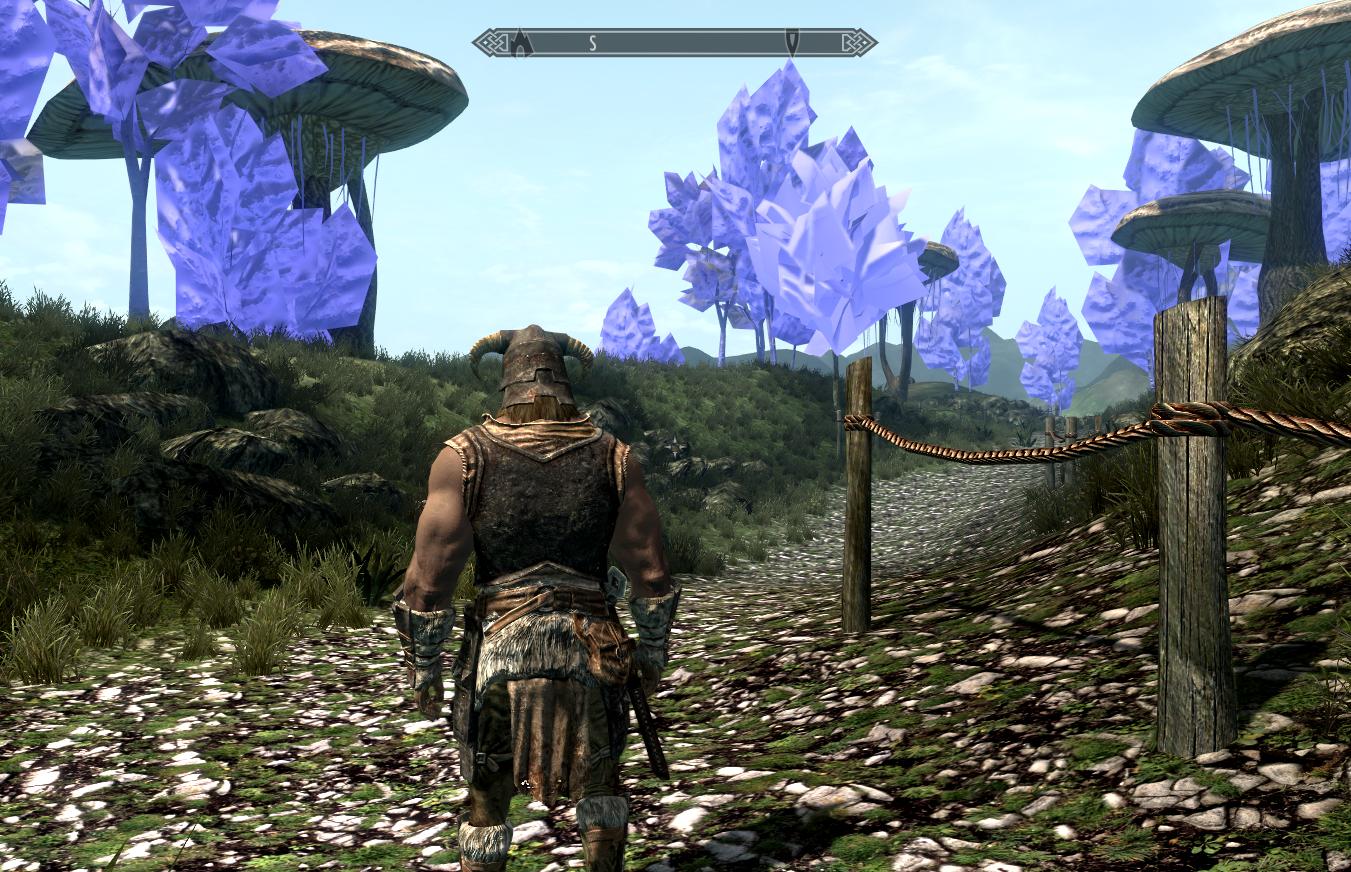
http://i.imgur.com/LmSHv.jpg
Karma: 0 (0 votes)
Last edited by thermador on 25 Mar 2013 - 15:51.

Post removed.

Karma: 0 (0 votes)

Happychappy:  Why don't you just update the nifs based on the new master?  We aren't even using skywind.esp anymore.  We are using a skywind.esm that was updated by Zilav.  I'm not entirely sure if we could re-merge those changes, or if they were done directly to the master.

If it impossible I guess that is okay, but it would be much better to not have to start over again.

Karma: 0 (0 votes)

@Happychappy:
The paths should be as follows.

Data\Meshes\Morrowind\...

Data\Textures\Morrowind\...

Etc...

Karma: 0 (0 votes)

I also agree with S.B.  If you are already doing that great, if not could you change it to be Morrowind instead of Skywind?  It feels a lot more future proof.

Karma: 0 (0 votes)

Ok, I'll figure out a method of changing the model paths for the esm. If somebody can give me instructions on how to do this or can somebody do it?

I have the FormIDs with the path names. Here is an example of what I have for the STAT group.

https://docs.google.com/file/d/0B1vwmz6hbHGPSEJERnc3VjZtSzA/edit

The paths names will be meshes\morrowind and textures\morrowind.

Karma: 0 (0 votes)

Awesome.  Thanks Happychappy.

Sorry, I can't help out with the .esm part though.  I'm not very experienced with scripts at all.

Karma: 0 (0 votes)

Hey guys, long time no see. Was a little busy with working last months, but now I have a week off. Nice to see that you are making good progress with Skywind.

zilav, cool to have one of the TES5Edit devs here around:) ..thanks a lot for the converter and of course for TES5Edit..think I will love this tool:)

happychappy, thanks for cleaning up the nif folder structure. It makes so much more sense now. I wrote a script for updating the master with the new nif-paths. Have you uploaded the nifs and textures somewhere already? ..and could you provide the other txt files with path names?

Karma: 0 (0 votes)

Quite a bit of an update coming up!

Also we need to get more of you people in the chat!

Karma: 0 (0 votes)

Long time no see Eazzy.  Glad to see you back.  That is awesome that you can help with the mesh problem!

And yes, we really need more people in chat

Also, I like that new format happychappy.  It's looking pretty good.  It seems like you could probably get rid of a couple of those prefixes though.  Just to shorten things up a bit more.  But it is fine as is.

Karma: 0 (0 votes)

I wrote a script for updating the master with the new nif-paths. Have you uploaded the nifs and textures somewhere already? ..and could you provide the other txt files with path names?

Awesome, I wasn't getting very far trying to do it with wyre smash and tes5edit!!

What do you need for the txt files? If its just a comma delimited with FORMID, nif-path, would this be ok? Will you need them in the separate groups or as one big file? There is also ACTI, ALCH, APPA, DOOR, BOOK, FLOR, FURN, INGR, KEYM, LIGH, MISC. I have not done anything do with weapons and armor.

I have not uploaded any meshes yet. I'm sill working on the renaming of textures. There will be an .bat for copying the textures.

But I would like to get a new Skywind.esm so I can test :)

Karma: 0 (0 votes)

It seems like you could probably get rid of a couple of those prefixes though

I've shorted them to no more than 4 char :)

Karma: 0 (0 votes)

happychappy

What do you need for the txt files? If its just a comma delimited with FORMID, nif-path, would this be ok? Will you need them in the separate groups or as one big file? There is also ACTI, ALCH, APPA, DOOR, BOOK, FLOR, FURN, INGR, KEYM, LIGH, MISC. I have not done anything do with weapons and armor.

The format of the STAT group file that you provided is perfect. You can provide the rest as one big file or as saparate files, as you like. Which master should I use for updating?

Karma: 0 (0 votes)

Here is the current Skywind master file we're using. I figured I'd post it since I noticed quite a few people needed it. Eloth/Machine may update it tomorrow though.

http://www.mediafire.com/?chnz7gv4687b0zh

http://www.mediafire.com/?tmmp3ro32jh3h95
This is the tree fix needed for some of the trees that were added to the Ascadian isles region. It goes into your Data/meshes/landscape/trees

The trees still have a bit of a collision issues, but they'll be fixed soon(I'm sure Eloth cannot wait to spend another hour fixing it and having me test it again =p).

Karma: 0 (0 votes)

I think your file got messed up somewhere happychappy.....  :)

LIGH;012C001E;0lightUcomUcandleU09;meshes\morrowind\clutter\kitchen\ironladle.nif


Karma: 0 (0 votes)

Double Post

My first one :(

Karma: 0 (0 votes)

LIGH;012C001E;0lightUcomUcandleU09;meshes\morrowind\clutter\kitchen\ironladle.nif

http://en.wikipedia.org/wiki/Ladle_%28spoon%29  I think its for cooking? I have an old copper one hanging on my wall. Anyway after 4500 nifs there are bound to be some wronged categories.

The hardest ones were whether they should be under furniture or clutter. I went for the skyrim basic set of rules, which is if you can't actually rest on it in a relaxing sort of way then its clutter. Also if it produces heat or is a machine tool then its furniture. Weird but works.

Karma: 0 (0 votes)

Should that be  Data/meshes/Skywind/landscape/trees Mehh.?

It does not work for me in  Data/meshes/landscape/trees


Karma: 0 (0 votes)

That's not what I meant.  That iron ladle says it is being used by a candle.... In the light group.

I actually just pulled that as an example. It looks like something got messed up when you created that big file.

Hmm.  It looks fine until the end of ALCH, then at the beginning of APPA something strange happened.

Edit:  Worked fine for me Ironman, exactly how he instructed.

Karma: 0 (0 votes)

ahh, i see :-P I'll check it out now.

[edit] Fixed file:

https://docs.google.com/open?id=0B1vwmz6hbHGPN3BBcWNIbGJad0k

I'm using a spreadsheet to copy values over and got out of alignment, thanks for picking that up shadow

Karma: 0 (0 votes)

Ah, much better.  Yep, I always like to scan over any documents people post just to see what's in them.  I guess this time it actually came in handy.

Karma: 0 (0 votes)

I have put the tree fix nifs into data/meshes/landscape/trees but now get purple again,no textures for the fixed nifs.?

Karma: 0 (0 votes)

your missing the textures in textures\landscape\trees\

http://goo.gl/3ijZy

Karma: 0 (0 votes)

I think it is time to close this thread and open a new one where the updated master file will be published (by someone who is going to manage it) along with all links for meshes and textures up to date.

I opened this thread to post my reconversion master and its updates, but I've already done everything i wanted with it, and now it is no longer updated by me.

Karma: 0 (0 votes)

happychappy, here the updated master:
http://www.mediafire.com/?y1c8et96avr4h91

Could you please check if CK finds everything?
I will convert everything again as soon as eloth is ready with cup replacements lol, so please don't work with it yet.

Here is the script for conversion (just in case you want try something):
http://www.mediafire.com/?h9h50z0kcpi3cy5

Put the pas-file in the "Edit Scripts" subfolder of your TES5Edit folder, load the master esm in TES5Edit, right click on the esm, group or multiselection and choose "Apply script". Select "Skywind - ChangeModelPath". While running, the script outputs process information in the messages window. When it finishes it writes some log files:

  • Skywind_modelPathConv.log - Processing information
  • skywind_modelPathConv_procList.txt - A list of all forms that's modelpath has been changed
  • skywind_modelPathConv_missList.txt - A list of all forms that's modelpath has not been changed, because there was no corresponding entry (with the same editorID) in the list
  • Skywind_modelPathConv_unusedList.txt - A list of items that were not used because there was no corresponding form in the master.

Here are the logfiles of my conversion:
http://www.mediafire.com/?wgm23vvvjclswui

Karma: 0 (0 votes)

Brilliant Eazzy! It loaded in the CK no problems for me. I've noticed that I haven't done the container group yet. Thanks again for doing that, and that tutorial is exactly what I've been trying to figure out for the last couple of days.

I think it is time to close this thread and open a new one where the updated master file will be published (by someone who is going to manage it) along with all links for meshes and textures up to date.

Good idea, but lets wait until we have a new morrowind file-path for meshes and textures finished and tested.

The download link on the side for Skywind, redirects about 3 times before landing on this thread. Its kind of confusing.

Karma: 0 (0 votes)

I've noticed that.  I pointed it out, but no one has done anything yet.

Let's wait for the new thread until Eloth releases the master with fixed cups and the mesh paths are changed though.

Edit: Oh, and the Skywind weapons mod has been merged of course. :)

Karma: 0 (0 votes)

Hey Zilav, I've decided to try my hand at converting over Oblivion using your scripts and see if I can get a working master for Skyblivion, but I have a problem and a question.

So to start out the conversion I open up Tes4 edit with Oblivion.esm loaded.  However, when I apply any of the scripts I get an error that says "Undeclared Identifier 'IntToHex64'".  I'm probably just making a really noobish mistake, but I really can't figure out the problem.  

Also, Is there any order I need to be aware of?  Some scripts are kind of self explanatory just by looking at the name, but I want to be sure I don't miss anything important that I need to do.

Thanks in advance.  This is a really awesome thing that you have done for us, and really the whole TES modding community.

Karma: 0 (0 votes)

I was using a 3.0.27 unreleased version that has additional scripting functions. Planned to be released after Dragonborn DLC. Eloth has it.

Anyway I doubt you'll be able to convert on your own. Several scripts have a hardcoded values for Skywind.esp, and they also assume that the converted plugin has a load order of 01, not 00 like Oblivion.esm. They were made to convert a plugin file, not the game master file. The same reason Andoran's converter is for main masters, not plugins, and hence converting morroblivion with it was not smooth.

So some scripts will require additional modifications. However converting master is actually easier since you don't need to replace any master refs (with cups), fix ownership from master, factions from master, etc. Everything is self contained without external dependencies.

Karma: 0 (0 votes)

Well that's good to know.  Yeah, I was looking through the scripts and noticed those two limitations.  I was going to try to get around the skywind.esp thing by creating a skywind.esp and renaming it later to be Skyblivion.esp, or do you mean values that it would actually put in the .esp that are meant for Skywind?  If that is the case then I'll look through and see if I can find them.  And I was going to get around the load order = 01 thing by creating a copy of Oblivion.esm and loading it up with Oblivion.esm.

Anyway, do you mind if I ask Eloth if I can borrow that new TESV Edit?  I understand I probably won't be able to get it to work completely, but I want to try anyway.

Edit: Found several places where the scripts reference Skywind objects.  Shouldn't be too hard to go through and replace them with Oblivion or Skyrim objects though.  At least I hope not......

Hmm, I'm only seeing references in the Fixup Issues, after REGN WRLD CELL, and before REGN WRLD CELL scripts.  This sound right?

Karma: 0 (0 votes)

I don't and can't mind. TES5Edit is an open source project.

The only true hardcoded values are spare FORMID space for new records that don't exist in Oblivion:

1) TXTS in Skywind - LTEX.pas

TXST_FormID := $01020090; // free space in LTEX
 

2) SOUN in Skywind - Fixup issues.pas

formid := $01300260; // free space after last SNDR record
 

Firts I wanted to write a function that will find a spare formid space of desired size, but in the end just found them in TES5Edit and hardcoded in scripts. It was faster.

Karma: 0 (0 votes)

Cool, well wish me luck.  I'll start on this once Eloth gets back to me on the new TesV Edit version.

Edit:  Okay, I have managed to convert over everything successfully except for cells, and worldspaces.  But I think I'll be able to figure that out as well soon, maybe.  Just thought I'd let you all know it is working, and it is possible we could get a new Skyblivion master...... Hopefully

Hey Zilav, have any clue what would cause this error when attempting to apply the After REGN WRLD CELL script?

Error: record REGN contains unexpected (or out of order) subrecord ICON 4E4F4349
Errors were found in: ParadiseRegion02 [REGN:0103EAD0]
Contained subrecords: EDID ICON RCLR WNAM RPLI RPLD RPLI RPLD RPLI RPLD RPLI RPLD
 
I applied the before script to a renamed Oblivion.esm, and then deleted all of the groups that weren't modified and saved as morr.esp.  Then I placed that in my Skyrim data directory and loaded it up in Tes5 Edit.  Would this be the correct method?
 
Edit2:  The error goes away when I simply delete paradiseregion02, but the script returns a value of 1 somewhere and then stops without updating any records.  I think I might just be doing something wrong but I don't know what.
 
Edit3:  Since I can't figure out what was wrong with my Cells, Regions and Worlds, I have decided to just upload what I have completed of the conversion.  It is almost complete, I just can't get the After REGN WRLD CELL script to work properly.
Karma: 0 (0 votes)

I just realized that this topic didn't move to the top of the list after I edited my post.  Very strange.  It better be at the top now.

Karma: 0 (0 votes)

Script was made for morroblivion regions, they don't have an ICON record. Look like skyrim doesn't have either, so you need to delete it via script or manually.

There is also another required step:

1) delete everything except REGN WRLD CELL groups.

2) apply "before" script

3) need to replace ACRE with ACHR using some binary replacement tool, I used http://gnuwin32.sourceforge.net/packages/gsar.htm

4) open with tes5edit, apply "after" script

5) merge everything back

Karma: 0 (0 votes)

Okay, cool, so that is what I was missing.  I've never used a tool such as that, so hopefully I can figure that out.  Thanks for the directions.

Oh, I also have another question.  Would it be possible to rename the Tamriel worldspace after conversion?  Because I don't think the game will very much like having two Tamriels.  Since Skyrim also uses Tamriel for its worldspace.

Karma: 0 (0 votes)

I don't know about renaming worldspaces, it is out of knowledge. I know how the records and plugins are structured, but how the game/CK treats them in particular situations is a question for experienced modders.

Karma: 0 (0 votes)

Shadow,

Just a thought,changing the world name sounds cool,and wrld_cyridill [spelled wrong i think] might be an idea.? 

But the change would be better before any navmeshing etc is done as the esps saved during that process use the current world region data.?


Karma: 0 (0 votes)

Well, I'm not even sure if the plugin will load correctly with Skyrim at all with that name, but we'll see.

Well, I no longer have any errors about ACRE or ICON.  But that blasted script still won't run.  Here are all the remaining different errors I get in the error log while loading up the .esp.  I have tried deleting the cell "DreamHub", and it still won't run, so I don't think that's it, and I literally have hundreds of the "Unused data in: cell" errors so I'm assuming that's normal.  Perhaps I need to delete the ROAD records in Oblivion.esm first?


[00:12] Background Loader: Error: record CELL contains unexpected (or out of order) subrecord XGLB 424C4758
[00:12] Background Loader: Errors were found in: DreamHub "Henantier's Dream" [CELL:010704E3]
[00:12] Background Loader: Contained subrecords: EDID FULL DATA XOWN XGLB
 
[00:12] Background Loader: Error: unknown record type ROAD
[00:12] Background Loader: <Warning: Unused data in: CELL \ DATA - Flags>
Karma: 0 (0 votes)

Yes there are no ROAD records in skyrim, you need to modify "before" script to delete them (copy the code for PGRD).

Also modify script to delete XGLB from CELL. Morrowind_ob.esm doesn't have either of those, that's why they are not deleted in script.

Flags in CELLs are recreated when you apply "after" script. So the first time you load esp with worldspace in TES5Edit those "Unused data" errors are normal, but should not appear anymore after applying "after" script in TES5Edit.

Karma: 0 (0 votes)

Thanks Zilav.  I've just modified your script to delete XGLB from cells, and to delete ROAD (hopefully).  

Time to see if it works!

Karma: 0 (0 votes)

I am currently applying skyrim shaders to various meshes, mostly bloodmoon and such, I realize bloodmoon is way of into the future but figured it might be of some use to the project. I admit that all I am doing is copy and pasting "BSLightingShaderProperty" for mos of them since I don't have 3ds max, also I am not graphic designer, if anyone is interested let me know, as I have quite a few meshed to go through. on a side note most of the morrowind meshes lack specularity needs to e adjusted

Karma: 0 (0 votes)

I think we're holding off on Bloodmoon until Dragon Born is released. There might be a huge overhaul on Solstheim once it's released.

Karma: 0 (0 votes)