
Installing Morroblivion_v056.7z file with Wrye Bash

Submitted by Sundews on

Hi, 

The instructions says to

"just drop the .zip/.7z/.rar files in your /Oblivion Mods/Bash Installers/ folder and install with Wrye Bash!"


I drop the Morroblivion_v056.7z into the /Oblivion Mods/Bash Installers/ folder, and  yet Wrye Bash doesn't see it - nothing shows up under the Installers tab.  Am I missing something?

Karma: 0 (0 votes)
Last edited by Sundews on 13 Apr 2013 - 21:58.
The Oblivion Mods folder needs to be in the same folder as the Oblivion folder, and Wrye Bash has to be set to Oblivion mode. If both these conditions are met and it's not showing up, it has to be a bug in Wrye Bash, since it is supposed to show any archive/folder in Oblivion Mods\Bash Installers on the Installers tab.

Karma: 0 (0 votes)

OK, the Oblivion Mods folder was not in the Oblivion folder.  So I moved it there, and then placed the Morroblivion_v056.7z file there. But Wryer Bash is still not seeing it.  It is set to Oblivion mode because it's seeing all the Oblivion mods.  Any other suggestions?

Karma: 0 (0 votes)

Oblivion Mods folder should be on the same level as Oblivion, i.e. D:\Oblivion and D:\Oblivion Mods. Wrye Bash automatically creates it in the correct place.

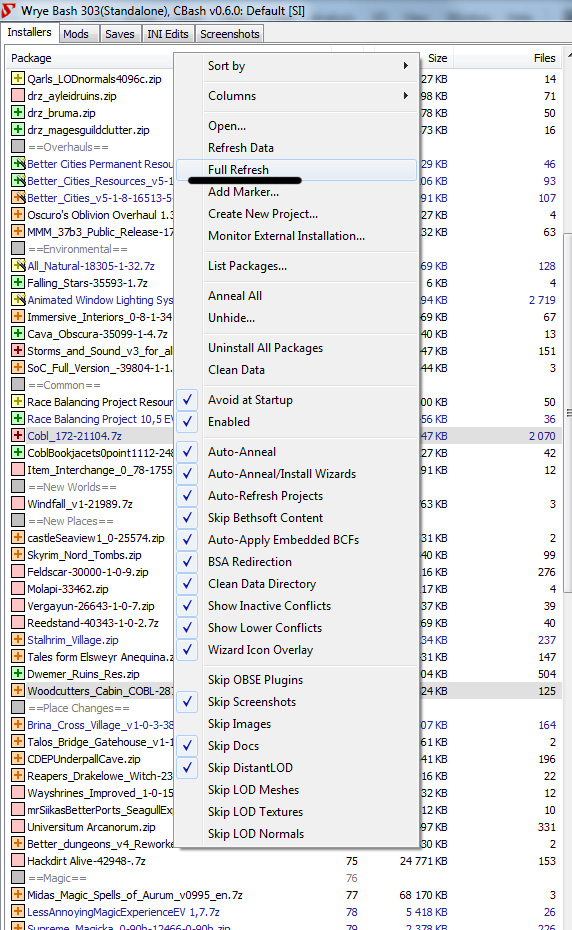
Check if BAIN is enabled: go to Installers tab in WB, right ckick the header and check the 'Enabled" flag.

Karma: 0 (0 votes)

Assuming the folder was in the right place the first time, the only other way it could go wrong (besides the BAIN thing) as far as I know is if you extracted the files out of the archive. Wrye Bash needs to see the Morroblivion_v056.7z archive itself.

Karma: 0 (0 votes)

The Oblivion Mods folder was originally at the same level as the Oblivion folder. So it shouldn't be INSIDE the Oblivion folder as someone suggested.  Anyway, I tried putting the 7z file in both places, still no go.


"Installers" is checked (enabled) in the tabs. I didn't see a way to enable BAIN.

Karma: 0 (0 votes)

I'm on Windows XP with Wrye Bash 303 installed running in Oblivion mode. Wrye Bash is listing all the  Oblivion mods from the Mods tab, and the Oblivion game saves from the Saves tab. It's not displaying anything from the Installers tab even though I have the Morroblivion_v056.7z file in the Bash Installers folder.


Any help is appreciated.

Karma: 0 (0 votes)

BAIN is just short for Bash Installers.

Does it scan your Oblivion folder when you go to Installers tab?

Karma: 0 (0 votes)

It doesn't appear to be, nothing is being dispalyed under the Installers tab. "Installers" is checked (enabled) in the tabs.

Karma: 0 (0 votes)

This is weird. Try doing the 'Full Refresh'.

Also try disabling and enabling installers again.

Are you using Python or Standalone version of WB?

Karma: 0 (0 votes)

How do you do a Full Refresh?

Disabling/Enabling installers didn't change anything.

I was using the standalone version, but tried the Python version as well, with the same negative results.


Karma: 0 (0 votes)

Open the .7z and run a test on file to make shore it downloaded properly

Karma: 0 (0 votes)

I opened the .7z file and clicked on 'Test' and there were no errors.

Karma: 0 (0 votes)


Karma: 0 (0 votes)

The "Full Refresh" option is not listed in the menu.

Attachments

Karma: 0 (0 votes)

Alright, why is 'Enabled' unchecked in your screenshot?

Karma: 0 (0 votes)

That's it!  So the option to enable the installers is hidden under the "Packages" tab, not the "Installers" tab. And hidden very well, I may add.

Karma: 0 (0 votes)

(ninja'd on saying to check enabled)

Well, Wrye Bash is not exactly an award-winner for UI design.

Karma: 0 (0 votes)

Thanks for the help guys!

I now have Morroblivion_v056.7z installed. 

Now that it's installed, can I delete the Morroblivion_v056.7z to free up 2.5GB of space? Or do I have to leave it in Bash Installers directory? 

Karma: 0 (0 votes)

It needs to be there for Wrye Bash to uninstall it, or to install it again. If you don't plan on doing either, you can free up space.

Karma: 0 (0 votes)

 
nm

Karma: 0 (0 votes)