
Lanterns casting weird rays

Submitted by VM313 on

I don't know if it has to do with my crappy pc or whether I screwed up the installation but my main issue that's making the mod unplayable for me is that the lanterns are casting weird rays and I wouldn't have any problem with it if it didn't affect the fps.
I'm attaching a couple of pics in case my description doesn't make any sense:
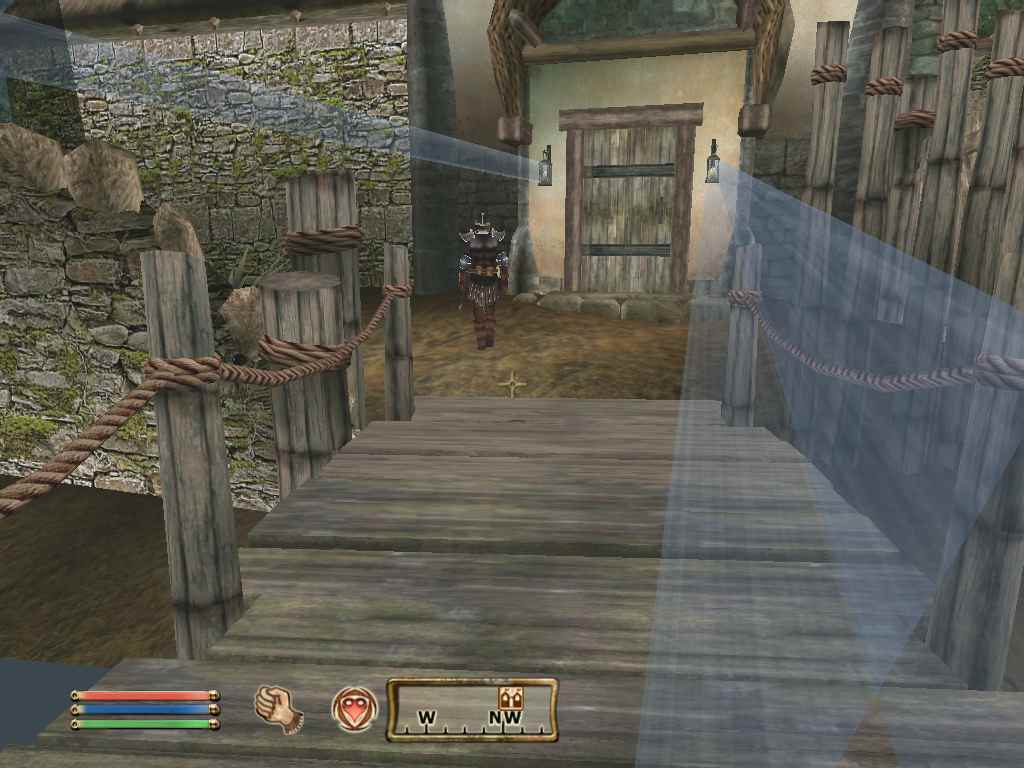
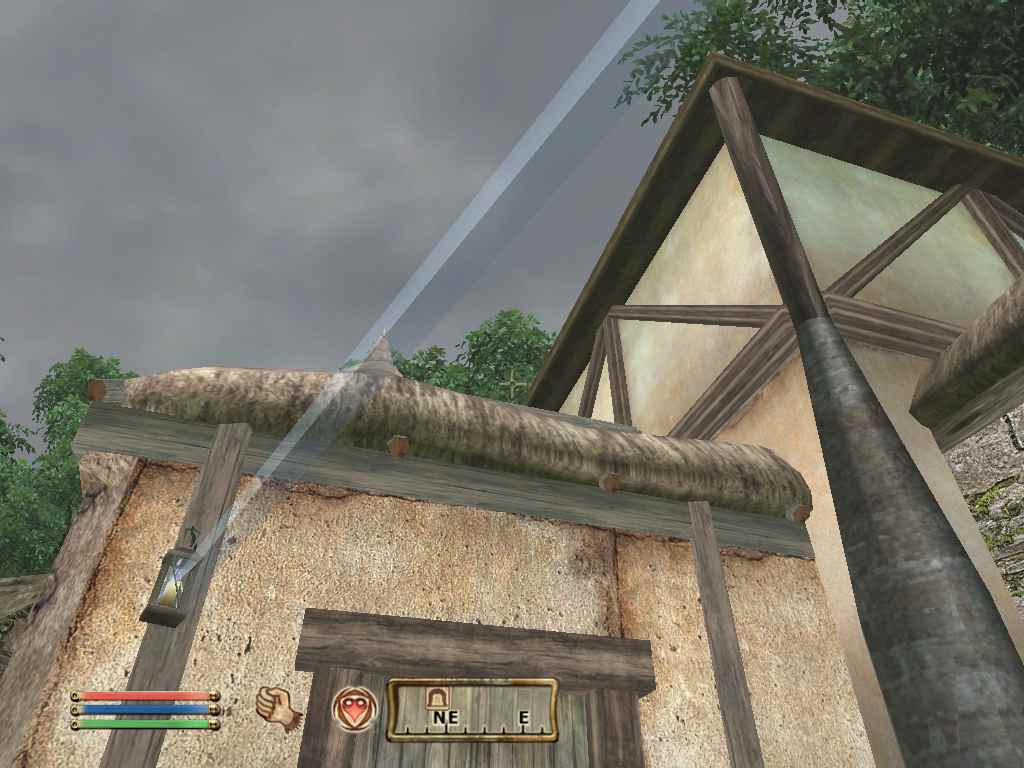
I use oldblivion to run oblivion. I run it at the highest settings and the weird graphics as seen in the screenshots are the result of oldblivion disabling some stuff because of the low fps (which is caused by the lantern rays).
I've played over 300 hours of Oblivion and Shivering Isles on this pc without trouble so I'm not sure if it's my pc to blame.

I only downloaded and installed the huge 2~gb file and the morroblivion installation. The huge 7zip file, I just extracted it blindly to the data folder.

I couldn't find any info on this on google or your forums so I'm sorry if this was already resolved.

Karma: 0 (0 votes)

As I recall Oldblivion is a program which disables some shaders and effects in Oblivion, right? Is there any readme file which says what exactly it does? I don't think anyone ever tried run it with Morroblivion before.

Does this happed only with this particular lantern type or do you have issueswith any other light sources in the game?

Karma: 0 (0 votes)

That's right, but I'm not too knowledgeable about what exactly oldblivion does. 
Here's the readme though: https://dl.dropboxusercontent.com/u/32750720/README.TXT.

Anyway, it is indeed an oldblivion issue because I just ran Oblivion.exe(I don't know why I didn't do this earlier) and started a new game (I can run Oblivion.exe only in interiors, it ctd's as soon as I go outside or enter a cell with water in it) and the lanterns doesn't seem to be shooting any fps killing lasers.

Only the lanterns with glass covers seem to be causing the problem. Torches, candles etc. work fine.

Karma: 0 (0 votes)

What are the Spec on the Computer you  are running  Oblivion on.

Karma: 0 (0 votes)

Here, I've removed the glass parts from lantern meshes. No guarantee that this will help, but you can try.

Drop the contents into Data\meshes\lights\ folder and overwrite.

Attachment Size
lanterns.7z (external) 14.37 KB

Attachments

Karma: 0 (0 votes)

That did it! Thank you Qwertyasdfgh, for going out of your way to do this!
I can't wait to try out the mod!

@roxon_55 Well, the issue's been fixed by removing the glass covers from the lanterns, nevertheless here are my relevant specs:
Intel Dual-Core 3ghz, 1gb RAM, Intel G33/G31 Express Chipset

Karma: 0 (0 votes)

Another 1gig or 2gig  Mem Would help Even with onboard Graphics..

Could try start\Controll Panel\System under (Advanced System Settings)another Panel will Open under Advanced you see (Performance on left)(Settings on Right) click Settings opens Another Panel there is 4 Listings. Click (Adjust for Best Performance) Click Apply, This will Take all the Pretty out of Windows,,,by doing this  Windows will not Waste Mem on making Windows Pretty in the Back Ground while you are Game Playing.


Next if you do not have a Short cut for Oblivionlauncher.exe, on Desktop go to Your Oblivion Directory  find Oblivionlauncher.exe Double Click to Open Here you have 5 Video Options Set  Video Quality to (Medium) in the Distant while Playing you will see Rainbow Landscape you Game will Generate it by the Time you Get There,, While in this Panel Set (Screen Effects ==None) Un_Tick ALL (Distant Rendering),,Set (Mode ==Windowed) and Set Windowed to the SAME as you Run your Monitor  At ,,This Laptop runs 1360x768,,  Exit this Panel start your Oblivion from Oblivion.exe,,

When it Starts go to==options==Video in here you will see(Resoultion ) should be Windowed to what you Set it to ,Take Tree Fade,Actor Fade,Item Fade,Oblect Fade,Grass Distance,View Distance,,,

Take them ALL to the Left Side if They are not There,Distant Land,Distant Buildings,Distant Trees, ALL should be OFF,,

,Int. Shadows,,Ext. Shadows, take to The LEFT to Turn OFF,,

Self Shadows,Shadows on Grass, Tree Canopy Shadows,Shadow Filtering Turn all to OFF

Specular Dist: Take LEFT to Turn OFF

HDR Lighting,Bloom Lighting,Water Detail,Water Reflections,Water Ripples, Window Reflections,Blood Decals,,Anti-Aliasing  Turn to Off,,

Press Return Load Game and try see What Happens,, Just Remember if Game Works to Save and EXIT the Reload  this Save or you Will have to Reset Video Again

Karma: 0 (0 votes)