
| Attachment | Size |
|---|---|
| MorroblivionIssues.jpg | 529.27 KB |
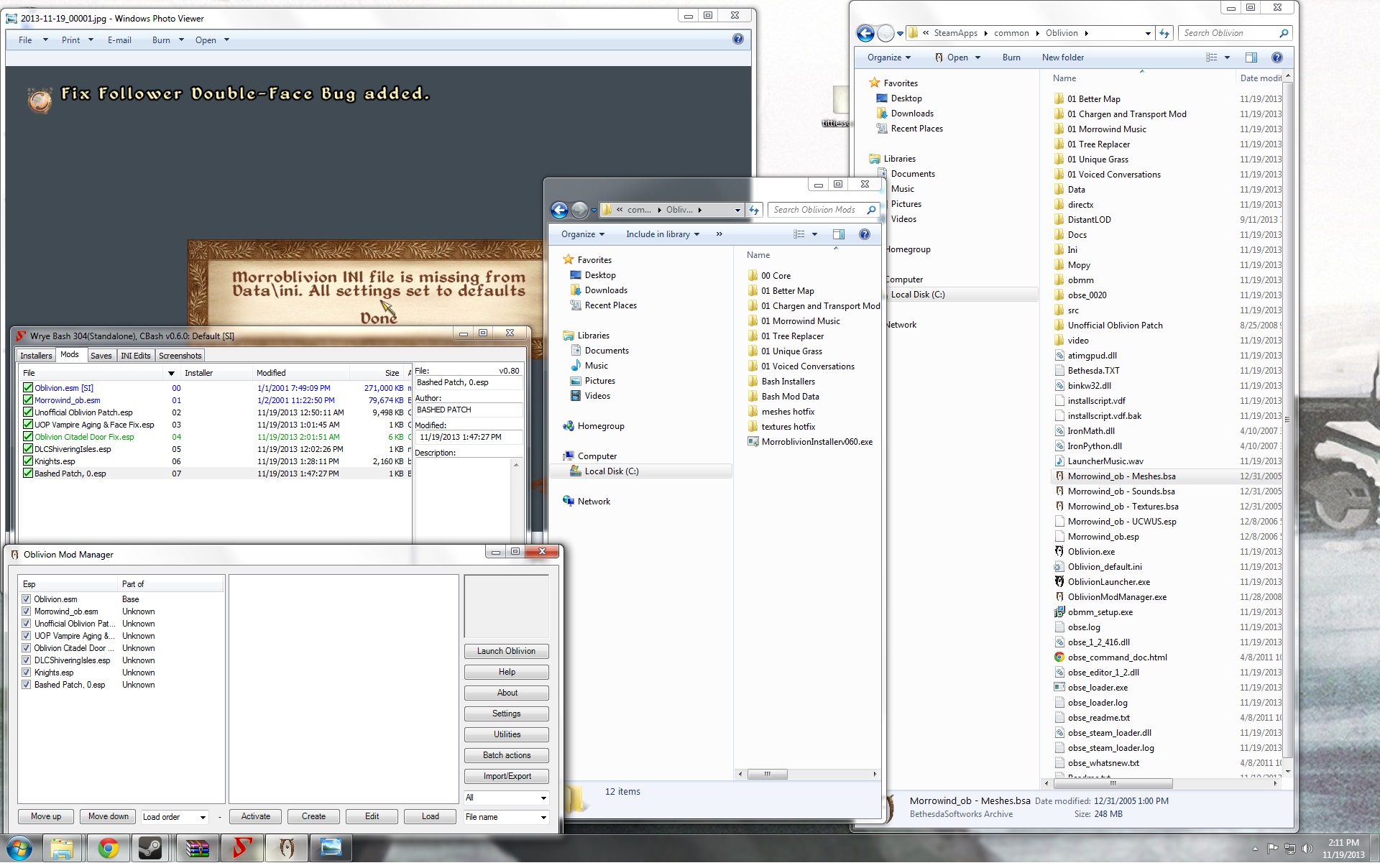
Been fiddling with trying to get Morroblivion installed correctly and having a few specific problems.
1) When I load up Morroblivion and do a new game, I get the common problem of blocky yellow background, with big blocky yellow bits that say "WTF! missing a mesh!" And then the familiar falling through the universe, etc, which a lot of people seem to have trouble with. Tried most of the fixes listed in the other posts without avail.
2) A game window pops up that says "Morroblivion INI File is missing from Data\ini. all settings set to defaults".
3) Neither in Wrye or in OBMM am I seeing all of my needed files. I only see Oblivion.esm, Morrowind_OB.esm, the unnoficial oblivion patches, shivering Isles, Knights, and Bashed Patch,0.esp. I've run the installer tab in Wrye, which gave me an Oblivion Mods folder in my directory, and even after running the Morroblivion installer, nothing shows up in the Wrye installer tab. So I'm missing all of the other pieces, even though I've tried putting them all over the place. I've tried cutting all the files in the 00 Core folder, moving them like u/Roxon in several posts has suggested, without success. Currently the installer, the 2gb file, and the hotfix all reside both in my Oblivion directory and my Oblivion Mods folder. Run the installer a few times, tells me success (of course, cheery little thing), but it's a no-go.
4) Also, I don't get the option to choose Vvardenfell or Cyrodiil, it just shoots me straight into the Morrowind ship.
I've attached a screen shot of my OBMM, Wrye, oblivion mods folder (in the middle) and Oblivion main directory (right side). Any help would be lovely!
a) Put the 2Gb file and the
a) Put the 2Gb file and the hotfix (the archives, without extracting anything) into 'Oblivion Mods\Bash Installers\' (currently it's just in 'Oblivion Mods\'). You can delete everything from 'Oblivion Mods' folder except 'Bash Installers' and 'Bash Mod Data' folders.
b)Go to Installers tab in WB and if you did everything right, you'll see 2 mentioned archives listed there. Install them by right-clicking and selecting 'Install'.
Then, activate the esps you want from 'Mods' tab.
c)If you were to install manually, the files should've gone to 'Oblivion\Data' folder, not just 'Oblivion'. At this point, delete from your 'Oblivion' folder the following:
- All folders prefixed with numbers
- DistantLOD, Docs, Ini and video folders
- All files starting with 'Morrowind_ob'