
Last edited by thermador on 21 Nov 2014 - 10:36.
Hmmm... I am out of ideas. I
Hmmm... I am out of ideas. I just cleared ALL cached data on the site, so maybe that will fix it?
Can anyone else test and see if they can turn off and on the "Skyblivion Active Topics" in their profile options? It works fine for me, both for this account (using Firefox), and a test account that is a normal non-admin user (using Internet Explorer 9).
Also, I checked in Internet Explorer, and the "low text in the forms" appears to be an Internet Explorer issue. The text appears correctly in Chrome and Firefox.
Can anyone else test and see
Can anyone else test and see if they can turn off and on the "Skyblivion Active Topics" in their profile options?
Works fine in Opera 12.
Thermador, I am still having
Thermador, I am still having problems seeing the favicon on chrome. I've tried it on several different computers, some of which have never visited the site and none of them seem to work. I'm not sure if there is anything you can do to fix it but thought I'd tell you.
Yeah it is a problem with
Yeah it is a problem with Chrome. I'm not sure if the browser doesn't like the format of the icon, or what. I will look into it.
I am now 10% done with the
I am now 10% done with the files uploaded to comments. 259 files so far, and that's only going back 3 weeks in time. I guess that shows how much traffic the site has had lately.
Over 30% done with
Over 30% done with reattaching files to comments. Over 800 files reattached so far. You will notice that some old threads are getting bumped to the top of the 'most active' lists. There is nothing I can do about that, sorry.
absolutely love the new theme
absolutely love the new theme, sizes are a bit off on my mobile though, but I can live with that
You've gotta be more specific
You've gotta be more specific than that ;)
Fonts too big? Fonts to small? Image placement issues? Borders? Too much unused space? Not enough space? etc...
the sections on the right
the sections on the right side are too big some of the active topics are getting cut off a little, and when on the developer chat page the names of the people doesn't quite fit next to the chat box so it goes underneath and the respose box is underneath that so you can't type stuff and read responses at the same time you have to keep scrolling, all I've noticed so far
Ah ok. I think it's the
Ah ok. I think it's the thick borders that are causing it. I'll see if I can fix it.
Also, I got over 1300 files reattached to comments now. Over 50% done!
the chat isn't working for me
the chat isn't working for me...i'm the only one?
Working fine for me. There's
Working fine for me. There's overall silence 4 hours long already. People sleeping, working, otherwise busy or talking privately.
i can't see the chat tab at
i can't see the chat tab at all...and also the chat page isn't working
this is a screen of my developer chat atm
![[External image]](http://imageshack.com/a/img822/4350/fcpq.jpg)
If you're using Ghostery (or
If you're using Ghostery (or a similar widget blocker) as an add-in for Firefox or Chrome, note that it blocks iflychat.com by default. If you are using NoScript (or a similar javascript blocker) you need to enable iflychat.com as well.
Otherwise, you may just have to refresh the page - dpeending on your geographic location, some users have reported chat outages.
Nothing! I only have adblock
Nothing! I only have adblock plus on chrome...the chat was working fine yesterday...i also tried with other browsers and on my tablet but same issue.
I'm writing from italy.
Should be something related
Should be something related to my account...i have tried with a different one and everything is working fine
Just checked the ban list -
Just checked the ban list - your account has been banned from chat. [External image]
![[External image]](http://tesrenewal.com/sites/all/modules/ckeditor/ckeditor/plugins/smiley/images/sad_smile.gif)
But I checked the logs and you haven't said or done anything to warrant a ban - so it was probably a mistake or mis-click by one of the moderators (it's easy to do). So I unbanned you. [External image]
![[External image]](http://tesrenewal.com/sites/all/modules/ckeditor/ckeditor/plugins/smiley/images/regular_smile.gif)
Ok XD thanks now everything
Ok XD thanks now everything is working again ^^
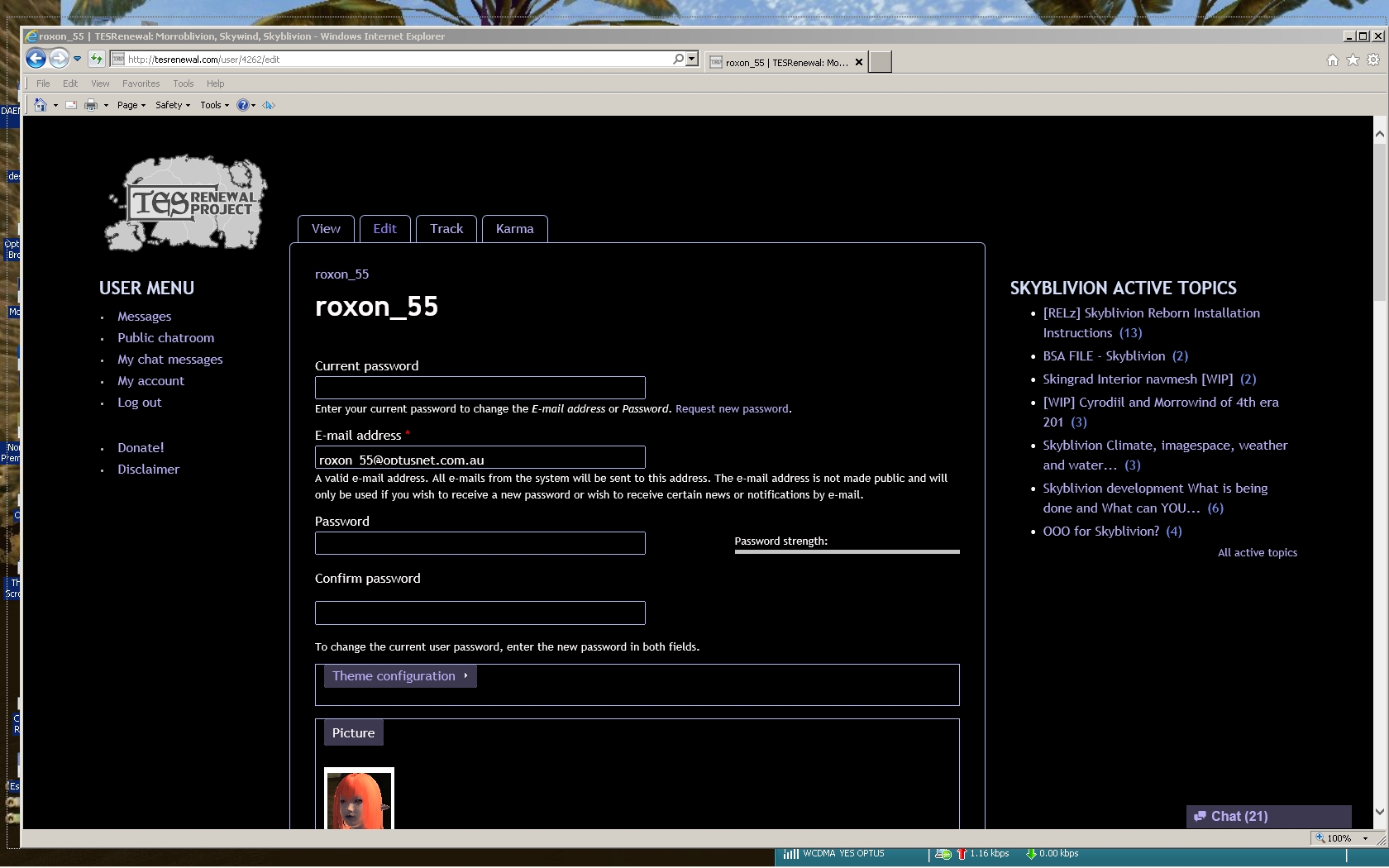
Still the Same With only User
Still the Same With only User Menu running All Other Menu's Un_Ticked Skyblivion Active Topics Still Stays on Screen.
Chat Does Not Come Up anymore But Public Chat\Developer Chat Pops up Every now and Then by the Selves.
| Attachment | Size |
|---|---|
| screenshot2.jpg | 474.61 KB |
Hey Thermador!
Hey Thermador!
I haven't been around in a while but just dropped by and I love the new site look and domain name! Looks great sir!
-Ice
Not sure if its just me, but
Not sure if its just me, but when I click +1 karma (or even -1 karma for that matter), it doesn't show as if i did so unless i refresh the page. Its not a big problem but it is confusing and aggravating. If you find a way to fix it that would be superb![External image]
![[External image]](http://tesrenewal.com/sites/all/modules/ckeditor/ckeditor/plugins/smiley/images/tounge_smile.gif)
I found a copycat website -
I found a copycat website - Morroblivion.net
First GameSkyrim and now this :S
http://morroblivion.net
Edit
Did you Read what it Has to Say is not Copy.
Very weird, though. Why would
Very weird, though. Why would there be a Morroblivion.net in the first place? It was always Morroblivion.com and now TESRenewal.com, but any links to the Morroblivion site redirect here.
But if I click on any link on Google to that .net site, it doesn't redirect.
I think it's a backup copy of
I think it's a backup copy of morroblivion.com before the update, thermador mentioned it on previous page in this thread.
Yep. I should take it down.
Yep. I should take it down. It'll disappear in a hour or two.
Update:
Update:
This weekend I fixed the following issues:
- Search module was no longer indexing the site - search results didn't include new content - turned out it there was a couple orphan nodes that needed to be deleted from the database because the cronjob was getting hung up on them each time it tried to reindex.
- Cleared bad data in users table left over from Drupal 6 - this bug made it so that a lot of people couldn't save changes to their profiles unless they selected a new theme. A few simple MySQL UPDATE commands, and all is better - no need to select a new theme if you don't need to.
- Fixed an issue where about 15 users' join dates were not correct, including my own. I am not sure why this happened, but I suspect it happened quite some time ago, probably back in 2012.
- Added ability to search within forums, both on the search page and via a popup from the search box in the upper left.
- Made the search form something that you can turn on or off in your profile.
- Small tweaks to search engine behavior.
- Misc. small fixes to all four site themes.
You may want to mention that
You may want to mention that you manually fixed the dates. For example mine now says I've been a member for 3 years, although it should be more like five.
brutal7 wrote:
brutal7You may want to mention that you manually fixed the dates. For example mine now says I've been a member for 3 years, although it should be more like five.
Yes, I did it based on the first post of yours that I could find.
However, your particular user ID number (#4528) puts your join date somwhere between Nov 10, 2010 (user #4527), and Nov 12, 2010 (user #4529), so it is in fact very likely to that your join date was on or around Nov 11, 2010.
A few theme fixes today.
A few theme fixes today.
- Site logo is clickable again
- Better site and chat functionality for mobile users (chatrooms anyway)
- Various small fixes
Note that for mobile devices, I recommend using the "noon" or the "midnight" themes. The image-heavy, spacious themes "art" and "houses" are only really suitable for large-format displays (recommend a 1080p, 24" monitor or better).
Noon (default, good for mobile and slow connections):
![[External image]](http://tesrenewal.com/sites/all/themes/noon/screenshot.png)
Midnight (good for mobile and slow connections):
![[External image]](http://tesrenewal.com/sites/all/themes/midnight/screenshot.png)
Art (needs a large monitor with resolution up to 1920x1080):
![[External image]](http://tesrenewal.com/sites/all/themes/art/screenshot.png)
Houses (needs a large monitor with resolution at or above 1920x1080):
![[External image]](http://tesrenewal.com/sites/all/themes/houses/screenshot.png)
Do not know what you Did,
Do not know what you Did, Pages are back to Normal no Extra's only Morrobliion on Page, no Skyoblivion.
Thanks.
Only things ticked On under
Only things ticked On under Account Menu
Main Menu
Morroblivion Menu
Search Form
View: Morroblivion Active Topics
Internet Explorer V10 Set on Automatic Update
Also tried Activating Skyoblivion Menu,Skyoblivion Active Topic. Then Un_Tick Both Logged Off then Logged Back On Still the Same Skyoblivion Active Topics Still There.