
Sound Quality Issues

Submitted by Iselilja on
Attachment Size
notmember.mp3 79.59 KB
fort.mp3 72.63 KB

I'm having some problems with the quality of my recordings, and was wondering if anyone here is familiar with Audacity and might be able to help.

I did a test recording last week that turned out fine (NotMember.mp3). I was advised to try to increase the Gain on the mic a bit.

Today I was recording the rest of the lines, but when I started editing them, I noticed that there was a bad background noise in all the recordings. I used the same settings as last time and I have tried increasing and decreasing the Gain with no luck. The Noise Removal is not helping at all. It ends up sounding like the Fort.mp3 example.

Do any of you have any idea what the problem might be or how I can fix it? Since it worked fine last time I have no idea why it's acting up now.
Karma: -1 (1 votes)
Last edited by Iselilja on 10 Feb 2014 - 15:42.

Who told you to increase the gain?... pfft.

There is a humming sound in both clips. One is worse than the other but both are unsuitable for the game.

I need to know what equipment you are using and how it is set up before i can really help you so go ahead and tell me everything :) Kom igjen Iselilja! Raskere!

Karma: 0 (0 votes)

Hahaha! Jeg jobber så raskt jeg kan!

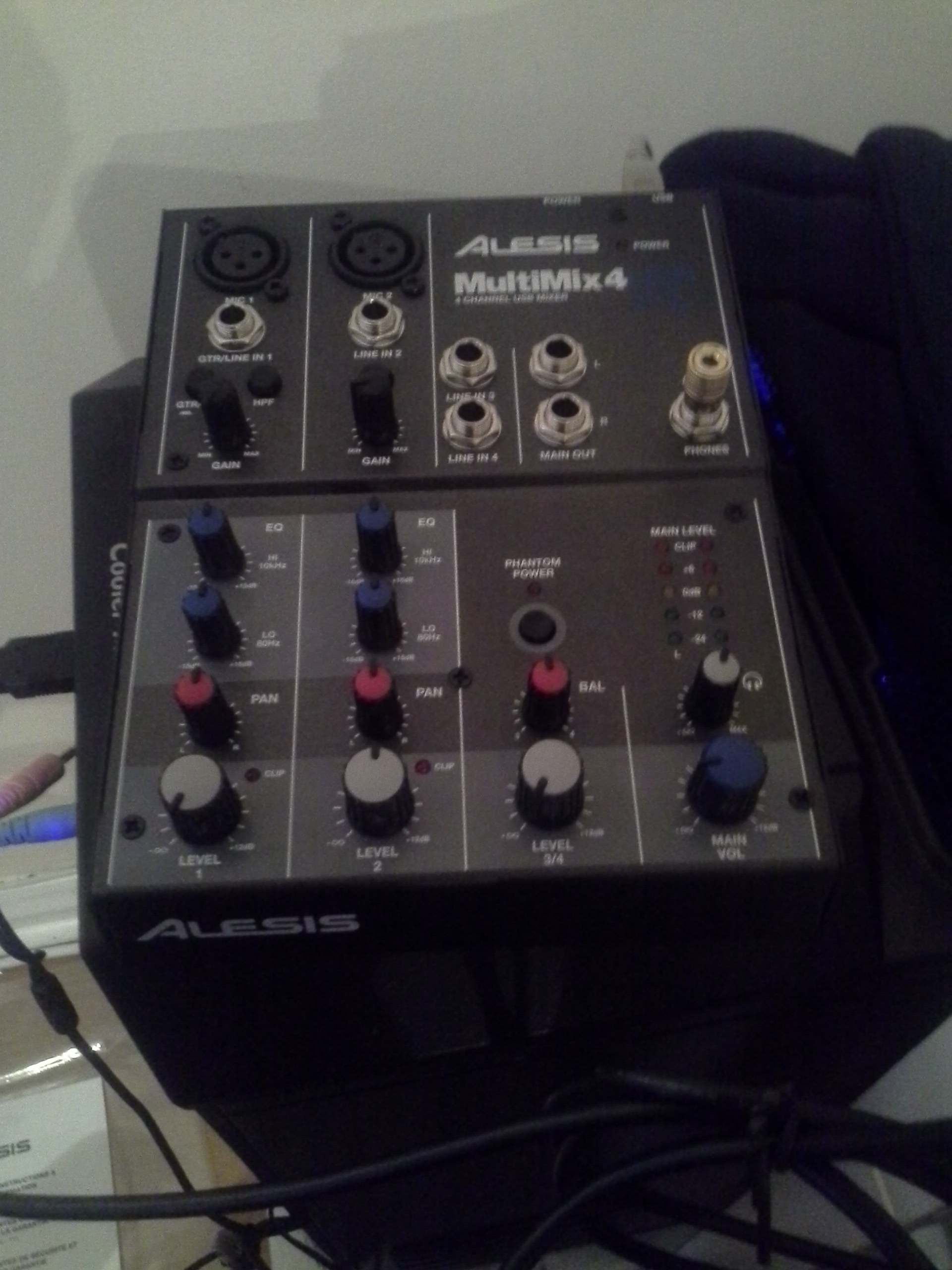
My mic is an Audio-Technica AT2020 with a pop filter. It's connected to a mixer via XLR, Alesis MultiMix 4, which again is connected to my PC via USB.

As I mentioned I use Audacity as editing software.

When I use the Noise Removal the sound is completely silent when I'm not speaking (no hum or anything) but it fails to remove the hum when I speak.

I have attached a picture of the mixer so you can see the settings. I use Mic 2. Could it be an idea to lower Gain and Level on the mixer and turn up Input Volume in Audacity to compensate?

I'm used to being behind the mic, but this editing it new to me. Thank you for all your help!

Attachment Size
20140211_111527.jpg 1.06 MB
Karma: 0 (0 votes)

ok.. nice.

Make sure your microphone XLR cable and your USB to Mixer cable is not too close to electrical cables.. this can cause interference. Twiddle every knob on your mixer a couple times so that it frees any dust particles that might be stuck on the connections inside the mixer itself. Record 6-8 inches away from your microphone and make sure to have as little background noise as possible (computers, refrigerators, heaters, kids, cats, crazy old women, tv, angry neighbours, nuclear war, the mailman, the milkman, the baby upstairs, the air conditioning, the construction site outside, the cow the jumps over the moon, twinkle twinkle little star, zzzzzzzzzzzzz)

Since it is a cardioid mic, point it away from the loudest/ most uneven source of noise so that it picks up your voice louder in comparison.

Lykke til!

Karma: 0 (0 votes)

I built a fort around my mic to shield it from background noise. One of those forts that you used to build as a kid with cardboard and bedsheets. I'm more excited about that then I should be.

That didn't really fix the problem though. I have been fiddling around with the settings on the mixer as well. I attached a file that I recorded today.

I'm starting to think that it's a problem with the mic or the mixer itself. My money is on the mixer. After google'ing the problem it seems that many people have this problem with mixers from Alesis. Apparently it can be solved if you open the box and change some components, and I am in no way qualified for that. I recently bought it, so I'm thinking of returning it to Amazon and ask for a replacement.

Do you think the mixer could be the issue? I should probably mention that I use the mixer as phantom power for the mic as well. It could be the electronics that are interfering.

Attachment Size
trader.mp3 71.13 KB
Karma: 0 (0 votes)

I have had similar problems with other mixers... sometimes, the interference only ever goes through the master meaning if you turn the master down, and volume up to full (keeping gain as high as possible too without getting distortion) it might yield better results. Try it :)

Karma: 0 (0 votes)

This might be a stupid question, but is Master the same as Level? The three main settings I have used are Gain and Level on the mixer itself, and the input volume in Windows control panel. I had to turn the input volume down (I have it at 5 atm) because at 100 there was a horrible white noise.

So I can try turning down Level and turning up input volume and Gain? Sorry about my ignorance.

Karma: 0 (0 votes)

Looking at you mixer, MAIN is MASTER. turn MAIN down, turn GAIN as high as you can without getting distortion and then put LEVEL to full.

Karma: 0 (0 votes)

After putting the settings like you recommended I think it sounds much better. I attached an example. On this one I have the Gain at about a quarter of full level (pointed at 9 o'clock). If I put it any higher I start getting a high level of background noise.

I could try to record with higher Gain and try to remove the background noise with Noise Removal if you are not happy with the sound of this clip.

Attachment Size
thieves.mp3 75.13 KB
Karma: 0 (0 votes)

It still isn't perfect.. it still has some loud noise... If there is nothing making sound in the background, and the mixer was the problem.. and you can't turn gain higher then we might have a problem.

The level i assume was full and the master was at quarter but how high was the gain? and can it not go higher? if the master is the problem then that is what needs to be done. If you get distortion through the gain, however.. then don't.

It really sounds like there is something making noise in the background.. it is not the typical noise a mixer makes :/

Karma: 0 (0 votes)

Here is two more:

'Goods' settings:

  • Mic in: 10%
  • Master/Main: 0
  • Level: 100%
  • Gain: 25%

'Book' settings:

  • Mic in: 5%
  • Master/Main: 0
  • Level: 100%
  • Gain 30%

Sorry about the lack of enthusiasm in the reads. It's been a long day.

Attachment Size
goods.mp3 53.13 KB
book.mp3 41.13 KB
Karma: 0 (0 votes)

Goods sounds pretty perfect! :D

Karma: 0 (0 votes)

Jaaaah!! FINALLY!

This was doing my head in. I was getting really worried that investing that money in new equipment would be for nothing.
 

And thank you for all your help! You are my hero! I will name one of my future cats after you.

Karma: 0 (0 votes)