Hiya guys and gals ! I registered just for this (friggin)
problem.In hope you true masters of modding can
actualy help me :) I installed the full content of
morroblivion v062 step by step with your guide, and
it worked wonderful ! But then there was this greeting
sound problem, at first i thought "meh could be my
soundcard". But after listening to the oldschool
Morrowind sounds ingame, i realised that..i dont know
why it did not play the greetings (etc.) o_O
Could anybody tell me in which folders "what"
needs to be ? Not just folder but also the files :)
You are wonderful, and i love your work :3
(thx in advance)
Edit: I have the german version (could be the reason ??).
Thx mate, your the man ! But
Thx mate, your the man ! But the "conversation.bsa" did not content :
* Dremora
* Kahjiit
* Orc
* Wood elf
* Dark elf
why ? O_O my bsa file is exactly "137.775" KB small. (?)
Dremoras don't have voice
Dremoras don't have voice lines and other races share voicetypes.
qwertyasdfgh wrote:
qwertyasdfghDremoras don't have voice lines and other races share voicetypes.
Ok thx mates :) You are all great ~ [External image]
sry for double post ! But now
sry for double post ! But now i have some other issue ~
As i started at the vvardenfell ship i can move freely, can
talk to jiub and i hear greetings (yay!) BUT as i tried to
move to the deck through the trap door, the game
freezes within the loading screen o_O I tried it..like 7
times with grafic changes (stuff like that) but did not
work at all. Any suggestions ?
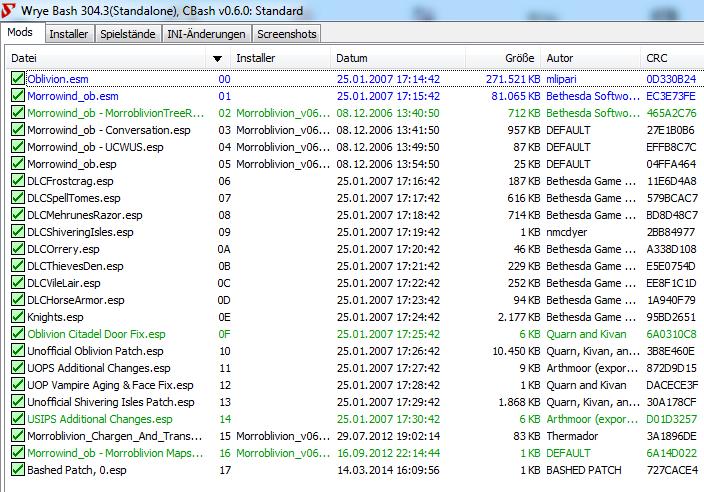
Can you Post your Load Order
roxon_55 wrote:
roxon_55Can you Post your Load Order
Of course mate !
| Attachment | Size |
|---|---|
| loading_order.jpg | 103.89 KB |
You have nothing in there try
You have nothing in there try without The DLC Content and Citadel Door Fix ,Keep Shivering Isle.
or Try an Earlier Version of the Transport Mod.
roxon_55 wrote:
roxon_55You have nothing in there try without The DLC Content and Citadel Door Fix ,Keep Shivering Isle.
or Try an Earlier Version of the Transport Mod.
Nice try but it did not work. :( I think it is "not" a problem
of the travel ship (or transport mod) but an loading crash
of unknown reason. Because it worked before i "installed"
the greeting mod, and afterwards i cant load anything
in the Morroblivion word. I CAN normaly load the main
Oblivion game etc. But at the Morroblivion stuff its crashing.
I even tried to delete the greeting mod, and nothing changed.
It is like.. a curse O_O
You're using the german
You're using the german version right? Are you using a german translation of the unofficial Oblivion patch? There might be problems otherwise. I would also recommend loading the UOP and its additions as the first .esps after the .esms. After that the DLCs and their patches. And then the Morroblivion stuff. If you only want to play Morroblivion you don't even need the DLC.
There isn't really anything in the voiced Greetings mod that could cause any crashes. The fact that your game crashes without it indicates that the problem lies somewhere else. Are you using OBSE?
Use WB and Un_Install ALL
Use WB and Un_Install ALL Morroblivion, Check your Oblivion\Data\Meshes,,Oblivion\Data\Textures,,Oblivion\Data\ini Directories Re_Move All morro,, Morroblivion Directories,,Go to User\User Name\Documents ( My Documents) Delete your Oblivion.ini...Re_move any Morro\Morroblivion in Sounds and FX Directory,,Delete Morrowind_ob.esm,, Then Re_Install
Re_Start WB only Install Oblivion.esm,,Morrowind_ob.esm Shivering Isles,,Unofficial Patch,,Morrowind_ob.esp,,Transport Mod.. and try Again.
I tried now the change the
I tried now to change the patch (english/german)
but it did not any change at all. Everything the same.
Yes i use OBSE, started game with it and without the
same problem. I tried to change the loading order =
the same. I am pretty frustrated ._.
Can somebody tell me the absolut perfect load
order (which is always working). So i can try that.
Or any other advice would be pretty helpful.
Edit: Roxon im trying your way now.
Ok this will be a huge post
Ok this will be a huge post because i need to make some
examples of my successes and failures with this fine mod.
1) I uninstalled the whole combination (Oblivion/
Morroblivion) 12 times (with reinstallation) and
NOTHING worked.
2) After 8 hours of freaking workarounds i tried the lamest
technic i knew. And.. it worked like magic ö_ö (funny eh ?!)
3) The problem of this is "not" that the german version is
making problems with the english patches or with the mod
at all, the problem is the installation order and which
german stuff needs to be overwritten by some other files.
4) I will now make a workaround guide for the german
version, that will work (6 from 6 times) !
----------------------------
Ok i suggest you have all the necessary files for
Morroblivion ! Plus i suggest you have Oblivion/Shivering
Island expansion ! IF you want to play with Knights of the
Nine then you can, but use the correct installation order in
this guide given.
We start with a clean Oblivion installation. Afterwards you
need to install W.Bash (Wrye Bash). Go forward and install
the CLASSIC Oblivion patch in german ! If your done use the
Unofficial Oblivion Patch in ENGLISH. (nothing new to you ?)
(Now start W.Bash and take a look if everything is working)
Now you need to think about what language you might want
to use from this point on !!! (because you can choose xD)
Go and install your Shivering Island expansion in german
OR english (both are on the same disc and will work !).
Even if you have a german Oblivion and a english Shivering
Island there will be no problem, i promise ! You need now
to install the correct "Classic" patch for Shivering Island.
(English to English/German to German) Afterwards the
ENGLISH Unofficial Shivering Island patch. (i tried both
Oblivion and Shivering Island with the german version
of the patch, but it will not work - trust me because they
do not like mixed languages and will cause crashes)
(As always start W.Bash and start Oblivion again to look if
everything is working properly)
Now you need to install the OBSE - simply put the 2 .ddl
files (obse_1_2_416.dll, obse_editor_1_2_416.dll) and the
one .exe file (obse_loader.exe) with the data folder into
the Oblivion folder.
Next stepping stone is Elys Silent Voice mod, i use v93 !!
(install the 3 files into Data>OBSE>Plugins)
(Again W.Bash)
Kay its time to install Morroblivion ! Use the master file
installer to make your "Morrowind.esm". And now listen
closely do NOT install the resources (2gb) data thing with
W.Bash ! You need to install everything per hand !
(And every included extra mod like the greetings etc.)
Do a clean Morroblivion installation, test it afterwards
with W.Bash ! If everything is working - YAY - then you can
install the other mods. BUT you even now need to use
the BSA Commander to open the .bsa file of the greetings
mod (like Brainslasher said above - do it like he told).
NOW you can install Knights of the Nine if you want, but
never before the other stuff is done ! And do NOT install
the Unofficial patch for "NotN".
The german version is troublesome because you need to
mix patch languages and if you do not do that - there will
be some crashes. The last info i can give you is the loading
order is SOOOO unimportant o_O ! If you exactly do as i
said. (.esm always before .esp that should be clear !)

Yes you'll need to rename
Yes you'll need to rename some folders to get your language version to work. You have to unpack your Morrowind_ob - Conversation.bsa file with a program like this. It should be in your data folder. Then put what you extracted into your Oblivion folder. This is what it should look like: /data/sound/voice/Morrowind_ob - Conversation.esp. Then go to the folders and rename them in this fashion:
Argonian => Argonier
Breton => Kaiserlicher
Dark Elf => Dunkelelf
Dremora remains the same
High Elf => Hochelf
Imperial => Kaiserlicher
Kahjiit remains the same
Nord remains the same
Orc => Ork
Redguard => Rothwardone
Wood Elf => Waldelf
You'll probably have to do this with every english mod that adds voice files. If you use Steam you could probably just change the game language in the settings as well.