Morroblivion Weapon Mesh Project

Submitted by Chris McCallum on
Attachment Size
Iron Longsword Redone 273.76 KB

Hi folks,

I have noticed a lot of the Morroblivion Weapons especially Blades don't look right when unsheathed. By that I mean my character's hand is around the crossbar of the Blade. This is happening because the Mesh isn't properly adjusted on the Y axis.

So I am taking it upon myself to fix any weapon that doesn't look right when it is out and ready for battle. I don't know if anyone else has taken up this project so I thought I would do it not just for myself but for everybody here who plays Morroblivion. Plus it is giving me good practice with 3DS Max 2012 and NifSkope. I've been working on the Iron Longsword most of the afternoon and I think I have it fixed as good as it can get. I raised it 1.9 units on the Y axis in 3DS Max 2012. I tried for 2 units but that cut into the collision of the original Blade and I don't know how to move collisions in 3DS Max 2012. I tried it and it really messed up the Nif. LOL!

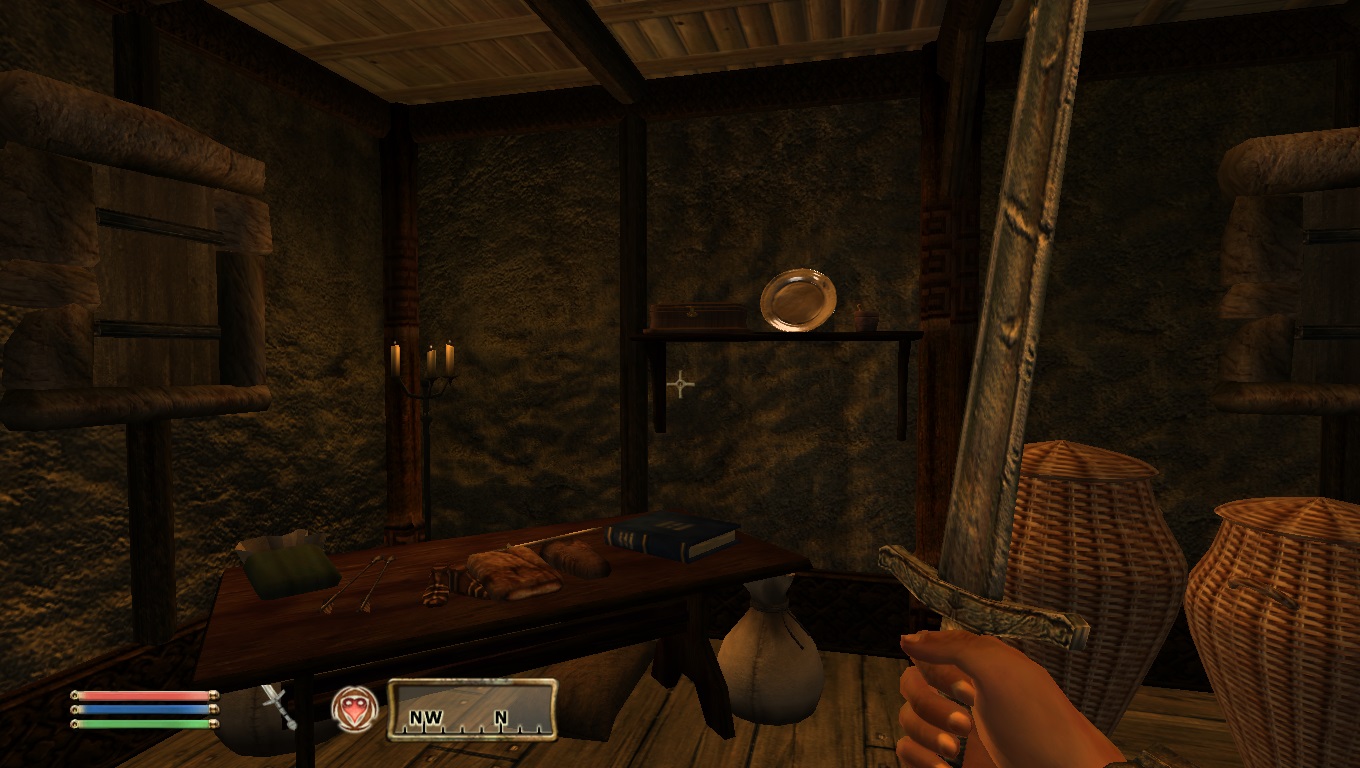
Anyways I have a screenshot of the new look of the Iron Longsword and as you can see the crossbar is clearly all the way above my characters hand. Now what I really need to know is if someone else is doing the same thing or not or if the developers are planning to do it. 

This isn't easy work and there could be 100s of Weapons that need adjusting and as I learn what I am doing it will get faster but right now all I have done is the Iron Longsword and I really want to test it in game for a while before moving on to another weapon.

The Armors look great. I have seen no problems with them and even if there were I couldn't fix them as Armor is a little bit above my current knowledge of Nif file manipulation and Bows may be an issue on Weapons because they bend and move. They have bones and I think some kind of skin to allow them to move. If I find a Bow out of line I will try to fix it but if I can't get it right quickly then I won't do Bows.

This is a good little project for me. It could take months to do but as I said if it is already being done or the developers are doing it then maybe I should not do it. Any feedback and information would be greatly appreciated.

Thanks - Chris McCallum

Karma: 0 (0 votes)

Funny, there was a person complaining about this very thing just a couple of days ago. I recommend reading this topic.

You don't need Max for such simple mesh modification - NifSkope can do it just fine.

Karma: 0 (0 votes)

Now that is something I didn't know about NifSkope. If I can move a Nif a little bit up the Y axis in NifSkope that would save a lot of going back and forth and I bet I could move the original collision as well. Tried it in Max and the collision simply grew to about 10 times its normal size. LOL. I don't know what I did wrong and Max isn't easy to learn. So I will see if I can learn how to move a Nif in NifSkope. Thanks so much for the info. :D

EDIT: Oh man thank you. I read the comments on this subject and in there was info on how to use NifSkope to move a Nif file on Axis. I just moved the whole Iron Longsword 2 units up and the collision went with it. Beats using Max any day of the week. Now my project will become seriously more easy. Thank you so much. - Chris McCallum

Karma: 0 (0 votes)

Don't forget that you may need to move the placed weapons in the game as well by the same amount of units, though if it's only 2 the difference might not be that noticeable.

Karma: 0 (0 votes)

Thank you. I didn't know that. I will be on the lookout for that issue. I agree with you. 2 units on the Y Axis isn't very much. Just enough to get a character's hand off the crossbar of a Blade. :D

Karma: 0 (0 votes)

Heh, what a coincidence. I was about to attempt this myself, I could help conjure up a list of all weapons that are affected by this. All I can confirm right now are most iron blade weapons (blunts are fine as far as I've seen) and I've seen glass blades do it as well. I'd also assume the steel weapon set is afflicted, but I'm going to test each weapon right now, I'll reply back with a list.

Karma: 0 (0 votes)

I don't know what is wrong with NifSkope but when I follow the directions in the other discussion about how to move a Nif up or down an axis I get a Nif with no results. When I run the game I get the hand on crossbar Nif every time. It just isn't working. It works flawlessly when I use 3DS Max as a middle man. I even ran into Compatibility Files issues and locked files. I have no idea how I got into those but I google searched around and I think I got that problem fixed. Anyways it looks like I am going to have to use Max as a middle man. It may be the newest version of NifSkope is having trouble with Morroblivion NIfs I don't know that for sure but something about it doesn't work. Anyways I've redone the Iron Longsword with Max and I set it to 2 units this time and the Nif seems to be working good. I've already checked the Iron Claymore and it can use some adjusting. So there are lots of them but this will give me something to do in my spare time to help with the project. Even if it isn't used I am still going to make it for myself as I enjoy doing this kinda thing. If I were a Pro Graphic Artist I would offer my help in the creation of Skyblivion and Skywind but I am not. I can manipulate Nifs but I can't draw a 3D item. I have utmost admiration for those who can. :D

Karma: 0 (0 votes)

Iron Claymore is done. Again 2 units up on the Y axis with Max as the middle man. Now that is a big sword. The handle is long and the Blade end is like super long. Nice job on that Mesh. Now my hands don't cover part of the crossbar. Now that I know what I am doing it only took about 10 minutes to do the Iron Claymore so using Max as a middle man isn't so bad.

Karma: 0 (0 votes)

Here's the list as promised. This is a list of in-game weapons rather than meshes so there will be less meshes to modify compared to the number of items listed here. I also included claymores that don't have the hand exceeding the cross guard, but the hand is still very close/touching the end of the cross guard. There are some repeat names, those have been included on purpose.
Anywho:

A Rusty Dagger
Anarenen's Devil Tanto
Ancient Silver Dagger
Berserker Silver Longsword
Black Dart*
Black Hands Dagger
Bloodskal
Bound Dagger
Clanbringer
Cruel Flameblade
Cruel Flamesword
Cruel Shardblade
Cruel Shardsword
Cruel Sparkblade
Cruel Sparksword
Cruel Viperblade
Cruel Vipersword
Daedric Dagger
Daedric Dagger
Daedric Katana
Daedric Shortsword
Daedric Tanto
Daedric Wakizashi
Daedric Wakizashi
Dagger of Symmachus
Demon Katana
Demon Tanto
Devil Katana
Devil Tanto
Dire Flameblade
Dire Flamesword
Dire Shardblade
Dire Shardsword
Dire Sparkblade
Dire Sparksword
Dire Viperblade
Dire Vipersword
Droth Dagger
Droth Dagger
Ebony Broadsword
Ebony Broadsword
Ebony Broadsword
Ebony Longsword
Ebony Scimitar
Ebony Shortsword
Elberoth's Saber
Enamor
Fiend Katana
Fiend Tanto
Fireblade
Flying Viper*
Fury
Glass Claymore
Glass Dagger*
Glass Dagger
Glass Dagger
Glass Dagger
Glass Firesword
Glass Frostsword
Glass Jinkblade
Glass Longsword
Glass Netch Dagger
Glass Poisonsword
Glass Stormblade
Glass Stormsword
Her Ebony Scimitar
Icicle
Iron Broadsword
Iron Claymore
Iron Dagger
Iron Dagger
Iron Dagger
Iron Dagger*
Iron Flameblade
Iron Flameslayer
Iron Flamesword
Iron Longsword
Iron Saber
Iron Shardblade
Iron Shardslayer
Iron Shardsword
Iron Shortsword
Iron Sparkblade
Iron Sparkslayer
Iron Sparksword
Iron Spider Dagger
Iron Tanto
Iron Viperblade
Iron Viperslayer
Iron Vipersword
Iron Wakizashi
Iryon Dagger
King's Oath
King's Oath
Magebane
Nordic Broadsword
Nordic Claymore
Nordic Silver Dagger
Nordic Silver Longsword
Nordic Silver Shortsword
Othril Dagger
Rathalas Dagger
Saint's Black Sword
Seasplitter
Shadowsting
Shimsil
Silver Claymore
Silver Dagger
Silver Flameblade
Silver Flameslayer
Silver Flamesword
Silver Longsword
Silver Shardblade
Silver Shardslayer
Silver Shardsword
Silver Shortsword
Silver Sparkblade
Silver Sparkslayer
Silver Sparksword
Silver Sword of Paralysis
Silver Viperblade
Silver Viperslayer
Silver Vipersword
Solvistaap
Soscean's Shortsword
Soul Drinker
Spiderbite
Spirit-Eater
Stalhrim Dagger
Stalhrim Longsword
Stalhrim Longsword of Flame
Steel Blade of Heaven
Steel Claymore
Steel Claymore of Hewing
Steel Dagger
Steel Dagger
Steel Dagger of Swiftblade
Steel Dai-katana
Steel Flameblade
Steel Flameslayer
Steel Jinkblade
Steel Jinkblade of the Aegis
Steel Jinksword
Steel Katana
Steel Saber
Steel Shardblade
Steel Shardslayer
Steel Shortsword
Steel Sparkblade
Steel Sparkslayer
Steel Spider Blade
Steel Tanto
Steel Viperblade
Steel Viperslayer
Steel Wakizashi
Stormblade
Stormfang
Sword of Agustas
Sword of White Woe
Temreki, Shackler of Souls
Wild Flameblade
Wild Shardblade
Wild Sparkblade
Wild Viperblade
Winterwound Dagger
Wolfender Silver Dagger
Wolfgiver Silver Dagger

Note: Those with an asterisk beside represent special weapons, such as upside-down blades and such. You probably shouldn't modify those, I just included it for reference.

I hope this list helps! And feel free to make a copy of this list and cross out any that you've already fixed.

Karma: 0 (0 votes)

Thanks so much for the list. I just did 4 more Iron Weapons in about 20 minutes. 2 units up the Y Axis seems to do the trick. With this list in hand I can go into the CS and get item ID numbers then add each one using the console to see what it looks like before and after the change. I need to be able to see the weapon in order to best determine the units for change. I can stand in one spot and use the console and this list to do all the work. I have to tell you the Iron Saber was in pretty rough shape. Now it looks awesome with my hand in perfect position on the handle. Well its midnight where I live so I am shutting down for the night. I'll be back on this project tomorrow. Now that I know what I am doing things are going to go a lot faster and it won't be long before I'll be able to post the mod for folks to try. It is going to be in loose file format as loose files always override those packed in a BSA and all it is is Meshes no ESP file to deal with.

Karma: 0 (0 votes)

Alright, I'm glad to have been of help! I'm also glad to hear that you're doing well and yes, the iron saber looked HORRIBLE, good thing you fixed that. If you need any more help with this, I'm more than willing to help. These bad weapon placements have been rubbing me the wrong way for far too long.

Karma: 0 (0 votes)

Not meaning to self-advertise, but if you get this: https://tesrenewal.com/forums/morroblivion-development/steel-weapons-remodel then you won't have to do the steel weapons, because I already recreated them all. The download link is towards the bottom of the page, just so you know. :) 

Good luck with the billion other meshes, though! :P 

Karma: 0 (0 votes)

I now have all the Daedric Weapons done as good as they are going to get. There are two in the set that have a structure on the handle that no matter where you place your hands it is going to clip but you can't see it unless you go out to 3rd person point of view. A lot of the Meshes use the same model so I am killing more birds with one stone so to speak. Thanks to the list and my knowledge about Form ID and the console I was able to get all the Daedric Weapons done in about an hour. That is how I am going to approach this - in parts. I am taking the list and separating it into smaller lists and adding the Form ID off to the side the printing it. This makes for a nice reference. Folks it is the One Handed and Two Handed Blades we are talking about here and even there not all of them need adjusting but I am finding that 2 units up the Y axis is enough to get your character's hand in a good spot on the weapons.

Karma: 0 (0 votes)

It's strange that NifSkope method doesn't work for you. Just to be sure did you actually save your modified model? There is a "Save As" button in NifSkope.

If you're going to use Max, can you upload 1 of your modified models as an example? I want to check if it has the right settings.

Karma: 0 (0 votes)

Sure, I'd be glad to. In fact I will upload everything I have so far so you can check it out and please by all means if you see a weapon that needs to be adjusted more don't hesitate to tell me. I went up the Y Axis by 2 units on all of them. Being that I am using Max as a middle man I have found that 2 is about all you can do or you run into the problem of overlapping the collision. I don't know what kind of problems that would cause if any but I think the 2 units or whatever they are (I call them units) get the weapons to a pretty good spot for your character's hands.

Attachment Size
morroblivion_weapon_mesh_project.7z 708.07 KB
Karma: 0 (0 votes)

Well I found one in the list that is actually better left alone and that is the Nordic Silver Dagger. If you raise it on the Y Axis it puts the triangle shaped tip of the blade outside the collision and guess what a problem with textures occurs. The tip is solid black and the thing is I put it back to normal which fixed the texture problem but this dagger doesn't really clip into your hand at all. The square shaped crossbar rests right on top of your hand. So this one I am not changing.

Karma: 0 (0 votes)

That was one of the few that I was not sure about, so I included it in anyways. There are some weapons that don't exceed the cross guard when held, but the bottom of the handle seems longer than it should be. A good example are a lot of the claymores.

Karma: 0 (0 votes)