
Random CTD every 10 min or so

Submitted by Tarbal on

Hi, this is my first post here. I'm really itching to get into Morroblivion, but it keeps crashing on me! I started out going kind of nuts with the mods, but now I barely have any installed (after reinstalling completely -- twice). Every 5 - 10 minutes, I get a crash, making the game unplayable. 

I get one BOSS warning regarding Morrowind_ob.esm:

Warning: This needs to load directly after Oblivion.esm to avoid landscape issues caused by a failure by the mod author to use TES4Gecko's "Move Worldspaces" function.

However, when I run Oblivion Mod Organizer or Wrye Bash, they show that it is clearly second to load.

Oblivion Mod Organizer gives me a different warning:

"There are files in your overwrite mod"

Here are my plugins for OBSE overwrite:

Blockhead, Elys Silent, hook, MenuQue, obse_jail_fix, OBSE_Kyoma_MenuQue, and obse_training_fix...

Its all pretty standard stuff, so I'm not really sure what the problem is. If anyone can help me out, I'd appreciate it.
Karma: 0 (0 votes)

From other threads, it looks like I'm not the only one crashing constantly around Andrano Ancestral Tomb. Other CTDs are random though, and I'm now running vanilla Morroblivion.

Karma: 0 (0 votes)

Keep Working on Your Game must Still Have Something Wrong Somewhere, I run 80 in Load Order can Still Play Game 16 hours Plus with No CTD.

Use ModMananger and TES4Edit to Sort Load Order Do Not Use ( WB )

Attachment Size
load_order_09_12_2015.txt 2.25 KB
Karma: 0 (0 votes)

OK, so I followed your advice along with some other stuff, but now I get a missing core bsa file error when I load a game. I know they are all there though. I had a conflict in mod organizer with Morrowind_ob and Morrowind_ob - conversation.bsa, even though I did not change them at all, so I reinstalled only the conversation one and merged them both in TES4edit.

Now, everything seems to work great, even with max settings, QTP3, and character overhaul. The only thing is that pesky missing core bsa file notification when I load a game. I'm not crashing though, so what gives? In my mod organizer, ob - conversations is not listed under mods anymore, but it is in plugins and successfully merged with Morrowind_ob.

I did get 2 errors on the merge though. Two random npcs have hair that doesn't match. It will probably crash when I see them I guess. Should I keep fooling with it or leave good enough alone? It seems to run great now, besides that core bsa notification...

Karma: 0 (0 votes)

OK, scratch that... It keeps crashing at a place I was crashing before: right in front of Punabi

Karma: 0 (0 votes)

I gave up on Wrye Bash, and stuck everything in the data folder and it works great now. It's so much easier on my video card too. Anybody else who has the issues I mentioned above, just stick all your mods in your data folder (overwriting and merging, as necessary) and tick the boxes in Oblivion Mod Organizer, auto-sort, and it works perfect.

Karma: 0 (0 votes)

Still Keep Tabs on What Happens in Game, Cliff Racers in Rocks can Still Cause Problems  as do Nixhounds Same Problem. Turn Auto Save OFF, I have Kept Auto Save on Wait so It can Be Used  when I Need it Use in Good Locations.

Edit.

Use TES4LODgen to Generate Distant LOD.

Karma: 0 (0 votes)

Played for probably 10 hours since -- Crashed maybe twice, but no consistent problems. Killed a few racers and hounds and no problems. Distant LOD sounds tempting... What's wrong with the autosave and how do I change that?

Karma: 0 (0 votes)

Auto Save is in your Game Options has been known to  Cause Problems with Corrupting Save, search Site on Auto Save Problems.

Killing them No Problems Don't  Save  where you Have Been Killing them  Could cause Problems when Loading a Save File.

Random Spawn Points can put them in Rocks and in Buildings some Times.

Every now and then you might get a bit of LAG, put on a Camera Program so when you get Lag you can back Away and Use your Camera and go Look for a Rat, Some cause a Lag Problem.

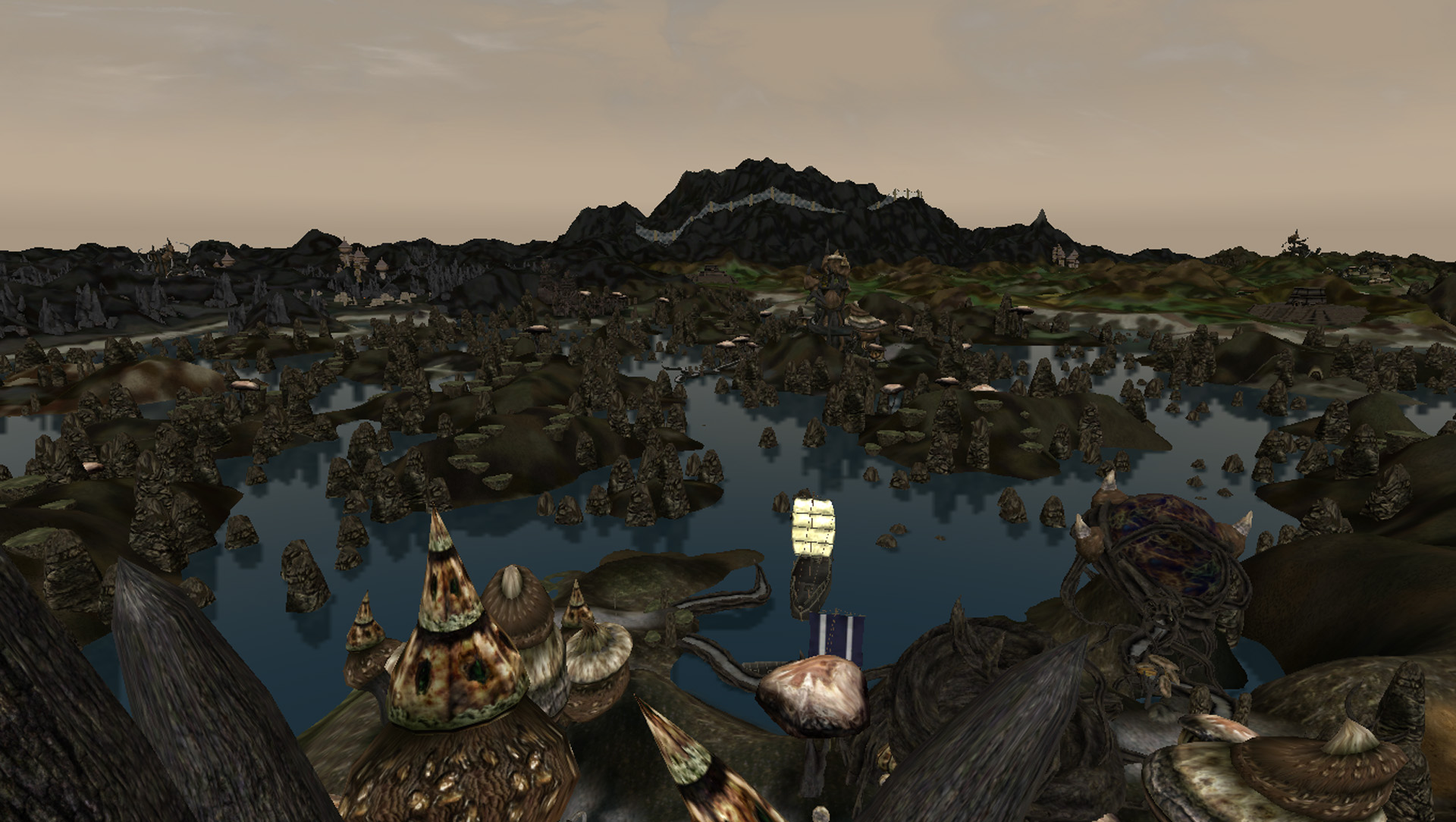
Distant LOD Makes the Game for your views, the views like Tes Vos To Ghost Gate and the Fence, you Can See the Work that The Modders have Put into Vvardenfell to Create these Views.

Had Trouble finding Tel Vos picture used Sadrith Mora Pic.


Have Fun.

Attachment Size
sadrith_mora.jpg 425.52 KB
Karma: 0 (0 votes)

Hey thanks, all of that stuff is good to know. I have had crash on load problems occasionally since I installed ENB. I'll be more careful about where I save.

My LOD definitely does not look that good. Things pop in and out in the distance. My rig can handle it, so I'd like to fix it if I can. 

I ran TES4LOD through Mod Organizer to install LOD. Then, created a MOD to organize the stray plugins. I basically just followed the following guide:

http://www.loverslab.com/topic/50847-anatriaxs-guide-to-morroblivion/

Is that a correct method of installing LOD? Mine sure doesn't show as far as that image. I have distances on max in settings, btw. 

Karma: 0 (0 votes)

TES4LODGen simple if in rar file Extract into a temp directory then cut TES4LOGen.exe and paste into your Oblivion Directory Create a Shortcut the Run.

I am running All discovery1 ( World Textures for Oblivion ) files that i can install in to my game,altered a few sections in my Oblivion.ini only to do with Trees,Grass, and Memory Oblivion can use for Caching.

I do not use ENB or any other files to Alter what you See, Only Altered Shaders and Textures.

The Distant LOD you see in  Picture is Collection of All the ( _far.nif ) i have Collected  2011  with Downloading All Morroblivion Files, Pays to have 100gig of files a lot are redundent ( thats Life ). dont mind spelling.

Fair chance  at Least  Half the Crashes  come from your operating system Check Your ( My Documents ) see how Many ( mega Bytes ) are in there, if anything over 20mb can cause  Operating System to Keep Checking While You are Playing.

If Windows XF UP Default  (Anything) Directory is ( My Documents ) So When Computer Starts First it Does is Load ( My Documents ) into Memory  For Default USER Even if You Log on As Admin,, for Ease of Access.

Only way Around is Keep My Documents Empty,there are other ways to pick windows up hard to type.

Computer 4gig Mem  1gig video  1terra  byte drive  3gig proc

Karma: 0 (0 votes)

I cleaned My Documents out, since I'm about to reformat anyways. Down to < 20 Mb, with just Oblivion directory with 4 save files. I'm still crashing at the Hlalmar/Sosia quest. As soon as I get close to Sosia, boom crash.

I didn't know people ran xp anymore... I'm running Windows 7 overclocked at 4.2 GHz, with 16 Gb of RAM and 2 GB VRAM. Unfortunately, I can't overclock my 660 TI, because it conflicts with ENB. Even with ENB, 99% of the game so far runs great. I have explored about 1/3 the continent, and it's just this quest that crashes me every time. That, and the occasional load bug CTD. 

I saw a post on here from a couple of years ago about the Hlalmar/Sosia quest being bugged, but in a different way. Sounds like they fixed it though. Guess I'll just kill Hlalmar and forget the 2 strength points...

Karma: 0 (0 votes)

Update: I just did a console command to purge cell buffer and the crashing stopped at Sosia. Seems that is an easy fix for when you have a consistent crash at a specific cell.

Karma: 0 (0 votes)

Try Installing ===PCB=== in your Load Order there is also others you could try for Caching.

Done Well at Working Your Problems Out.

Karma: 0 (0 votes)

Thanks for all of your help. Now, I get a stack overflow at Telvayn Ancestral Tomb though. After about 20 hours of no crashes, now that cell will not load without crashing no matter what. I reinstalled with nothing but OBSE, elys silent mod, and MenuQue. I get a stack overflow at that tomb every single time. Oh yeah, then I added the 4Gb patch, stutter remover, and purged buffer cell and nothin works. Stack overflow

Karma: 0 (0 votes)

It occurs right when I'm approaching the door (or slightly before that). It has not been discovered yet. I've tried loading older saves and same problem. By the way, Conscribe does not output anything in this case...

Karma: 0 (0 votes)

https://www.mediafire.com/?dn9vv2be5o9d9d7

Link to Clip had no Problems at Telvayn Ancestral Tomb.

Try going to where you can see the Door not to Close, use a Detect Creature Spell and See if you can find  a Creature in a Rock or in the  Ground If so You can Delete them By using Console . Use Camera Mode go to Creature  open ( ~ ) Console, Mouse Click on Creature Type in Console ( Delete ) Press Enter. Gone..

Karma: 0 (0 votes)