
I am playing with the latest version of Morroblivion. I also have a lot of other mods installed for my normal Oblivion playthrough, including Oblivion Reloaded, Better Cities, Maskar Oblivion Overhaul, Unique Landscapes, Basic Primary Needs, etc., and all the latest unofficial patches. I have noticed, however, that after either using the purger that comes with Oblivion Reloaded or when loading a save during in-game, especially if the save was in a different area from my current position or after I got killed in combat, the game would crash to desktop. I followed all the steps and suggestions in the stability and performance section, including using the stutter remover, 4gb patch, and disabling distant land but none of them seemed to solve the problem. I also recall having this problem on an earlier build when I didn't have any extra mods installed. Is there a way to fix this or is there something wrong with my setup?
I hope these screenshots will
I hope these screenshots will suffice. Also, a workaround I have found for this is to load the auto-save and then load any save I have and I can load them just fine, just a bit annoying though. still it would be great if I didn't have to do that.
| Attachment | Size |
|---|---|
| screen1.jpg | 104.57 KB |
| screen2.jpg | 119.7 KB |
| screen3.jpg | 102.25 KB |
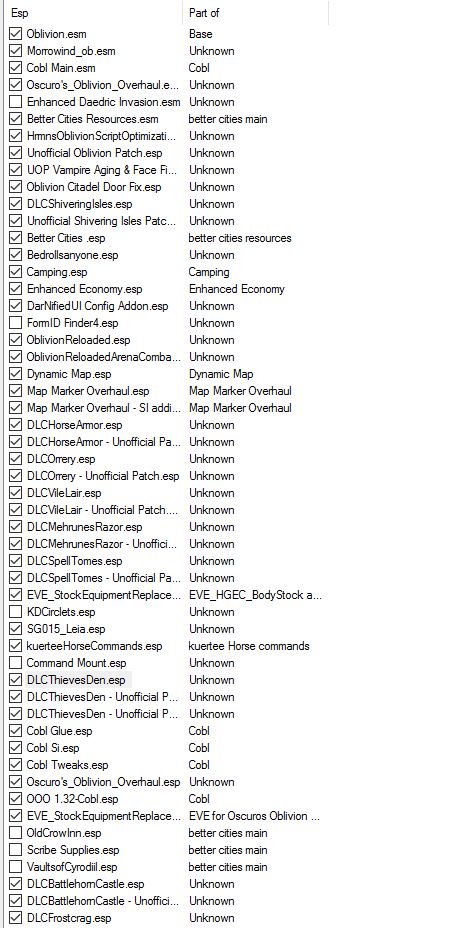
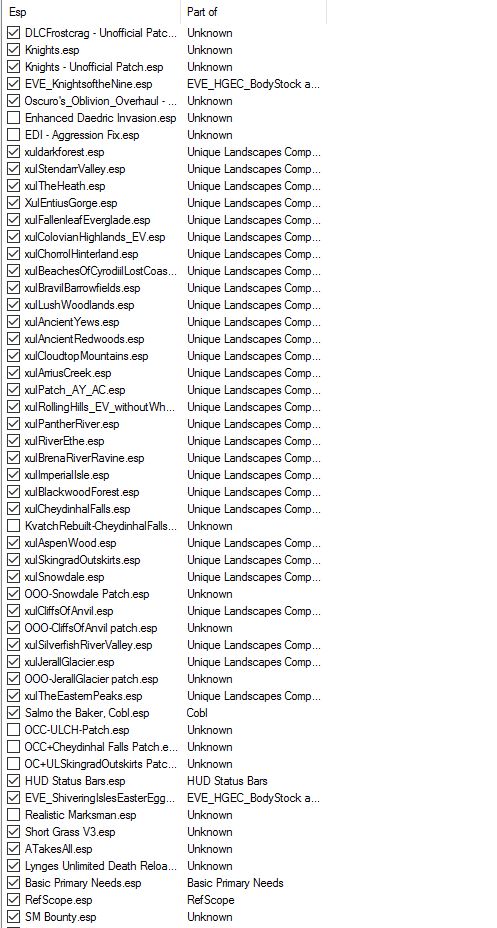
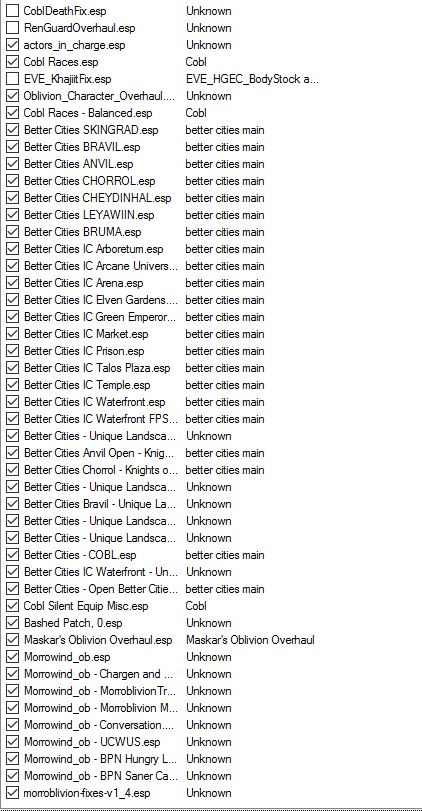
Bashed patch should be the
Somewhat similar situation
I have done all of that but
I have done all of that but to no avail. Is it possible this is simply due to engine limitations?
Fortunately, i was able help
@GalenKnight56
@GalenKnight56
You may be right about engine limitations (specifically, running out of resources due to your heavy mod setup). Unfortunately, I'm not in a position to install all of your mods to try to reproduce and debug your CTD behavior... I did test Basic Primary Needs and the BPN Morroblivion addons and verified that they do not cause the problem. If you are certain you are not dealing with a corrupt savegame file and you've already tried the 4GB patch and other techniques to decrease CTD, then I think the next step is to start with a clean Morroblivion base and verify that loading a saved game created with that setup does not cause CTD. Once that is verified, then activate your mods in a systematic way until you experience the crash again. IMHO, the most straight-forward systematic way of tracking down errors (whether it is in a database record, a data file or an esp file) is the binary search algorithm.
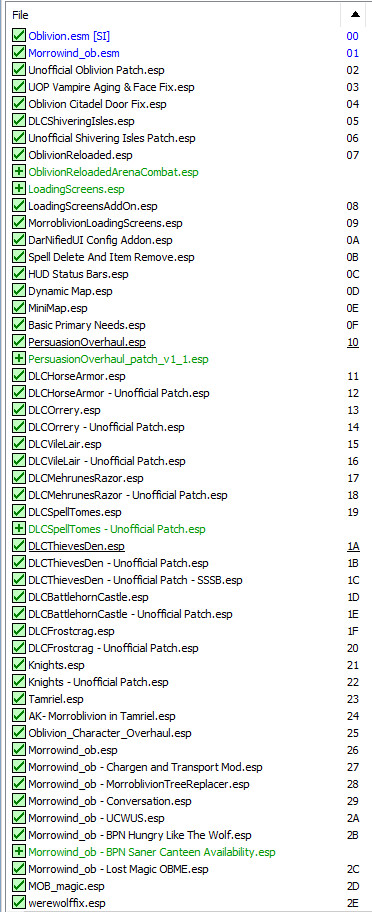
Here is my setup which works without CTD on loading a saved game:
*Also, I'm running the Steam version of Oblivion (v1.2.0.416) with GOTY DLCs, OBSE v0021, Oblivion Reloaded 4.2.3, Oblivion Stutter Remover v4.1, OBME v1, Blockhead, MenuQue, ConScribe, Elys_USV, Elys_Pluggy. Attached my OSR and OR ini files for you too. For my system/setup, I found disabling the OR memory purger and only enabling those specific sections in my OSR ini helped decrease my CTDs by a large amount.
| Attachment | Size |
|---|---|
| wrye_bash_list_1.jpg | 170.09 KB |
| wrye_bash_list_2.jpg | 111.44 KB |
| sr_oblivion_stutter_remover.ini | 2.41 KB |
| oblivionreloaded.ini | 2.16 KB |
| oblivionreloadedesp.ini | 8.01 KB |
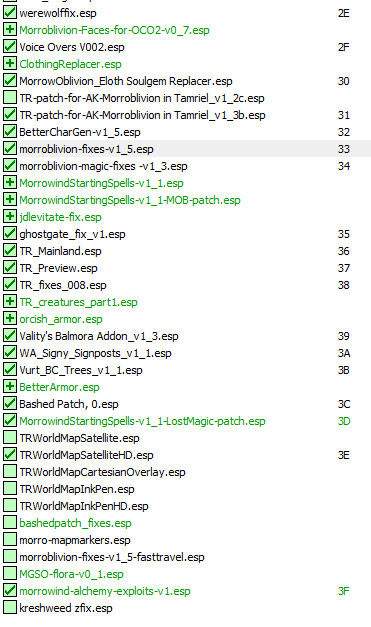
If you only crash in a
If you only crash in a specific area, and that crash stops after the 3 day reset, then it is likely that your problem was caused by a glitched monster or npc spawn.
I believe I may have found
I believe I may have found the source of the problem. When I disabled Oscuro's Overhaul, all the crashes I talked about seemed to disappear. I wonder if this is due to a conflict between Oscuro's Overhaul and COBL
EDIT: neither were the culprit....oh well
Many Oblivion guides
Many Oblivion guides recommend not loading any savegames when already ingame as there are a few memory glitches attached to this. It's better to restart the game just to be sure, especially in a heavily modded game.
Dumb question: How would
Dumb question: How would there be memory glitches attached to the save files?
And I dont seem to have this problem at all in base Oblivion and Shivering Isles.
Oblivion sometimes fail to
Oblivion sometimes fail to flush properly memory information that belong to the current play state and they are not properly overwritten by loading a savegame, thus lefting memory in an unclean state. Potential savegame corruption then is caused by notorius C/C++ undefined beheviour.
So there is no known way of
So there is no known way of adequately solving this issue? at least for MorrOblivion?
It's not Morroblivion, it's
It's not Morroblivion, it's the executable itself.
The Only way to solve this is find the exact code that should clean memory and fix them in Assembly.
So in other words there is no
So in other words there is no real easy way to fix it as of now? And I will just have to accept the fact that Morroblivion will crash ever so often, especially when I load a save in-game?
If your game is crashing so
If your game is crashing so often when reloading there may be two possibilities:
An installed mod (or an interaction between 2 or more mods) can be interfering with the reloading operation. Some mods that use OBSE commands need to reapply changes to every savegame load.
Game is unable to flush memory completly creating corruption of data in memory. This may happen when:
1)The savegame is bloated.
2)Some OBSE plugins may cause issues in some situations. In particular Oblivion stutter Remover Heap Replacement functionality can cause issue on some configurations on some heap algorithm, or when Heap is setted to a too big value.
Also pluggy is know to may cause some unexplicable CTD on loading.
I can load saves from in-game
I can load saves from in-game fine -- my suspicion is that you have an incompatible mod in your setup. One reason for loading a save to cause CTD is that a mod script is trying to restore player status effects which are not part of the vanilla game. Try to post your mod load-order and we'll go from there.