
Firestone effect bug

Submitted by wagnerschuh on
I was playing morroblivion normally when my character from nowhere started to catch fire. I was looking at the active effects and there was the enchanting effect firestone: fire damage 7. But I do not have any item in inventory with that effect or with that name firestone. I tried throwing all of the items away and even then it keeps catching fire until i die. What can I do to solve it? Is there any command to remove that effect?
 
Can someone please help me? I would be very grateful hehe
Karma: 0 (0 votes)

It sounds like you have been hit by the effect of a Firestone Ring.  Normally, this effect should have a 1 second duration, but there is a bugged scenario where a bystander standing next to someone who equips the Firestone Ring (or any other enchanted item with On Touch Damage Magic) is hit with a constant magic effect version of the enchantment.  I have not had time to convert all OnTouch damage enchantments over to the CWUTarget script system yet...  until then, you can try this command:

Player.RemoveSpell 010400CF

Hope that helps.


Karma: 0 (0 votes)

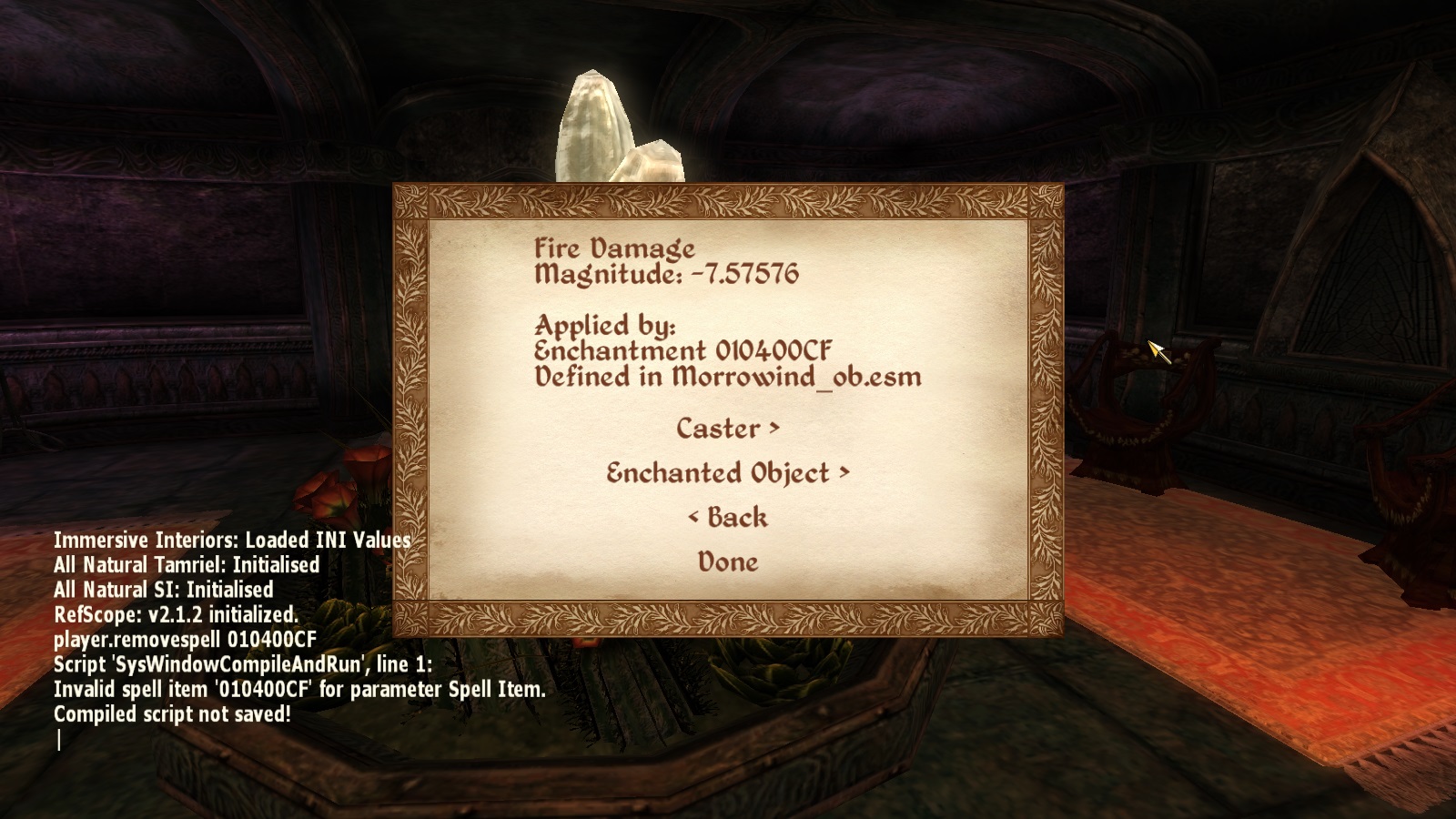
  I tried to use the command you passed and gave the following message: Invalid spell item 010400CF for parameter spell item.   Maybe that's not the spell's id? Any other ideas?    Thanks for the Help! [External image]


Karma: 0 (0 votes)

Go Back to a Save Before you got the Effect, Play your Game the Same  and see where you go the Effect.

Karma: 0 (0 votes)

Here is the easiest way for you to do it on your own:

1. Download and Install RefScope: http://www.nexusmods.com/oblivion/mods/21862/?
2. Load your game and wait for the RefScope message box to pop up.  Do not open any menuscreens.
3. After the RefSceope window pops up, close it.
4. Then hold down the "X" key and press the "C" key.
5. Choose "Active Effects".
6. Find the Active Effect you believe is causing the problems, click it.
7. FInd the line "Applied by spell: ... "  Do not close the pop up -- just press the "~" key to open the console.
8. Now type "Player.RemoveSpell " followed by the hexadecimal number after "Applied by spell: ...".  Press the enter key.

Karma: 0 (0 votes)


I wish I could load a save, but I saved it up moments after being affected by the spell :/   ponyrider0, I tried to do exactly as you said, but even then the command does not work. I would not like to lose my save: / I'm posting a screenshot for you to take a look. Any other ideias?   Very grateful for everyone's help :D  


Karma: 0 (0 votes)

I tried to delete the ring and the enchantment in the construction set and then saved a new mod and activated the mod. With the mod the ring and enchantment no longer exist in the game, but still the effect continues on my character. Is there nothing that can be done? :/

Karma: 0 (0 votes)

Since you are familiar with the construction set, you can make your own work-around to keep your current save-game.  Do NOT delete the ring or enchantment.  Instead, open the enchantment and set the Fire Damage magic effect magnitude to 0 (zero).  Hopefully, this will work.  If not, your best bet is to find a Saved-Game editor and use that to modify the magic effects.  Good luck!

Karma: 0 (0 votes)

After some time testing the possibilities with the contruction set I finally managed to solve the problem. For someone who has the same problem I changed the firestone ring spell from fire damage to fire shield. The effect of the ring continues to appear on my status but is no longer hurting me.
 
Thank you very much for your help in solving the problem :D :D :D :D
 
Karma: 0 (0 votes)