Hi,
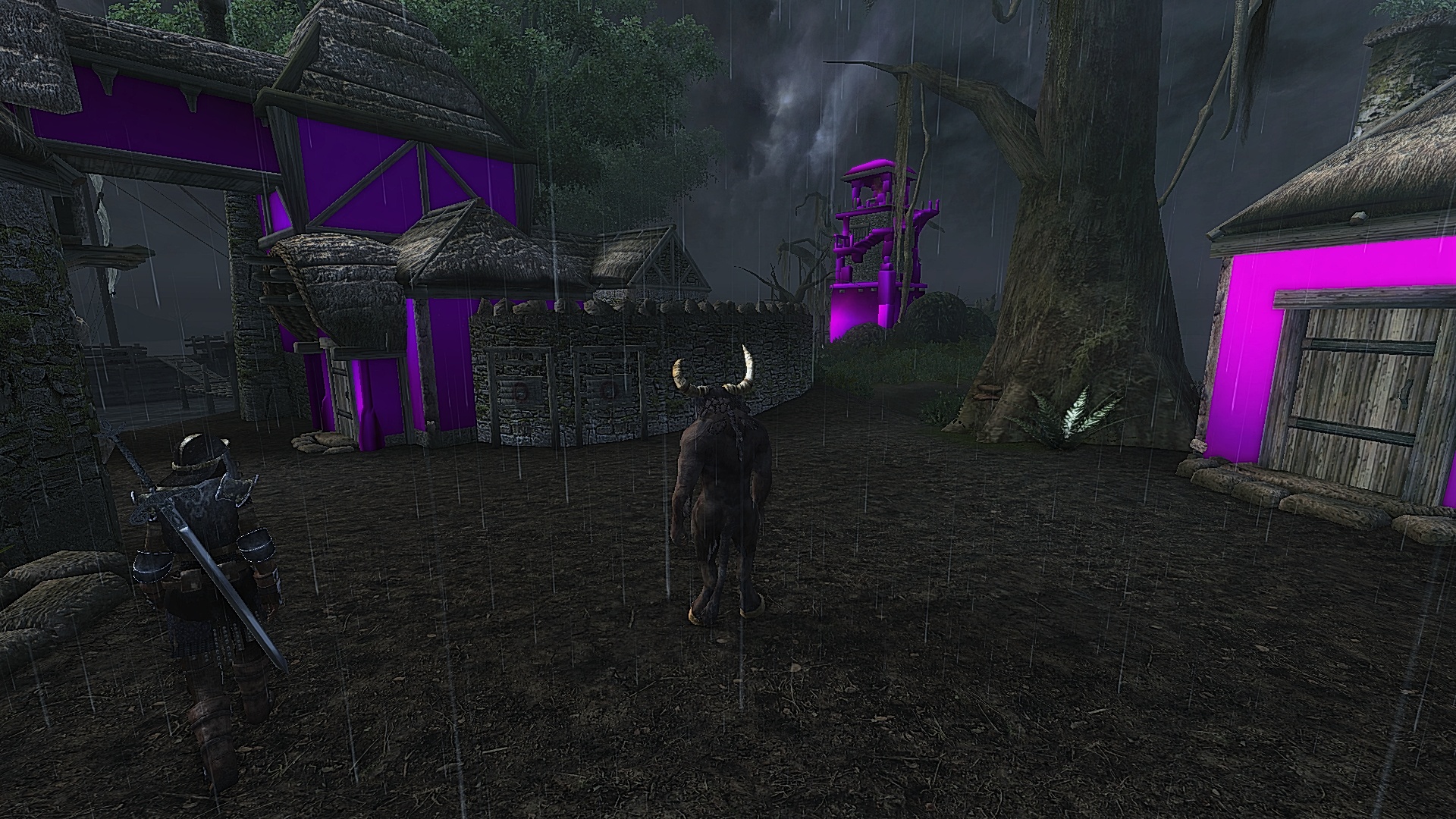
I've searched pretty far and wide, looking for a way to fix the purple Seyda Neen homes I've recently experienced. All I did, in order for this issue to arise, was disable Morroblivion + its related plugins. I decided to enable them again, start a new character, and enjoy Morroblivion, but now some houses (and a few other, minor meshes, like part of the wooden bridge) appear to be having texture issues. Just the walls, not the door or roof.
I've already re-downloaded Morroblivion in its entirety, and placed the mod back in my Oblivion directly (Data), but the issue is still there.
Just wondering if anyone knew of a way to fix it.

Try Re_install Shivering Isles. If not a Number so we can Find Textures.
Try using QBMM Oblivion Modmanager with ArchiveInvalidation to Force your Game to Read the .bsa Files.
When you have a single texture that is purple, it's usually related to a bad texture or mesh file in your Oblivion\Data directory which is over-riding the original asset found inside the Morroblivion BSA.
For the main houses in Sedya Neen, they use 3 different house meshes in the exUnordUhouse mesh set. These meshes share "Oblivion\Data\textures\morro\x\stonewall01.dds" as an exterior wall texture. I would search your Oblivion\Data\Textures\morro\x directory for this file and if it exists, delete it. The game engine should then be able to load the original texture stored inside the BSA.
If the file does not exist, it may be an issue related to BSA archive invalidation. The easiest way to fix this is to install mods and manage your load order with Wrye Bash or another Mod Manager which has automatic archive invalidation.
I've got the Steam installation of Oblivion, and use the old Oblivion Mod Manager. I've applied Archive Invalidation through both the Oblivion Mod Manager and Nexus Mod Manager, trying to fix the issue, but it didn't work. I've got no Textures\morro folder, either. It's quite annoying, I didn't even swap in any mods, simply deactivated Morroblivion, then, later, reactivated it, and found this issue.
I'll keep trying different things, thank you, though.
Use bsacommander Extract the files out of the morrowind_ob-textures.bsa in to a Temp Directory around 2.5gig then Cut and Paste the ( morro ) directory into your Textures Directory in your Game
Edit.
It Could be a waste of time Doing the above..
The Texture Missing on the Lighthouse is a Oblivion Texture.
( Textures\architecture\stonewall\stonewall01.dds )
The House is ( Textures\morro\ ) Directory..
the Skywalk is Another Oblivion Texture..
That's very interesting. It seems that I have no missing textures when in the Cyrodiilic worldspace, despite appearing to be missing them when in Vvardenfell. I'm still tinkering around with possibilities, removing / applying archive invalidation / QTP, etc.
I fast traveled around, to different locations around Cyrodiil and the Shivering Isles, and have yet to see any missing textures. Is there anywhere in particular I should be checking? Somewhere that shares the same, missing texture?
What version of QTP.
QTP3 Redimized.
The Oblivion Textures that are Playing Up are in QTP3 Downloaded it.
So Something in Your Game is Stopping the File From Being read. The only thing That can is ( Permissions )..
Go to where You have Bethesda Softworks Installed.. Right Click on the Directory go Properties,, will Open a Panel, down at the Bottom You will See ( Attributes ) Read-only will be Ticked,, Remove the Tick press Apply Wait till it applys when Finished Try Your Game again.
I activated QTP3 Redimized, re-ran Archive Invalidation, unmarked the Oblivion directory's read-only status. No-go. I'll just uninstall Oblivion, or validate files through Steam, as, maybe, a file was corrupted. Or something.
I was just wondering, in case this issue happens again. When Googling the situation, I've discovered that I'm not the only one that encountered this issue.
Thank you for all of your help, though.
Sorry that we couldn't get it working for you. When you do get it working (by re-installing or some other means) please post exactly what you re-installed or fixed here so that it can help others. I'll also add it to the active bugs... Thanks!