Morroblivion Installation Instructions

Submitted by Daggers on

[insert image here]

A video installation guide for Morroblivion version 68 and newer is available here.

Welcome to the Morroblivion installation section. The written instructions below are primarily for setting up Morroblivion version 67 and older. For Morroblivion version 68 and newer, use the current Morroblivion Project Release page and the video guide linked above.

If you are experienced with TES modding, much of this will be familiar. If you are new to Oblivion modding, read the instructions carefully before installing.

Requirements

Notice: These requirements are also listed on the Morroblivion Project Release page.

Expand

What do I need to own?

You must own legitimate installations of The Elder Scrolls III: Morrowind Game of the Year Edition, including the Tribunal and Bloodmoon expansions, and The Elder Scrolls IV: Oblivion version 1.2.0416 with the Shivering Isles expansion. CD/DVD, Steam, and GOG versions are supported.

Important: These instructions are for the original The Elder Scrolls IV: Oblivion, not Oblivion Remastered.

xOBSE and Plugins
Install xOBSE separately. Installation instructions for xOBSE and most OBSE / xOBSE plugins are included in their archive folders or readme files. Follow those instructions carefully.

Recommended Tools

  • Wrye Bash - Recommended for installing legacy resource archives, managing installers, and creating a Bashed Patch when needed.
  • Wrye Bash Releases - Current release downloads.
  • LOOT - Recommended for automated load-order sorting and load-order warnings.

Installing Morroblivion Version 68 and Newer

Expand

Notice: Version 68 and newer use the current Morroblivion installer workflow. The legacy screenshot-based instructions below are useful for context, but they are outdated for v68 and newer.

  1. Download the current Morroblivion installer from the Morroblivion Project Release page.
  2. Extract the installer archive, then run the installer.
  3. The installer will detect your legal Morrowind and Oblivion installations before deployment.
  4. When prompted, select your Morrowind and Oblivion installation directories. Select the main game folders, not the Data folders.
  5. When prompted for the Morroblivion installation directory, select your Oblivion directory for a direct install, unless you are using a managed mod setup that requires a different staging directory.
  6. Install xOBSE separately, then install any OBSE / xOBSE plugins required by the Morroblivion options or add-ons you enable.
  7. Use Wrye Bash, LOOT, or another Oblivion-aware mod manager to review your plugin list and load order.
  8. Launch Oblivion through xOBSE after installation.

Patch Notice: Morroblivion version 68 currently does not use separate patch files. The associated v67 patches 1-3 are for version 67 only and are already included in v68.

Installing the Morroblivion Master - Version 67 and Older

Notice: This section is for Morroblivion version 67 and older. The installer text may differ slightly from the screenshots because the images are legacy examples.

Expand
  1. Download the master file installer for the version you are installing from the Project Release thread or its archive section. Extract the executable, launch it, and follow the on-screen prompts.
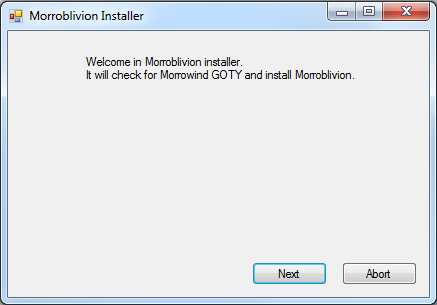
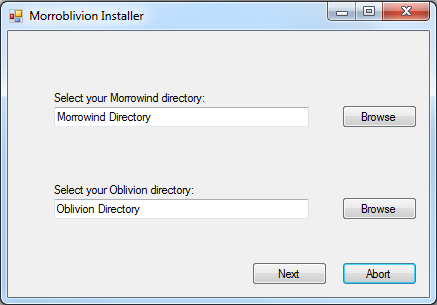
  2. Select your Morrowind and Oblivion directories. Use Browse if needed. Select the main game folders, not the Data folders.

    Example: Select C:\Oblivion, not C:\Oblivion\Data.

    Once the installer detects both games, select Next.
  3. [insert success image]

    When the installer reports Success, Morroblivion has been installed to your Oblivion Data folder. Verify that Morrowind_ob.esm is present in:

    Oblivion\Data\Morrowind_ob.esm

Installing Resources with Wrye Bash - Version 67 and Older

Expand

Download the resource archive for the version you are installing from the Project Release thread or its archive section.

  1. Download and install Wrye Bash. Wrye Bash is a mod-management tool used to manage Oblivion installers, plugins, and load-order workflows.

  2. Launch Wrye Bash and open the Installers tab to initialize Bash Installers for the first time.

  3. Wrye Bash usually creates an Oblivion Mods folder at the same directory level as your Oblivion folder.

    Example: If Oblivion is installed at C:\Oblivion, Wrye Bash may create:

    C:\Oblivion Mods\Bash Installers

    Place the Morroblivion resource archive into the Bash Installers folder. Do not manually unpack it first unless your setup specifically requires that.

  4. Return to the Installers tab in Wrye Bash. If the archive was placed correctly, it should appear in the package list on the left.

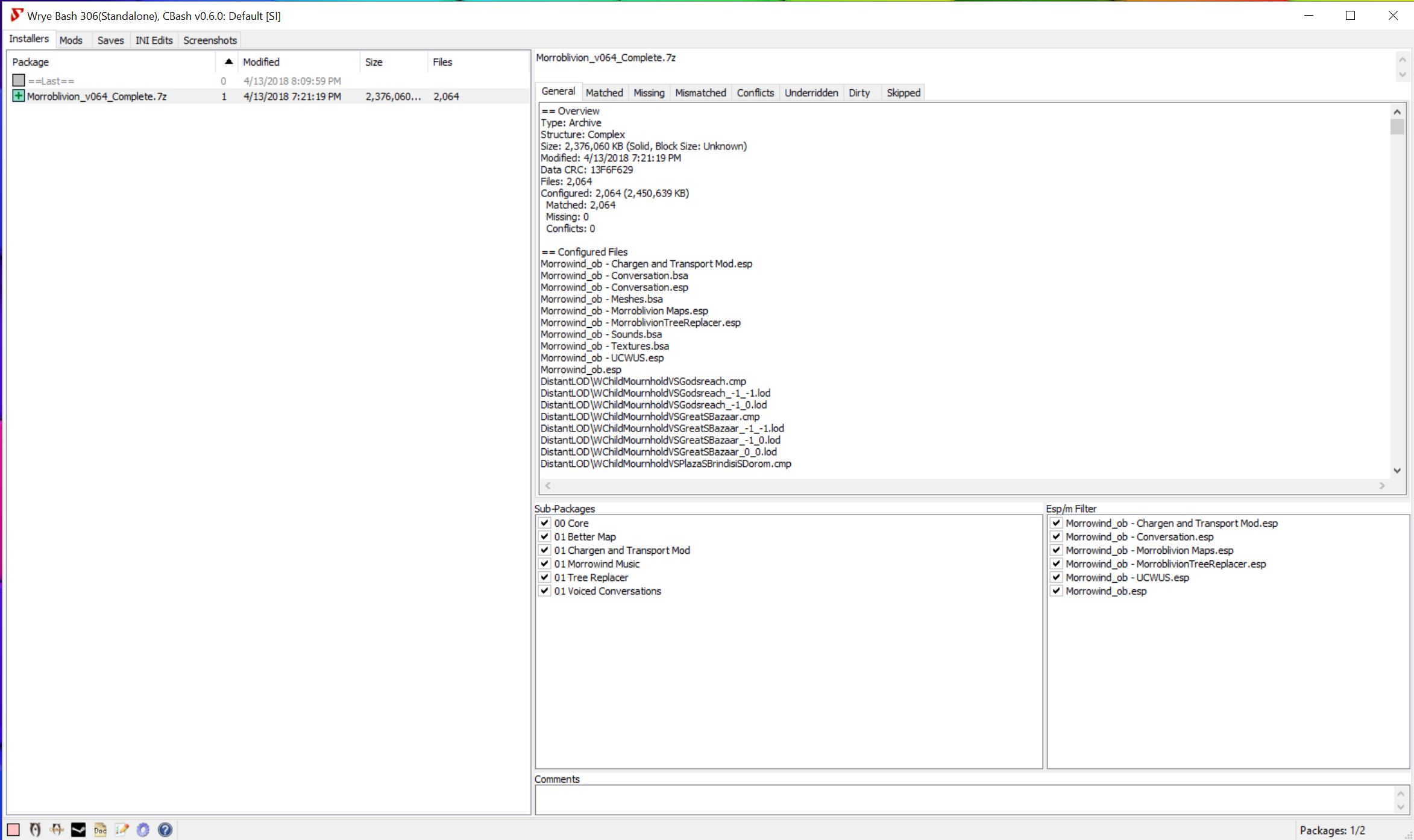
    Select the Morroblivion archive. The sub-packages will appear in the center pane. Always install 00 Core. Optional packages are prefixed with 01.

    Detailed descriptions of optional packages are available in the Project Release thread.
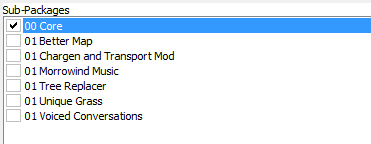
    Right-click the Morroblivion archive and select Install.

Troubleshooting: Missing textures, yellow placeholder objects, or falling through the starting ship usually means the 00 Core resources were not installed correctly or were not installed into the correct Oblivion Data path.

Installing Resources Manually - Version 67 and Older

Expand

Download the resource archive for the version you are installing from the Project Release thread or its archive section.

  1. Open or extract the Morroblivion resource archive. For legacy versions, you should see folders similar to the following:

    • 00 Core
    • 01 Chargen and Transport
    • 01 Morrowind Music
    • 01 Oblivion Trees - Morroblivion Tree Replacer
    • 01 Poster Map - Morroblivion Better Map
    • 01 Voiced Conversations
  2. Open the 00 Core folder and copy all of its contents into your Oblivion Data directory:

    Oblivion\Data

    Copy the contents of the folder, not the folder itself.

  3. Repeat the same process for any optional 01 folders you want to install. These folders are optional and should only be installed if you want the feature they provide.

Updating Morroblivion and Other Patches

Notice: This section applies to version 67 and older. For version 68 and newer, do not install v67 patch files over v68 unless a current release note specifically instructs you to do so.

Expand

Version 68 and Newer

Morroblivion version 68 currently does not have separate patch files. The v67 patches 1-3 are for version 67 only and are included in v68.

Version 67 and Older

  1. For Morroblivion v67, use the current patch guidance from the Project Release thread and the Dagger Galore a Patch for Morroblivion Nexus page.

  2. Dagger Galore is the accumulated Morroblivion patch package for v67. It includes worldspace improvements, quest fixes, object placement fixes, landscape fixes, and other corrections.

  3. Install the main file according to the Nexus page instructions. Only install optional files if the Nexus page indicates they are still required for your setup.

  4. Open or extract the archive into your Oblivion Data directory, or install it through Wrye Bash. This process follows the same general workflow described in the Installing Resources Manually and Installing Resources with Wrye Bash sections above.

Lighting Note: Dagger Galore v67 lists Morrowind Lighting Overhaul-related changes as merged. Check the Nexus Files tab for the latest main and optional file layout before installing additional lighting files.

Setting Up Load Order

Expand

Tip: Use Wrye Bash, LOOT, or another Oblivion-aware mod manager to manage your load order. The default Oblivion Launcher can enable plugins, but it should not be used as your primary load-order management tool.

Recommended: Use LOOT for automated sorting, then review Morroblivion-specific placement notes manually.

Important: If you are not using EngineBugFixes, Morrowind_ob.esm must load directly after Oblivion.esm. EngineBugFixes removes the strict technical requirement, but keeping Morrowind_ob.esm directly after Oblivion.esm remains a safe baseline.

If you are not using EngineBugFixes, your load order should begin like this:

  • Oblivion.esm
  • Morrowind_ob.esm
  • ... any other ESM or ESP files

General Morroblivion plugin order:

  • Oblivion.esm
  • Morrowind_ob.esm
  • Other ESM files
  • Other gameplay, worldspace, and compatibility plugins
  • Morrowind_ob.esp
  • Morrowind_ob - UCWUS.esp if installed
  • Morrowind_ob - Conversation.esp if installed
  • Morrowind_ob - MorroblivionTreeReplacer.esp if installed
  • Any Morroblivion map replacers

The Project Release thread contains additional guidelines and explanations for all included files under Load Order and File Details.
Karma: 1 (1 votes)
Last edited by Daggers on 20 May 2026 - 10:30.Updates to the HTML code newer and better formatted. - Daggers :)

aharris,

All of the essential files for OBSE are present; you have a few more plugins and mods than I do, and I manually installed all of the Morroblivion files into my Oblivion data file before I let Wrye Bash sort them (some people have said that can help).  You could try unzipping and dumping all of the files into your data file so that the Morroblivion files are not managed by Wyre Bash apart from the load order, and/or try disabling or uninstalling some of your plugins for OBSE (i.e., the training and jail fixes) and some of the other non-Morroblivion mods.  Other than that, everything looks good as far as I can tell...

Karma: 0 (0 votes)

Thanks for all the work on this mod ! :)

First time trying, could someone please listed the Specific Subpackages being used? I just downloaded Morrowind Voiced Greetings and Combat, because the FAQ mentioned it was a separate download. When I installed it with Wrye Bash, it showed conflicting with the 2 gig resource file. It turns out it was the same thing I just downloaded. :p

Now I wonder which Trees and Map mod is being used? It looks like the Chargen and Transport is the same as linked separately also, so I didn't download.

Thanks for any help. :)

Karma: 0 (0 votes)

Hey guys, so I've followed every instruction at the post and read almost all comments but couldn't find a solution to my problem.

every time I launch the Oblivion.exe I get a black screen and it stops responding.

Any ideas why?

Karma: 0 (0 votes)

You do not Launch Oblivion.exe you Launch obse_loader.exe.

Karma: 0 (0 votes)

I tried obse_loader.exe, same thing happened


Karma: 0 (0 votes)

I tried obse_loader.exe, same thing happened

Post your load order.

Karma: 0 (0 votes)

hey, in the meantime before skywind is released, i thought i might play Morroblivion. Only problem is my Oblivion crashes every time after the bethesda intro animation plays.

I have completely formatted my oblivion, morrowind and even steam folders completely and tried reinstalling everything(inc. steam and obse), but no luck. I am using steam versions with all DLCs. I am using Wrye Bash with no other mods. I deleted every save file and have done every suggestion in steam settings to allow for mods and followed the install instructions carefully.

i have also made sure the load order in WB is all correct. I am running windows 10, is this OP too new to run Morroblivion? I am baffled. Help would be greatly appreciated!

I really want to play morroblivion! :(

Karma: 0 (0 votes)

I have no problems playing Morrowind, Oblivion, and Morroblivion under Windows 10.  Can you play Oblivion itself?  Did you install Oblivion outside of C:\Program Files (x86)?  [You should.]  What is your CPU speed?  Unfortunately, raw speed matters, so a dual core 3.4 GHz Pentium from yesteryear might do quite well, whereas the latest generation 2.1 GHz laptop i7 might struggle.

Karma: 0 (0 votes)

Hi.

This is the 3rd time i've failed at this now. This is way way different from Steam Workshop and just simply dropping and dragging into document folders! Is there anyone that could please go through this with me? Team Viewer may be needed and i'm happy to watch and learn! :-D

Anyone?

Karma: 0 (0 votes)

My computer won't even just let me open the morroblivion launcher to complete the damned download.  It tries to get me to used a program to open it, and the programs sais something about not opening .exe's.  I am at a loss for what to do here.

Karma: 0 (0 votes)

My computer won't even just let me open the morroblivion launcher to complete the damned download.  It tries to get me to used a program to open it, and the programs sais something about not opening .exe's.  I am at a loss for what to do here.

Karma: 0 (0 votes)

Hey Guys!

I'm new to this, although I've been playing TES since Morrowind.

I have attempted to get Morroblivion running several times without success, mainly due to problems with Wrye Bash. For someone completely new to it, it's everything but self-explaining...

But today I tried again and finally managed to get it up and running. Well, it starts. 

Problem: already in the starting-sequence there are missing textures. Parts of the boat are purple. Then in the census-office, the census-magister suddenly turns to a mess of white and yellow planes, althoug he is totally ok in the beginning.

Configuration & System:

Windows 10 professional 64bit, 8GB, SSD; i5-quadcore 3.3GHz with AMD7870

Morrowind and Oblivion via Steam; Steam-libary on a separate Harddisk (d:\Games\Steam...)

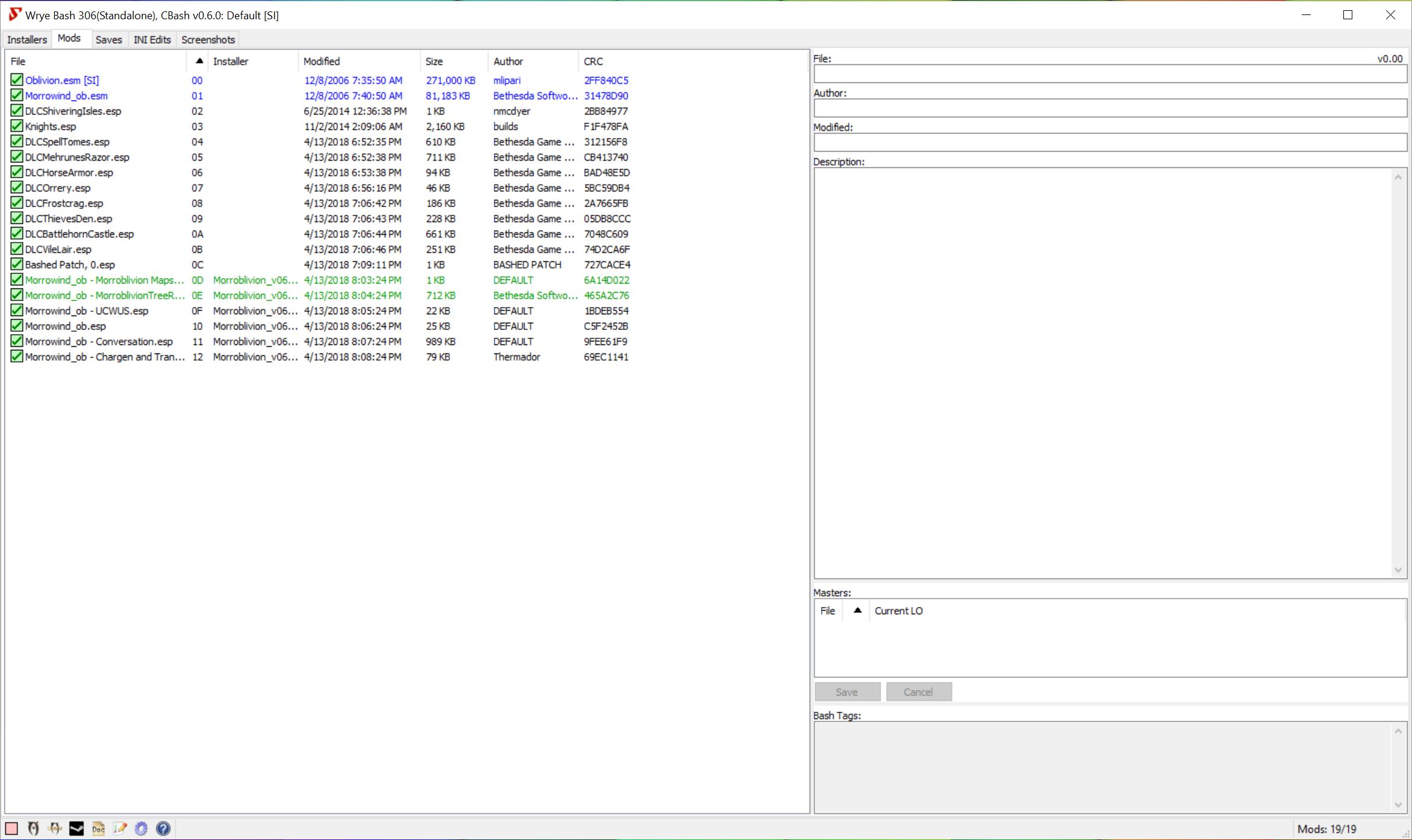
Screenshots of WryeBash (load order and intallations) are attached.

Attachment Size
wrye1.jpg 102.92 KB
wrye2.jpg 70.79 KB
Karma: 0 (0 votes)

Activate Shivering Isles. as per Requirements

Karma: 0 (0 votes)

@momo03:  Looks like you are close to having a correct Morroblivion installation.  However, you are making it much harder than it needs to be.  It looks like you expanded the "Morroblivion_v064_Complete.7z" inside the Bash Installers directory.  You do NOT need to expand this file.  Wrye Bash does it for you.

Regarding the purple textures and yellow diamonds: there is something wrong with the BSA files which contain meshes and textures.  In order to figure out what that is, do these steps:

Step 0: 
- First, right-click directly on the word "Paket".  A menu should pop-up, and from this menu, find and select "Uninstall All Packages" or whatever the equivalent translation should be.

Step 1:
- Click on "Morroblivion_v064_Complete.7z".  The right-half of the window will now fill up with information on this file.

Step 2:
- Look under "Subpakete", and you will see a list of packages.  Put a check mark in the box that says "00 Core".  You can also put a check mark in any other package you like (optional). 
- Look under "Esp/m-Filter", and you will see a list of files ending in ".esp".  Each sub-package you select from "Subpackete" will add files to this list.  Just put a check-mark next to all the files listed here.

Step 3:
- Right-click directly on "Morroblivion_v064_Complete.7z".  A menu pops up, find and select "Install".  The Morroblivion_v064_Complete.7z files should now be correctly installed.

Step 4:
- Make sure that you follow the correct instructions for installing OBSE and the OBSE plugins.  "obse_1_2_416.dll" and "obse_steam_loader.dll" should be in the same directory as "Oblivion.exe".  The OBSE plugins are files like "Elys_USV.dll" and "MenuQue.dll" and should be located in "\Oblivion\Data\OBSE\Plugins".

Step 5:
- Launch the game from the regular steam launcher.  Do not use any other way of starting the game, otherwise OBSE will not load correctly.

Hopefully, these steps will clean out any errors in installing the BSA file.  If you still have purple textures, let us know.

Regarding the green diamonds under "Paket", you do not need any of these, they are showing up here because you expanded "Morroblivion_v064_Complete.7z" in the Bash Installers file and Wrye Bash incorrectly thinks that they are separate installer files.


Karma: 0 (0 votes)

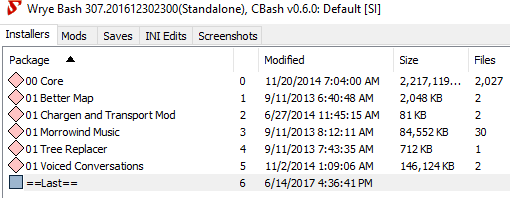
When I put the resources in the bash installer, they show up on wyre bash, but they are red diamonds and not blank tick boxes. Any suggetsion?

Karma: 0 (0 votes)

When I put the resources in the bash installer, they show up on wyre bash, but they are red diamonds and not blank tick boxes. Any suggestions?

Karma: 0 (0 votes)

Tyrantking

When I put the resources in the bash installer, they show up on wyre bash, but they are red diamonds and not blank tick boxes. Any suggestions?

Sounds like you uncompressed the archive rather than just copying it into the Bash Installers folder.  Send a screenshot with Wrye Bash opened to the Installers tab and we will go from there.

Karma: 0 (0 votes)

Here it is.

Attachment Size
capture.png 13.75 KB
Karma: 0 (0 votes)

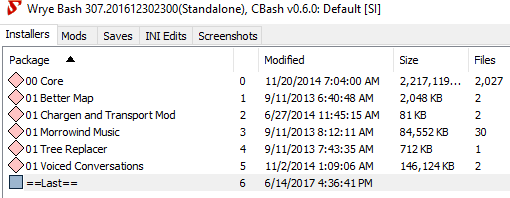
Other than wasting additional hard-disk space, your setup should work fine.  Next time, do NOT uncompress or double-click the Morroblivion_v064_Complete.7z file.  Just copy the Morroblivion_v064_Complete.7z file into the Bash Installers folder.  If you have any problems following the rest of the instructions let us know. 

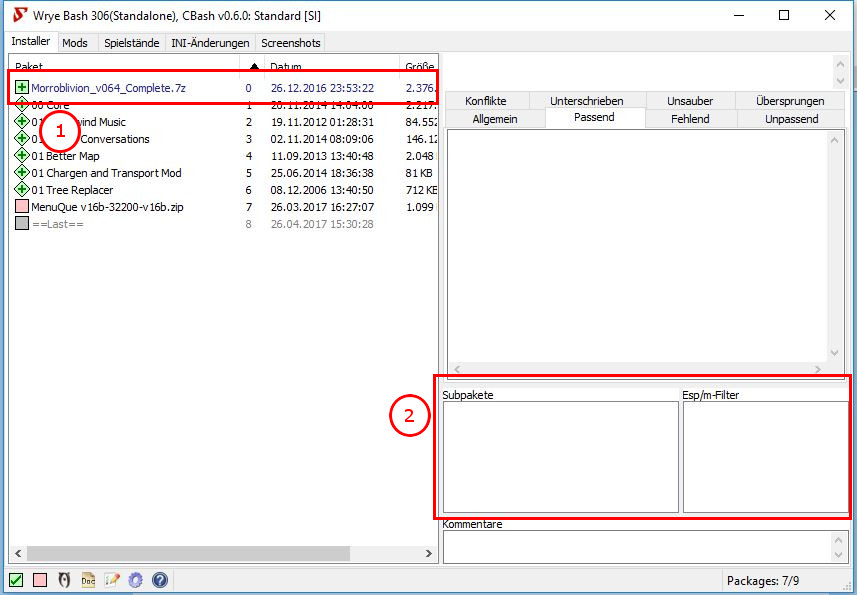
FYI, here is how the full Wrye Bash window should look when Morroblivion is properly installed: Under "Package", you see Morroblivion_v064_Complete.7z.  Under "Sub-Packages" you see the sub-packages which on your version are listed in Package.  A square in the Package represents an archived 7z or zip file.  A diamond represents an uncompressed folder.  They both work similarly.

Karma: 0 (0 votes)

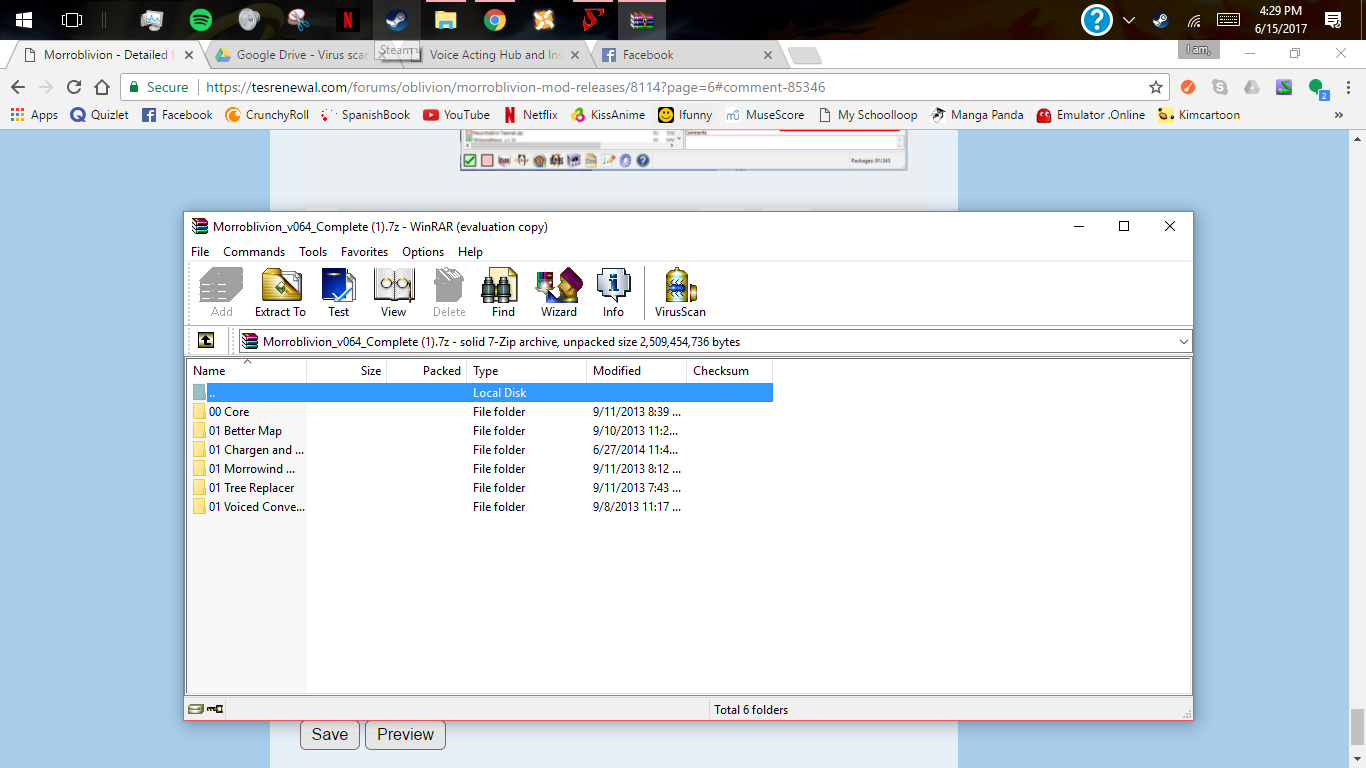
When I open winrar, with the files, they are already uncompressed.

Attachment Size
capture.png 169.22 KB
Karma: 0 (0 votes)

That's because winrar is an uncompressor.  If you do not want to uncompress it, then leave it as a 7z file and just drag the Morroblivion_v064_Complete.7z file to the Bash Installers folder.  Do this from the explorer window and do not open it in winrar.

Karma: 0 (0 votes)

Ok, so I redownload the file, and dragged it from my downloads section into the bash installer file. But now when I go to tick in the tick box, its filled in rd, but it is a normal square now. I can individually tick in the files from the sub-packages, but when I launch Oblivion, it does not work ad a window pops up saying that I am missing some files.

Karma: 0 (0 votes)

You missed the final step.  In step 4 of the instructions, there is a sentence after ticking the tick boxes that tells you what to do next:

...Then right-click on Morroblivion archive and select 'Install'.

https://tesrenewal.com/forums/oblivion/morroblivion-mod-releases/8114

Karma: 0 (0 votes)

When I right click the box, wrye bash starts the process, but then it always stops responding. Then when I try to reopen Wrye, it always says, only one instance of wyre bash can be open.

Karma: 0 (0 votes)

Nevermind, it wants to work now.

Karma: 0 (0 votes)

Ok, when I launch the game, it says I am not missing nearly as much now, but when I launch a new game, if forces me to morrowind. I thought there was supposed to be a pop up asking which game to start? And now it is saying that I am only missing the morrowind_ob.esm or esp. I can't remember which one. And when i launch the game, I am in a nearly empty cell, with yellow slabs. The only thing in there is me, Jiub, and a floating head. We keep falling and we reach the floor border of the cell and teleport back to our original spot. I am pretty sure I read somewhere about someone having this problem. I have the morrowind esm after oblivion in my load order. I have the shivering isles dlc installed. I have the goty for both morrowind and oblivion. I have no idea what this could be. And I am sorry for being such a bother. My modding experience is just nmm, and I am not extremely tech savy.

Karma: 0 (0 votes)

There is no longer a pop up to ask you where to start.  If you want to change between Morroblivion and Oblivion, you must set the value in the \Oblivion\Data\INI\Morroblivion.ini file.  In that file, you will find a line that says "set mwMainMenu.AltStart to 1".  Change this to "set mwMainMenu.AltStart to 0" in order to start in Oblivion.

Regarding the multiple error messages, you have still not installed the Morroblivion_v064_Complate.7z archive correctly.  Please refer back to my previous post: https://tesrenewal.com/comment/85347#comment-85347 and look at the Red Box in the middle with the heading "Sub-Packages".  There must be a checkmark in the box next to the first line that says "00 Core".  If not, then left-click in the box to make the checkmark appear.  Now look at the Red Box on the right with the heading "Esp/m Filter".  Read down the list and find the line that says "Morrowind_ob.esp".  If it is not checked, click the box to make the checkmark appear.  Now in the left panel, find the line that says "Morroblivion_v064_Complete.7z".  Place the mouse cursor over that line and right-click.  A menu appears:  search down the menu and left-click the option that says "Install".  A box will pop-up with the title "Installing...".  If it looks like it has stopped responding, look at the Windows Task Bar at the bottom of your screen for any flashing icons or windows.  If there is, click that window to see if there is a pop-up asking you for permission to over-write files.  Click Yes to allow it to do so.  If you installed Oblivion in the "Program Files" folder or if you have Steam and did not change the location of your default Steam Library, then you may have to reinstall the main Oblivion game outside of the "Program Files" in order for Wrye Bash to be able to install the files correctly.  Hope this helps, good luck.

Karma: 0 (0 votes)

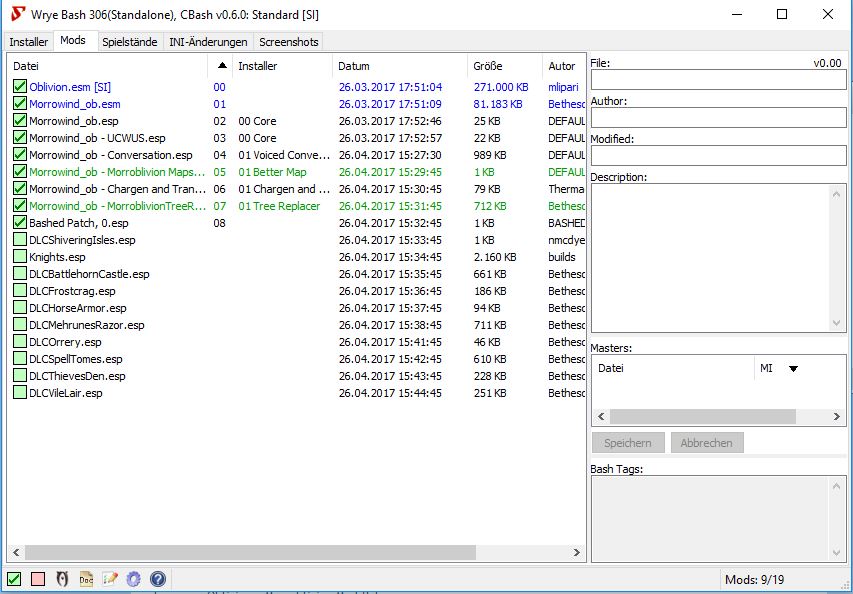
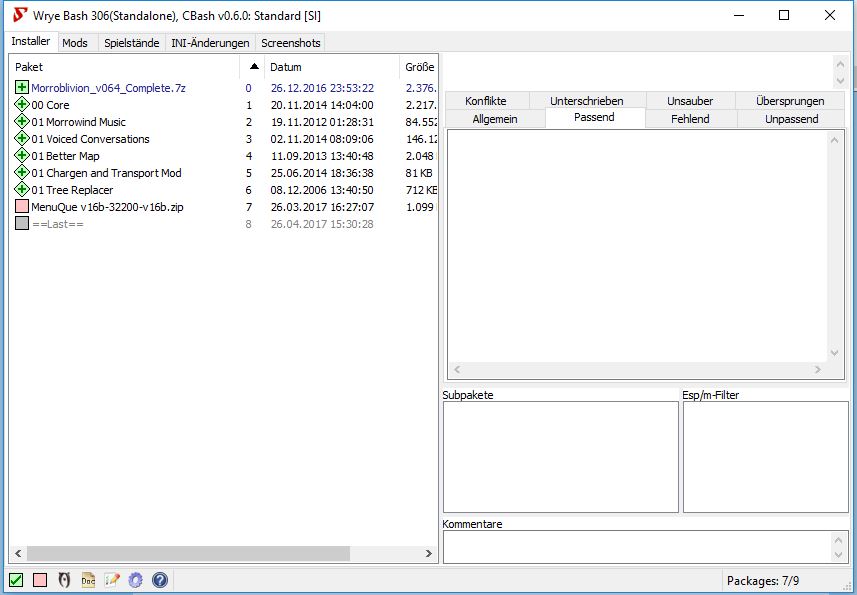
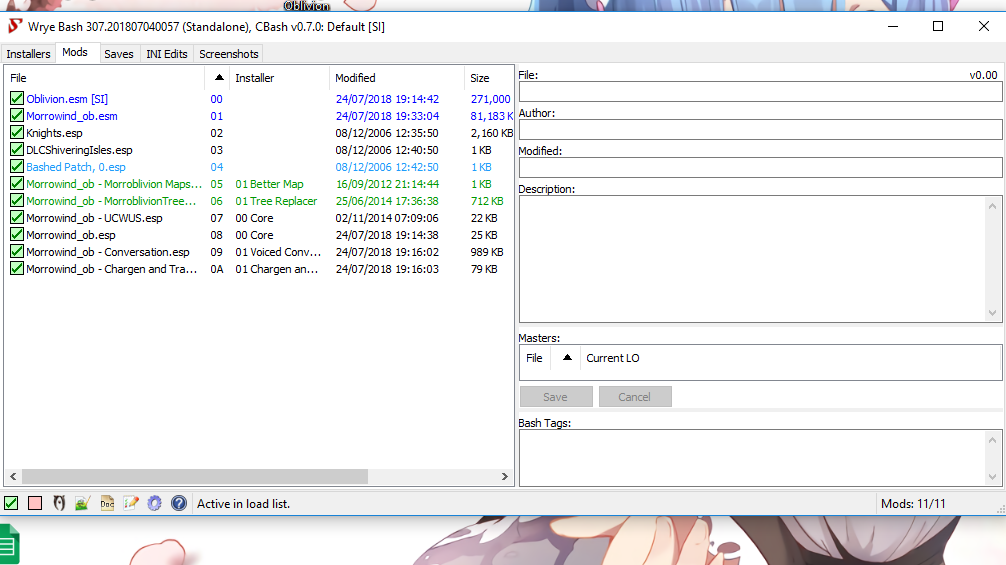
Not sure if I have done everything correctly. When I launch oblivion is launches into vanilla oblivion. So here come some screen shots of my 'Mods' load order and 'Installers'. Not sure anything went wrong but I defiantly don't know how to launch into Morroblivion.

Karma: 0 (0 votes)

All of your files appear to be installed. However, the Bashed Patch, 0.esp should be at the bottom with only the Morrowind_ob - Morroblivion Maps.esp below it. Make certain that OBSE is installed correctly, especially if you use Steam make certain you have the obse_steam_loader.dll installed. Make certain you have installed the prerequisites: Ely's Universal Silent Voice, MenuQue OBSE Plugin (required for Morrowind_ob - UCWUS.esp), Unofficial Oblivion Patch (this is not a "hard" requirement, but is highly recommended). Double check your Morroblivion.ini located in Oblivion\Ini and make certain set mwMainMenu.AltStart to 1. Afterwards, load the game again to see if it starts you off on the Prison Ship in Seyda Neen.

Karma: 0 (0 votes)

Diana TES GotH

...Bashed Patch, 0.esp should be at the bottom with only the Morrowind_ob - Morroblivion Maps.esp...
...the prerequisites: Ely's Universal Silent Voice, MenuQue OBSE Plugin (required for Morrowind_ob - UCWUS.esp), Unofficial Oblivion Patch (this is not a "hard" requirement, but is highly recommended)...

I get a load error with current load order, plz help lol
Can I install the mods with NMM? Or should I install them manually? 


Karma: 0 (0 votes)

Rancid36

I get a load error with current load order, plz help lol

Are you trying to launch Oblivion through the Wrye Bash icon?  This will NOT work.  If you were trying to launch Morroblivion by double-clicking the Oblivion.exe this will also NOT work.  

To start Morroblivion with the Steam version of Oblivion:
Launch Oblivion through the Steam Client, otherwise OBSE will not load into memory and the Morroblivion scripts will not be able to run.  Also make sure OBSE is properly installed with the obse_steam_loader.dll and obse_1_2_416.dll in the Oblivion directory, 

Karma: 0 (0 votes)

So. Would anyone like to tell me why I needed to dl MenuQue? Seeing as how it is nowhere in the install instructions and the instructions that come with MenuQue aren't really helpful. It says "Copy the Data folder and its contents to your "Oblivion" folder." Well, see the funny thing is that there is already a folder named "Data" in the Oblivion folder, and I really don't think that replacing it with this other Data folder will work. I mean, Morroblivion loads, but tells me every time I start it that "MenuQue is not installed". I'd sure like to install it if I need to, but I'm not about to overwrite the Data folder that already exists.

Karma: 0 (0 votes)

Don't be scared -- when you drag the "Data" folder from MenuQue into the Oblivion folder, Windows will ask you to merge the two folders together -- it will NOT overwrite the existing Data folder.  

HOWEVER, with that said, you should use the Wrye Bash Installers tab to install MenuQue as a plugin -- so you can easily uninstall it whenever you want.

FYI, MenuQue is an OBSE plugin which allows Morroblivion to update the statistics page with values which are kept separate from Cyrodiil -- such as your Morrowind bounty, Faction reputaton, etc.  I don't recall if anything actually breaks if you don't install MenuQue, I think they major issue is that you won't be able to tell if you've committed a crime or have an active bounty (until a guard stops you, of course).

Karma: 0 (0 votes)

I installed all mods with Wyre BAsh, all it's ok, but there is one thing wrong, i don't have voices, i installed 01voice too, but no voices, why?

Thx in advance

Karma: 0 (0 votes)

Bloodmoon main quest is really bugged, tree stone, and hircine side, he doesn't appear and when you transofrm in werewolf after a bit of time game crashes...

any advice? thx


EDIT: I downloaded here fixes and now i have a big ! on werewolf form

Karma: 0 (0 votes)

So I have apparently mucked up step 2:

Part IIIa. Installing with Wrye Bash. (this method is recommended)

1) Download and install Wrye Bash. It's a multifunctional mod manager and is considered the best tool to control your modded Oblivion installation.

2) Launch it and go to the Installers tab to initialize installers for the first time.
[External image]

So when you first click on Installers there is a pop-up asking to initialize installers. I think I accidently hit no. Now I can't get that pop-up again. I tried re-installing WB, restarting Windows in between, installing in a different drives but it still "remembers" my screw-up. Is there another way to initialize installers?

Karma: 0 (0 votes)

Corwyn77:

Place the mouse cursor directly over the word "Package" which is a heading directly below the "Installers" tab.  Right-click and a very long menu opens up: find the word "Enabled" and click once.  A dialog box asking you if you want to enable the Installers tab now opens up.  Click Yes.

Karma: 0 (0 votes)

ponyrider0

Corwyn77:

Place the mouse cursor directly over the word "Package" which is a heading directly below the "Installers" tab.  Right-click and a very long menu opens up: find the word "Enabled" and click once.  A dialog box asking you if you want to enable the Installers tab now opens up.  Click Yes.


Thanks. Weird thing is, this time I reinstalled and it worked automatically.

Also, trying to start from the Oblivion button in WB gave me an error, as did trying to start from the Oblivion folder directly but using the steam launcher worked just fine. So far, anyway.

Karma: 1 (1 votes)

Alright, I've been trying to get this working for days. Followed every instruction. I even installed a 2nd hard drive in my computer so that I could install morrowind and oblivion into a separate steam directory that isn't located in the program files directory.

Whats happening is I launch Oblivion from steam, then launch it from the Oblivion launcher, and then it goes black for a second as though its trying to start, and then turns off after maybe a second of black screen. Can anyone tell me what I'm doing wrong? I attached screens of Wrye Bash both the installers and mods tab.

Attachment Size
morroblivion1.jpg 221.63 KB
morroblivion2.jpg 239.03 KB
Karma: 0 (0 votes)

Your Wrye Bash Installers and Mod tabs look okay to me.  If Oblivion is crashing to desktop even before getting to the main menu screen, it may be an issue with your Oblivion.ini or perhaps the OBSE steam loader.  Please post your obse.log, obse_steam_loader.log and obse_loader.log if you have that too.  Have you verified that Oblivion runs when the Morroblivion mods are deactivated?

Karma: 0 (0 votes)

Not sure if this post is still checked but im having issues getting this to work. i followed to guide but when i open oblivion through steam it plays as normal oblivion and when i run it using Wyre it says load order error not sure where to go from here if anyone can help.

Uploaded a picture of my load order incase im being realy stupid.

Attachment Size
2018-07-24.png 103.9 KB
Karma: 0 (0 votes)

It looks like you have the Morroblivion ESM and ESPs in the correct place.  Make sure the BSA files are in the same directory.  If you are running the Steam version of Oblivion, the you must launch from Steam and use the Steam Loader version of OBSE.  Make sure you installed OBSE correctly.  That is the most common reason for Morroblivion not to work:

  • obse_1_2_416.dll, obse_loader.exe, and obse_steam_loader.dll must be installed in \Oblivion\ instead of \Oblivion\Data\. 
  • The OBSE plugins such as MenuQue.dll and Elys_USV.dll must be installed in \Oblivion\Data\OBSE\Plugins\. 

If you have confirmed all of these things, then please post your obse.log and obse_steam_loader.log files.

Karma: 0 (0 votes)

it works now, i hadnt correctly installed OBSE thanks for the help.

Karma: 0 (0 votes)

I have managed to get through the majority of the process without any issue but when it comes to using Wrye Bash to install the sub packages, I keep getting an error
Attachment Size
Error screenshot 21.7 KB
Karma: 0 (0 votes)

I am on part 3a step 4. This is my second attempt and both times I have gotten stuck at this step. I have attached a snip of what I am looking at. If someone has any tips I would greatly appreciate it.
Attachment Size
creature_conversion_tutorial.pdf 2.03 MB
Karma: 0 (0 votes)

Hi, I have a problem: I tried using Wrye Bash, but the installer asked me to specify which games to connect it to but did not give me any options. So I tried the manual path as per instructions (although I may have frakked up the installation of OBSE, can that cause the following problems?). Then the purple objects appeared, so I thought "Damn, what did I miss?" and uninstalled everything. So now I installed everything again from ground up (only the required games and mods so far) and the Core Installation (for the .esm). Now I'm pondering how to install the files and submods.
Does anyone have an idea either how to install Wrye Bash correctly or how to make this mod work without apparently missing data?

To clarify, I used to play with a heavily modded version of Oblivion (so how to apply mods is nothing new), but I used OBMM and this was 6 years ago. :)


EDIT: Works now.

Karma: 0 (0 votes)

I have a perfectly working 0.63a version, do I need to do everything again to make it version 0.64? how many files changed?

Karma: 0 (0 votes)

Quite a lot, see the changelog.


Karma: 0 (0 votes)

so yeh i did all the steps.

but when i launch oblivion it says morrowind_ob.esm not loaded and you are atleast missing a file.

and when i create a caracter im in a empty space falling down with yellow clouds and a naked caracter with no legs what do i do.

Karma: 0 (0 votes)

so yeh i did all the steps.

but when i launch oblivion it says morrowind_ob.esm not loaded and you are atleast missing a file.

and when i create a caracter im in a empty space falling down with yellow clouds and a naked caracter with no legs what do i do.

Karma: 0 (0 votes)