Morroblivion Installation Instructions

Submitted by Daggers on

[insert image here]

A video installation guide for Morroblivion version 68 and newer is available here.

Welcome to the Morroblivion installation section. The written instructions below are primarily for setting up Morroblivion version 67 and older. For Morroblivion version 68 and newer, use the current Morroblivion Project Release page and the video guide linked above.

If you are experienced with TES modding, much of this will be familiar. If you are new to Oblivion modding, read the instructions carefully before installing.

Requirements

Notice: These requirements are also listed on the Morroblivion Project Release page.

Expand

What do I need to own?

You must own legitimate installations of The Elder Scrolls III: Morrowind Game of the Year Edition, including the Tribunal and Bloodmoon expansions, and The Elder Scrolls IV: Oblivion version 1.2.0416 with the Shivering Isles expansion. CD/DVD, Steam, and GOG versions are supported.

Important: These instructions are for the original The Elder Scrolls IV: Oblivion, not Oblivion Remastered.

xOBSE and Plugins
Install xOBSE separately. Installation instructions for xOBSE and most OBSE / xOBSE plugins are included in their archive folders or readme files. Follow those instructions carefully.

Recommended Tools

  • Wrye Bash - Recommended for installing legacy resource archives, managing installers, and creating a Bashed Patch when needed.
  • Wrye Bash Releases - Current release downloads.
  • LOOT - Recommended for automated load-order sorting and load-order warnings.

Installing Morroblivion Version 68 and Newer

Expand

Notice: Version 68 and newer use the current Morroblivion installer workflow. The legacy screenshot-based instructions below are useful for context, but they are outdated for v68 and newer.

  1. Download the current Morroblivion installer from the Morroblivion Project Release page.
  2. Extract the installer archive, then run the installer.
  3. The installer will detect your legal Morrowind and Oblivion installations before deployment.
  4. When prompted, select your Morrowind and Oblivion installation directories. Select the main game folders, not the Data folders.
  5. When prompted for the Morroblivion installation directory, select your Oblivion directory for a direct install, unless you are using a managed mod setup that requires a different staging directory.
  6. Install xOBSE separately, then install any OBSE / xOBSE plugins required by the Morroblivion options or add-ons you enable.
  7. Use Wrye Bash, LOOT, or another Oblivion-aware mod manager to review your plugin list and load order.
  8. Launch Oblivion through xOBSE after installation.

Patch Notice: Morroblivion version 68 currently does not use separate patch files. The associated v67 patches 1-3 are for version 67 only and are already included in v68.

Installing the Morroblivion Master - Version 67 and Older

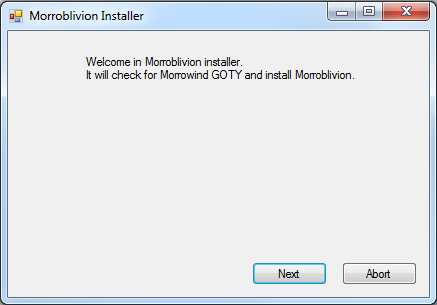
Notice: This section is for Morroblivion version 67 and older. The installer text may differ slightly from the screenshots because the images are legacy examples.

Expand
  1. Download the master file installer for the version you are installing from the Project Release thread or its archive section. Extract the executable, launch it, and follow the on-screen prompts.
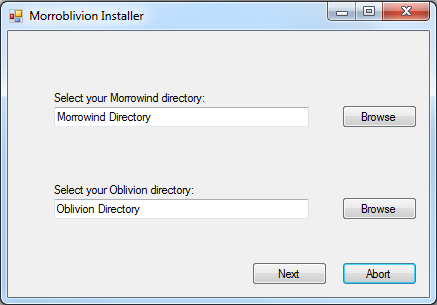
  2. Select your Morrowind and Oblivion directories. Use Browse if needed. Select the main game folders, not the Data folders.

    Example: Select C:\Oblivion, not C:\Oblivion\Data.

    Once the installer detects both games, select Next.
  3. [insert success image]

    When the installer reports Success, Morroblivion has been installed to your Oblivion Data folder. Verify that Morrowind_ob.esm is present in:

    Oblivion\Data\Morrowind_ob.esm

Installing Resources with Wrye Bash - Version 67 and Older

Expand

Download the resource archive for the version you are installing from the Project Release thread or its archive section.

  1. Download and install Wrye Bash. Wrye Bash is a mod-management tool used to manage Oblivion installers, plugins, and load-order workflows.

  2. Launch Wrye Bash and open the Installers tab to initialize Bash Installers for the first time.

  3. Wrye Bash usually creates an Oblivion Mods folder at the same directory level as your Oblivion folder.

    Example: If Oblivion is installed at C:\Oblivion, Wrye Bash may create:

    C:\Oblivion Mods\Bash Installers

    Place the Morroblivion resource archive into the Bash Installers folder. Do not manually unpack it first unless your setup specifically requires that.

  4. Return to the Installers tab in Wrye Bash. If the archive was placed correctly, it should appear in the package list on the left.

    Select the Morroblivion archive. The sub-packages will appear in the center pane. Always install 00 Core. Optional packages are prefixed with 01.

    Detailed descriptions of optional packages are available in the Project Release thread.
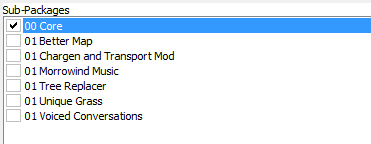
    Right-click the Morroblivion archive and select Install.

Troubleshooting: Missing textures, yellow placeholder objects, or falling through the starting ship usually means the 00 Core resources were not installed correctly or were not installed into the correct Oblivion Data path.

Installing Resources Manually - Version 67 and Older

Expand

Download the resource archive for the version you are installing from the Project Release thread or its archive section.

  1. Open or extract the Morroblivion resource archive. For legacy versions, you should see folders similar to the following:

    • 00 Core
    • 01 Chargen and Transport
    • 01 Morrowind Music
    • 01 Oblivion Trees - Morroblivion Tree Replacer
    • 01 Poster Map - Morroblivion Better Map
    • 01 Voiced Conversations
  2. Open the 00 Core folder and copy all of its contents into your Oblivion Data directory:

    Oblivion\Data

    Copy the contents of the folder, not the folder itself.

  3. Repeat the same process for any optional 01 folders you want to install. These folders are optional and should only be installed if you want the feature they provide.

Updating Morroblivion and Other Patches

Notice: This section applies to version 67 and older. For version 68 and newer, do not install v67 patch files over v68 unless a current release note specifically instructs you to do so.

Expand

Version 68 and Newer

Morroblivion version 68 currently does not have separate patch files. The v67 patches 1-3 are for version 67 only and are included in v68.

Version 67 and Older

  1. For Morroblivion v67, use the current patch guidance from the Project Release thread and the Dagger Galore a Patch for Morroblivion Nexus page.

  2. Dagger Galore is the accumulated Morroblivion patch package for v67. It includes worldspace improvements, quest fixes, object placement fixes, landscape fixes, and other corrections.

  3. Install the main file according to the Nexus page instructions. Only install optional files if the Nexus page indicates they are still required for your setup.

  4. Open or extract the archive into your Oblivion Data directory, or install it through Wrye Bash. This process follows the same general workflow described in the Installing Resources Manually and Installing Resources with Wrye Bash sections above.

Lighting Note: Dagger Galore v67 lists Morrowind Lighting Overhaul-related changes as merged. Check the Nexus Files tab for the latest main and optional file layout before installing additional lighting files.

Setting Up Load Order

Expand

Tip: Use Wrye Bash, LOOT, or another Oblivion-aware mod manager to manage your load order. The default Oblivion Launcher can enable plugins, but it should not be used as your primary load-order management tool.

Recommended: Use LOOT for automated sorting, then review Morroblivion-specific placement notes manually.

Important: If you are not using EngineBugFixes, Morrowind_ob.esm must load directly after Oblivion.esm. EngineBugFixes removes the strict technical requirement, but keeping Morrowind_ob.esm directly after Oblivion.esm remains a safe baseline.

If you are not using EngineBugFixes, your load order should begin like this:

  • Oblivion.esm
  • Morrowind_ob.esm
  • ... any other ESM or ESP files

General Morroblivion plugin order:

  • Oblivion.esm
  • Morrowind_ob.esm
  • Other ESM files
  • Other gameplay, worldspace, and compatibility plugins
  • Morrowind_ob.esp
  • Morrowind_ob - UCWUS.esp if installed
  • Morrowind_ob - Conversation.esp if installed
  • Morrowind_ob - MorroblivionTreeReplacer.esp if installed
  • Any Morroblivion map replacers

The Project Release thread contains additional guidelines and explanations for all included files under Load Order and File Details.

Karma: 1 (1 votes)
Last edited by Daggers on 20 May 2026 - 10:30.Updates to the HTML code newer and better formatted. - Daggers :)

Do I have to own English versions of games in order to install Morroblivion, or does it work with other language copies?

Karma: 0 (0 votes)

It should work with any language. There's even a german translation if you're german.

Karma: 0 (0 votes)

I have a question I'm hoping someone can help me with about this mod.

First off, thank you so much for making it, and I can't wait until Skyblivion and especially Skywind are finished.

I have previous questions posted here that I was able to answer myself after posting, so I jumped the gun on those, apologies. I'm now having constant crashes (the sky is constantly flashing, looks like flash lightning all the time), so I know I have something wrong - most likely with an Oblivion mod having a compatability issue. But I don't want to play this modless unless (QUESTION:)

Does Morroblivion already include a graphics enhancer? (so its not vanilla Oblivion graphics in Morrowind?)

If not, is there a preferred one to use with this? I have Oblivion Reloaded (which I've seen mentioned could be the problem) and Oblivion Character Overhaul ver 2. I have other Oblivion mods too (though I went sparingly on them, so not too many) but these are the only graphic enhancer ones I have. I also have "Oblivion Enchanted" which when started, a window pops up to tell me its not compatable with "Cast when used" system, but I'm nearly positive that mod is specifically for Morroblivion.

I'm not happy with the major skills I chose for this character so I will be starting over anyway, want to get the mods right this time.

Any help on this would be greatly appreciated.

Karma: 0 (0 votes)

Morroblivion doesn't include any graphical enhancements except maybe for a custom weather system if you want to count that. Though it only effects the Morrowind worldspace. If you're experiencing graphical issues it's not Morroblivion's fault. When it comes to graphics enhancers you'll just have to go with what you like best, there shouldn't be any incompatibilities with Morroblivion and any of them.

Do you mean this mod? Yes it is incompatible with The Universal Cast when Used System or UCWUS. Both edit the same things but go different paths in what they do. One replicates Morrowind, the other one Oblivion.

Karma: 0 (0 votes)

I followed this installation process to a T (I believe), yet it doesn't seem as though Morroblivion is active.

I have both the Morrowind GOTY edition and the Oblivion GOTY edition, both on Steam. I have OBSE correctly installed. I installed Elys Universal Silent Voice into Oblivion > Data > OBSE > Plugins. I used the Morroblivion installer and got the "success" message.

I then downloaded the resources and Wrye Bash (stand alone version). I put the resource archive into the Bash Installers folder and then installed 00 Core and all the sub-packages using the Installers tab in Wrye Bash. It was successful and the files are both in my Oblivion Data folder and in the Mods tab of Wrye Bash.

My load order starts with Oblivion.esm loaded first and then Morrowind_ob.esm loaded second. All the mods are activated with a green tick.

I close Wrye Bash, launch Oblivion through Steam, click "new game". I start in the Imperial Prison however. I deleted my Oblivion.ini file that was generated in My Documents and also checked the Morroblivion.ini in my Oblivion folder and made sure it was set to starting in Morrowind and not Oblivion.

A link at the bottom of this post can be found to screenshots of my files etc. Have I done something wrong? Was the intro where you choose where you start removed in previous versions as I heard? Am I meant to automatically start in Morrowind, or am I meant to play through the Prison tutorial and then it'll take me there?

I must've skimmed over something! I've been trying for 2-3 hours. Any help is appreciated! Here's a link to all my screenshots.

Karma: 0 (0 votes)

You installed Morroblivion correctly, however you made a small mistake when installing OBSE. You missed the obse_steam_loader.dll file. Without it The Steam version can't start OBSE. Here's the instructions from the readme:

IF YOU ARE USING THE STEAM VERSION OF OBLIVION:

1. Copy obse_1_2_416.dll, obse_editor_1_2.dll, obse_steam_loader.dll and the Data folder  to your Oblivion directory. This is usually "C:\Program Files\Valve\Steam\SteamApps\common\oblivion".
2. Ensure you have enabled the Steam community in-game, or OBSE will fail to load. Go to Steam > Settings > In-Game and check the box marked "Enable Steam Community In-Game".
3. Launch Oblivion via Steam or by running Oblivion.exe. OBSE will automatically be run along with Oblivion when launched. To disable this, rename or move obse_steam_loader.dll. You do not need to use obse_loader.exe unless you are running the editor.

Karma: 0 (0 votes)

When I gave up on Morroblivion I went to play Oblivion as is, with a few overhaul mods, and I noticed OBSE wasn't working so I re-installed it and now Morroblivion runs perfectly! Thank you for your help. Can't believe I missed something so small!

Karma: 0 (0 votes)

This is my first time, so I'm having quite a bit of trouble installing Morroblivion, I've done everything until #2 of part 2 of your instructions, so can you please tell me where and how to unpack the .exe file from archive?

Karma: 0 (0 votes)

This is my first time, so I'm having quite a bit of trouble installing Morroblivion, I've done everything until #2 of part 2 of your instructions, so can you please tell me where and how to unpack the .exe file from archive?

Unpack using 7-zip, location doesn't matter.

Karma: 0 (0 votes)

Karma: 0 (0 votes)

Which file do you unpack? Morroblivion_v064_Complete or Morrowblivion_v064_Installer?

Karma: 0 (0 votes)

I followed all the step but i did not get a morroblivion archive in my WB now i am stuck. Can someone please help me?

Karma: 0 (0 votes)

i'm new to modding. So i am lost. What does it mean to  Unpack the .exe file from the archive and run it

Karma: 0 (0 votes)

jjmillari'm new to modding. So i am lost. What does it mean to  Unpack the .exe file from the archive and run it

You need an unpacking program, for example, 7-Zip. With this program you can do that Morroblivion_v064_Installer.7z Archives Open and Unpack the MorroblivionInstaller_v064.exe in a folder of your choice. Then you can double-click the MorroblivionInstaller_v064.exe run to install the Morrowind_ob.esm.

Greeting
[External image]

Karma: 0 (0 votes)

I can't seem to get it to work :( I followed the instructions to the letter. However, when I launch the game and start a new game, It just starts oblivion rather than morrowind. How can I fix this?

Karma: 1 (1 votes)

Hello, I seem to have a little problem with the voices in Morroblivion. Let me explain.


When I start the game, I think that I am supposed to have the voice of the NPC nearby like the guards or the dark elf which is speaking to you when you wake up. (I checked it on youtube and it worked for them.) But in my case, nothing happen; the NPC's lips are only moving without any sound.

Yet, I can hear the guard which come a few seconds after the begin to tell you to get on the deck, but that's all. I can also hear the other voice from where you walk around (when you aren't in a conversation).

I tried to reinstall OBSE, manually extract the different files from the '00 core' of the 2,3Go pack and it still remain as it is. I also took the whole file outside of my C:Program files but it still didn't change anything.


I hope my explanation was clear, will be waiting for an answer. Thanks

Karma: 0 (0 votes)

Hi i have some trouble so i did every thing in the installation guide but when i try to open oblivion it crashes at the start :/ can some one help me? 

Karma: 0 (0 votes)

hello could you tell me what am missing and how to fix it in step by step form please and thank you very much

Attachment Size
20150728_215641.jpg 2 MB
Karma: 0 (0 votes)

Ok, so I have completed everything up to the point that I am trying to install the assets through Wrye Bash, they all show up (00 Core, 01 Better Map etc.) I check the box next to them, I tell it to install, then it stops responding... Any ideas as to my problem? Or is this an isolated issue? I have tried reinstalling both the games and wrye bash, I've also restarted my pc a few times. Thank You for any help.

Karma: 0 (0 votes)

Nevermind, I unpacked everything manually and it is now working with no problems so far. Thanks and keep up the great work!!

Karma: 0 (0 votes)

Hi all

Thanks to qwertyasdfgh for the guide, however i'm stuck

Part IIIa. Installing with Wrye Bash

(2)  I have moved the resource archive to Oblivion Mods/Bash Installers folder, but next time I open Wrye Bash, there is nothing showing in the installers tab.  it's totally blank. 


[External image]


[External image]


I'm using windows 10, if that makes a difference.   Is anyone able to offer any ideas?.

Karma: 0 (0 votes)

Hi! I tryed to install, but I have a problem. I think, I have installed OBSE(copied files into the root folder Oblivion/) and loaded Ely's Voice with Nexus. After Bash installation Oblivion Mods/ has created, but Bash do not see resources. Of course, I used the Installer, saw "success". So, I just copied files from resource archive into root folder and checked ESM loading order and overlay in Steam. 

Karma: 0 (0 votes)

The resources doesn't show up in Wrye Bash, am I supposed to unzip the resources into OblivionMods/BashInstallers?

And now it says i have an old version of Oblivion when i try to start with the obse_loader, even though it worked perfect before i tried installing morroblivion.


Karma: 0 (0 votes)

Hello i seem to be having Problems with the Installation. I followed the instructions exactly but it doesn't seem to be working for me.

I took a screenshot of the Message it gives me in game


Karma: 0 (0 votes)

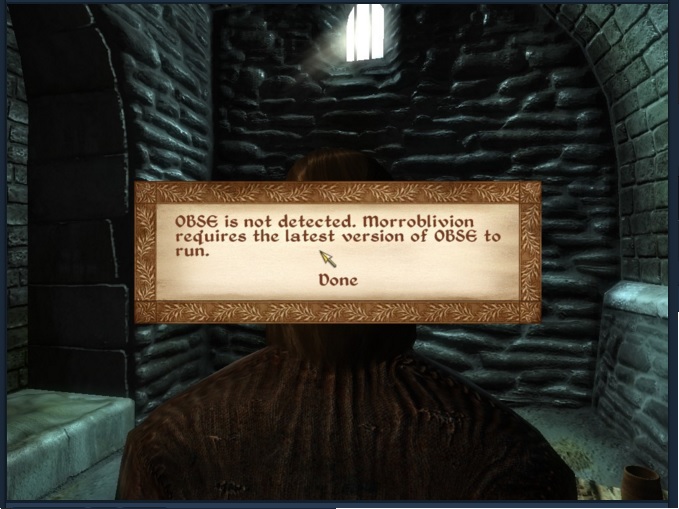
every time i open oblivion i get the error that i need the updated version of OBSE, i am currently using version 21. is it saying this because i didn't install everything correctly?

Attachment Size
untitled.jpg 107.37 KB
Karma: 0 (0 votes)

I recently saw that Morroblivion is downloadable and playable. I feel like I can guess the answer to this question, but thought I would ask it anyway. I have games currently in progress, for both Morrowind and Oblivion, with some mods active, the question I have is about starting a Morroblivion game while keeping my current Morrowind and Oblivion games, saves, settings, and mods intact.

Is this a possibility, and if so, how would I do it?

Karma: 0 (0 votes)

I have both the Morrowind GOTY edition and the Oblivion GOTY edition, both on Steam. I have OBSE correctly installed. I installed Elys Universal Silent Voice into Oblivion > Data > OBSE > Plugins. I used the Morroblivion installer and got the "success" message.

I then downloaded the 2 GB resource file and Wrye Bash. I put the resource archive into the Bash Installers folder and then installed everything under the Installers tab in Wrye Bash. It was successful in that the files are now showing in my Oblivion Data folder, but they don't show up in the Mods tab of Wrye Bash or under Data Files tab when launching Oblivion.

When I play the game it's complete mayhem, with yellow warning signs everywhere, and I constantly fall through the prison ship. After a short time I get a warning that states that a BSA has failed to load.

What on earth did I do that is causing the files not to load properly? It's especially confusing because WB seemed not to have any trouble "installing" the 00 Core files. I really have no idea where the problem is located, so I took screenshots of everything with the hope that they will help.

[External image]

[External image]

[External image]

[External image]

[External image]

[External image]

[External image]

Karma: 0 (0 votes)

For some reason you're missing the Morrowind_ob.esp file which should have been installed with the core pack. Maybe try installing it again or, if all else fails, unpack the resource file somewhere else and copy it over manually.

I also recommend using all the optional files, they improve the mod a lot.

Karma: 0 (0 votes)

Copying it over manually did the trick.  Thanks Brainslasher!

Karma: 0 (0 votes)

Hello! I'm having a technical issue during installation. I have morrowind GOTY and Oblivion GOTY, and have downloaded all of the Rescource files and the proper files required for installation. BUT when i Install I get this Error: Unhandled exception has occured in your application, if you click continue the application will ignore this error and attempt to continue. if you click quit the app will close immediately. 

Then it says: Could not find a part of the path 'C:\users\(my user name)\Desktop\morrowblivionstuff\oblivion directory\data\morrowind_ob.esm

any help in resolving this issue would be greatly appreciated. Cant wait to check it out. morrowind was\is my favorite TES game BY FAR.

     -Sugarlips

Karma: 0 (0 votes)

Maybe start it in Admin mode and try a different location for the file.

Karma: 0 (0 votes)

Hi, I seem to be doing something wrong and was wondering if there is anyone who has an idea of what's going on. I followed the instructions as best as possible and I keep getting an error message a few seconds after I start a new game. I will include the screenshot. I have initially used Wyre bash but I was having an issue so I decide to use my own mod manager and i was able to install the resources that way but the exact same issue happened so I installed it manually but same issue. I am wondering if I am placing something in the wrong spot or something.

Attachment Size
oblivion_6_29_2016_9_07_06_pm.png 698.74 KB
Karma: 0 (0 votes)

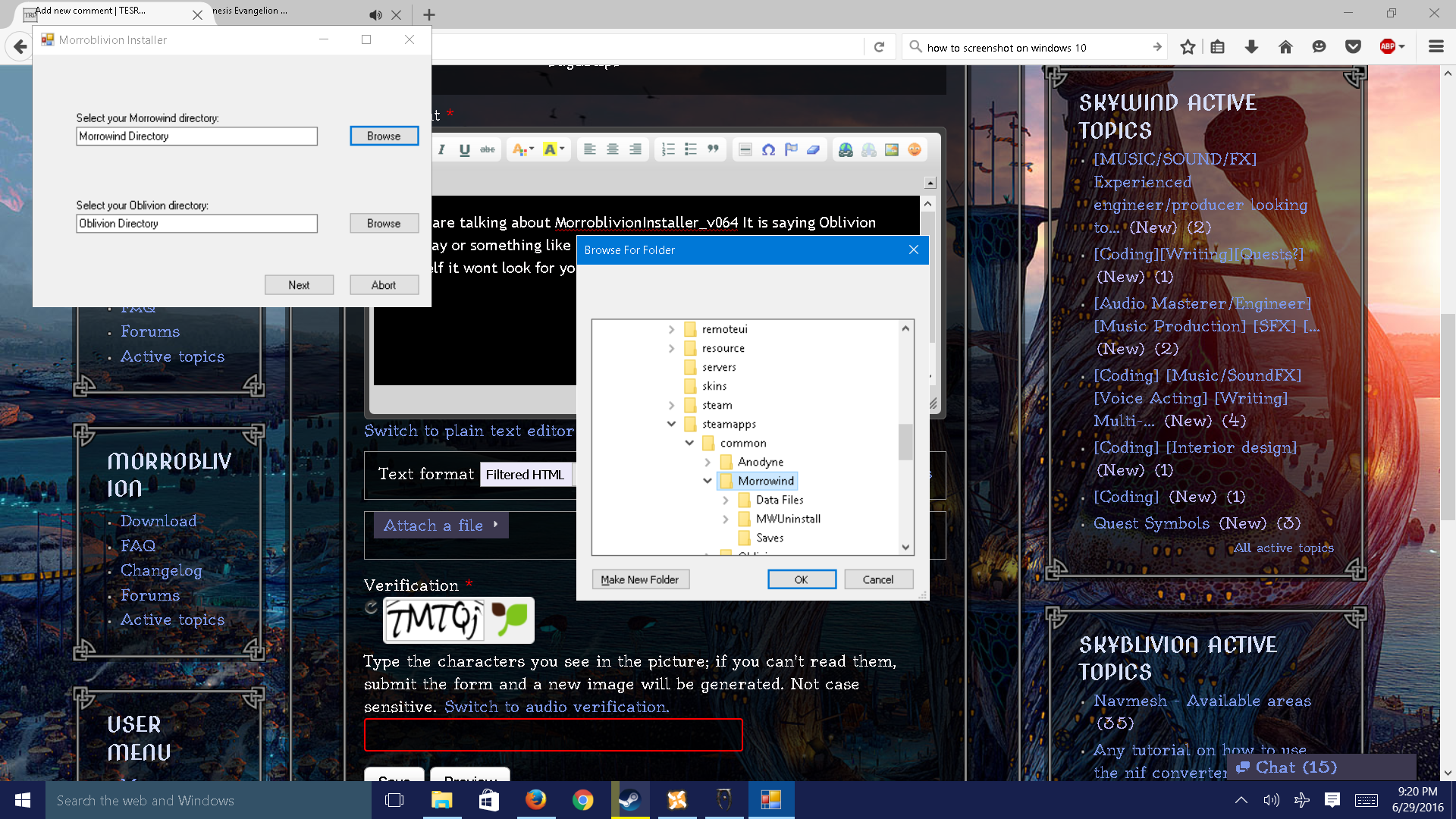
If you are talking about MorroblivionInstaller_v064 It is saying Oblivion pathway or something like that. You have to go out of your way and find it yourself it wont look for you I had that same issue.

Attachment Size
screenshot_9.png 2.2 MB
Karma: 0 (0 votes)

wrye bash will not launch, i dont know what the problem is, but when i launch it it starts and immediately crashes to desktop

Karma: 0 (0 votes)

Hi friends,

First off, huge Morrowind fan and a big thanks to everyone supporting the community!

I am having trouble getting the main mod .7zip file to install via Wyrebash.  I place the still archived file into the Oblivion Mods/Bash Installers, then open Wyrebash and click the installers tab at the top.  Wyrebash prompts me to enable installers, which i do, and it "installs" some things as in it looks like an initial setup step for wyrebash.  I then can see the large 2GB file, left click it and i see the sub folders, i check them all, then I right click back onto the large 2GB file and select install and then wyrebash hangs for about 9 seconds, then stops responsding and i have to force quite.  I'm on WIn10 and have diasable UAC via the reg and have also installed both morrowind and oblivion F:\games\steamapps\common\Oblivion (or Morrowind, I've done them both this way) I have been searching online but haven't come up with anything other than disabling UAC.  I do have some previous Oblivion Files from a recent modded playthrough with Mascaras Oblivion Overhaul, but did a fresh install of Oblivion.  I do have prior saved games, but have deleted the Oblivion.ini file as that seemed to be very suggested in the 6 pages of this particular forum.  


Can anyone suggest anything else to keep wyrebash from locking up?  I also tried running it in Admin mode, but it still locked up :/  I'll try installing the 2G file manually after I've extracted it, probably wont have a problem there, but would much rather have wyrebash do it if i could.  


Sorry this got long, thanks in advance!

Karma: 0 (0 votes)

@ Nerevar7: Wrye Bash may appear that it has stopped responding, nevertheless, give it a minimum of 5 minutes before you force anything to close. This is typical with many large installs via Wrye Bash. 

Karma: 0 (0 votes)

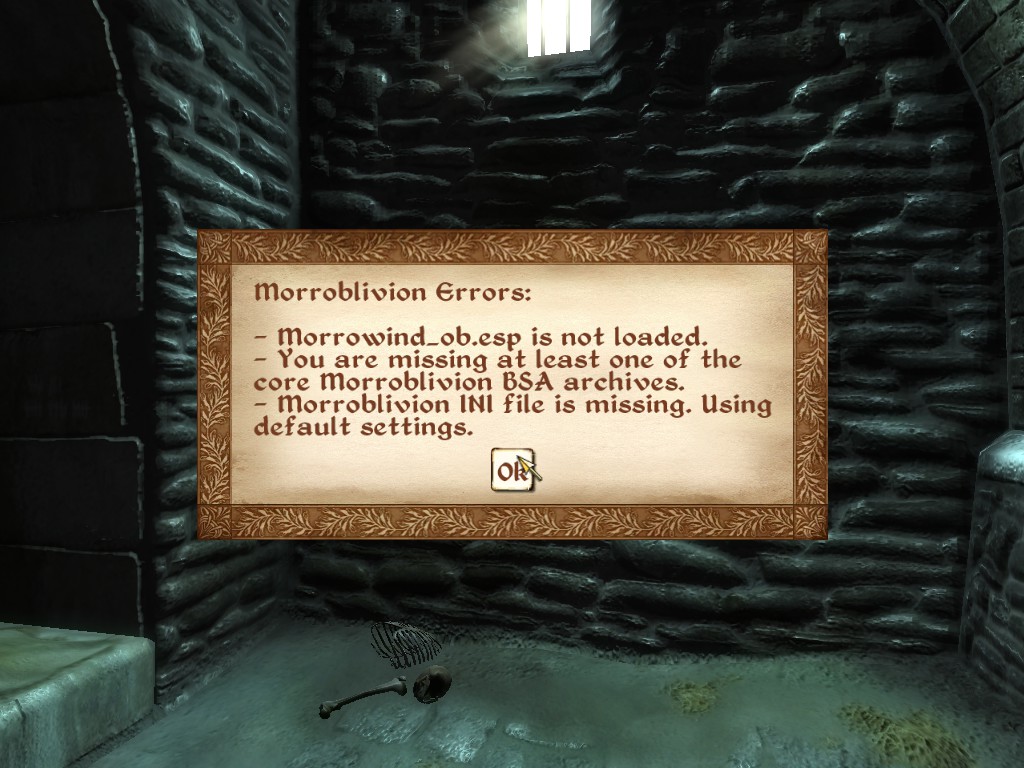
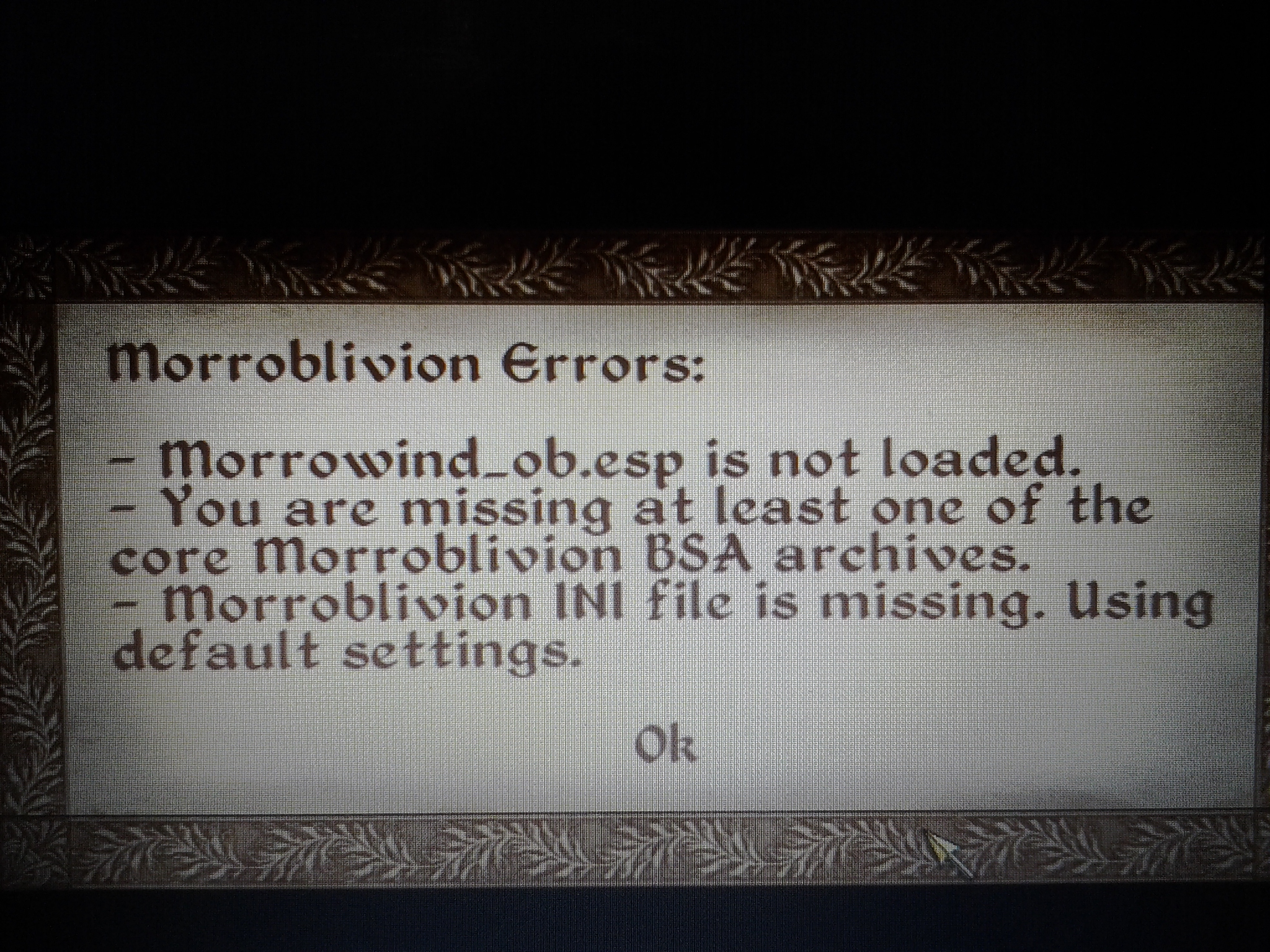
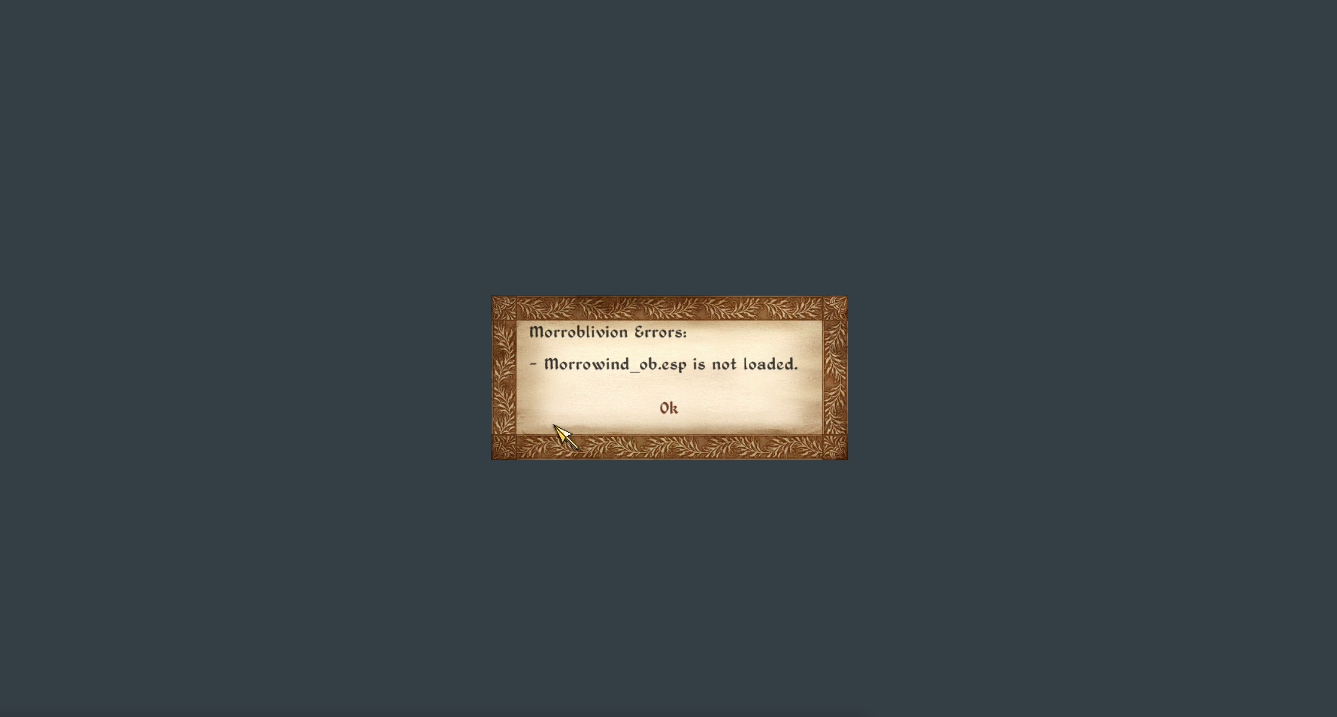
Please help, every time I start a new game I got this message. I think that I installed everything correctly, but still, there's a chance that I messed up somewhere. 

Attachment Size
morrowind_ob.esp_is_not_loaded.png 151.41 KB
Karma: 0 (0 votes)

Well after much scratching of the head and making monkey faces at my screen. i finally managed to engage my brain long enough to actually install this correctly (trust me this is a miracle) and i definitely didn't forget to install the chargen and transport mod, which would have made me look like a right tool!, nope definitely didnt forget HA HA HA... ha... ha... *cough* 

Attachment Size
37352520.jpg 71.64 KB
Karma: 0 (0 votes)

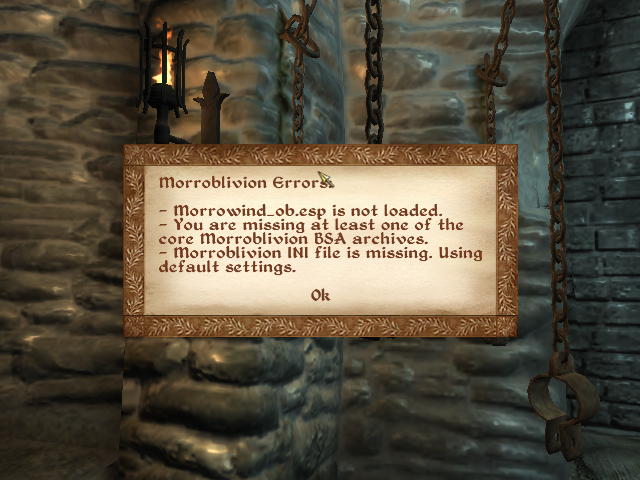
So I'm having a similar issue to some others, in that I keep getting an error message telling me "You are missing at least one of the core Morroblivion BSA archives." I've tried re-installing things 3 times, to no avail. The only thing I haven't tried is completely manually installing everything, as I like to use Mod Organizer to install my mods to keep my base game folder as clean and vanilla as possible. If anyone could tell me what I might do to get things working with Mod Organizer that would be great, otherwise I guess I'll just have to give up and manually install - and hope I don't muck that up ~.~

Karma: 0 (0 votes)

Arkxenoth

So I'm having a similar issue to some others, in that I keep getting an error message telling me "You are missing at least one of the core Morroblivion BSA archives." I've tried re-installing things 3 times, to no avail. The only thing I haven't tried is completely manually installing everything, as I like to use Mod Organizer to install my mods to keep my base game folder as clean and vanilla as possible. If anyone could tell me what I might do to get things working with Mod Organizer that would be great, otherwise I guess I'll just have to give up and manually install - and hope I don't muck that up ~.~

I finally found a way to install Morroblivion with Mod Organizer without having to extract the BSAs. [External image] You must first go through the process of installing all the required files with Wrye Bash Standalone. You should not install Mod Organizer until the Morroblivion installation is complete. This allows Morroblivion to be treated as an Unmanaged mod, the same as the vanilla files. It works beautifully now! You can view the WIP Guide I have created here: https://tesrenewal.com/forums/oblivion-general-chat/successfully-modding-morroblivion-with-mod-organizer

I hope this helps.

Karma: 0 (0 votes)

Hello all!

I'm fairly certain I've installed everything correctly. Things have been great, with one exception. Seyda Neen works like a charm, but whenever I attempt to enter a building in Balmora (Caius Cosades' House or the Cornerclub, for example), the loading screen appears and then freezes. I still hear the music, but no progress is made on the load. Alt+Tabbing doesn't get me out, nor can i access task manager; this forces me to restart my pc.

Any suggestions or assistance would be greatly appreciated. Thanks!

Karma: 0 (0 votes)

So I've completely installed the prereqs and Morroblivion manually now... and I still get a message telling me that I'm missing a core Morroblivion BSA archive. I've played for a few hours and can't seem to find anything missing, and everything seems to look alright. This leaves me wondering if it's just generating this message because I'm running the game through Mod Organizer for the other few mods that I'm using along with Morroblivion? I haven't had any crashes, can't find any missing textures/meshes, and everything SEEMS to be working properly (other than a tiny little anomaly in the inventory screen, which I already know the cause of and isn't related to Morroblivion at all).... I'm questioning whether or not I should even bother trying to figure out why it keeps giving me the message, and just play since it doesn't seem to be a problem... it's just a bit annoying seeing the warning every time I load my game ~.~

Karma: 0 (0 votes)

Its probably Mod Organizer. If you have it managing the BSAs then it makes them disappear and unpacks the files on launch, causing the morroblivion asset check quest to generate that error. Check the morroblivion ini, there is a setting in there for the asset check that causes the popup.

Karma: 0 (0 votes)

Umbros

Please help, every time I start a new game I got this message. I think that I installed everything correctly, but still, there's a chance that I messed up somewhere. 


I'm getting the same thing. I'm positive I followed the instructions exactly except that Wrye Bash would not work on my computer so I manually extracted the Resources into Oblivion/Data. I'm using NMM to sort files. According to it, I have checked Morrowind-ob.esm and it is right under Oblivion.esm. In-game I can see only a few details; most of the screen is yellow.

Karma: 0 (0 votes)

Post your load Order, you should have other files Activated. Beside these 2. needed

Karma: 0 (0 votes)

Much obliged! and just wanna say i appreciate yalls work on this!

Karma: 0 (0 votes)

Game crashes.

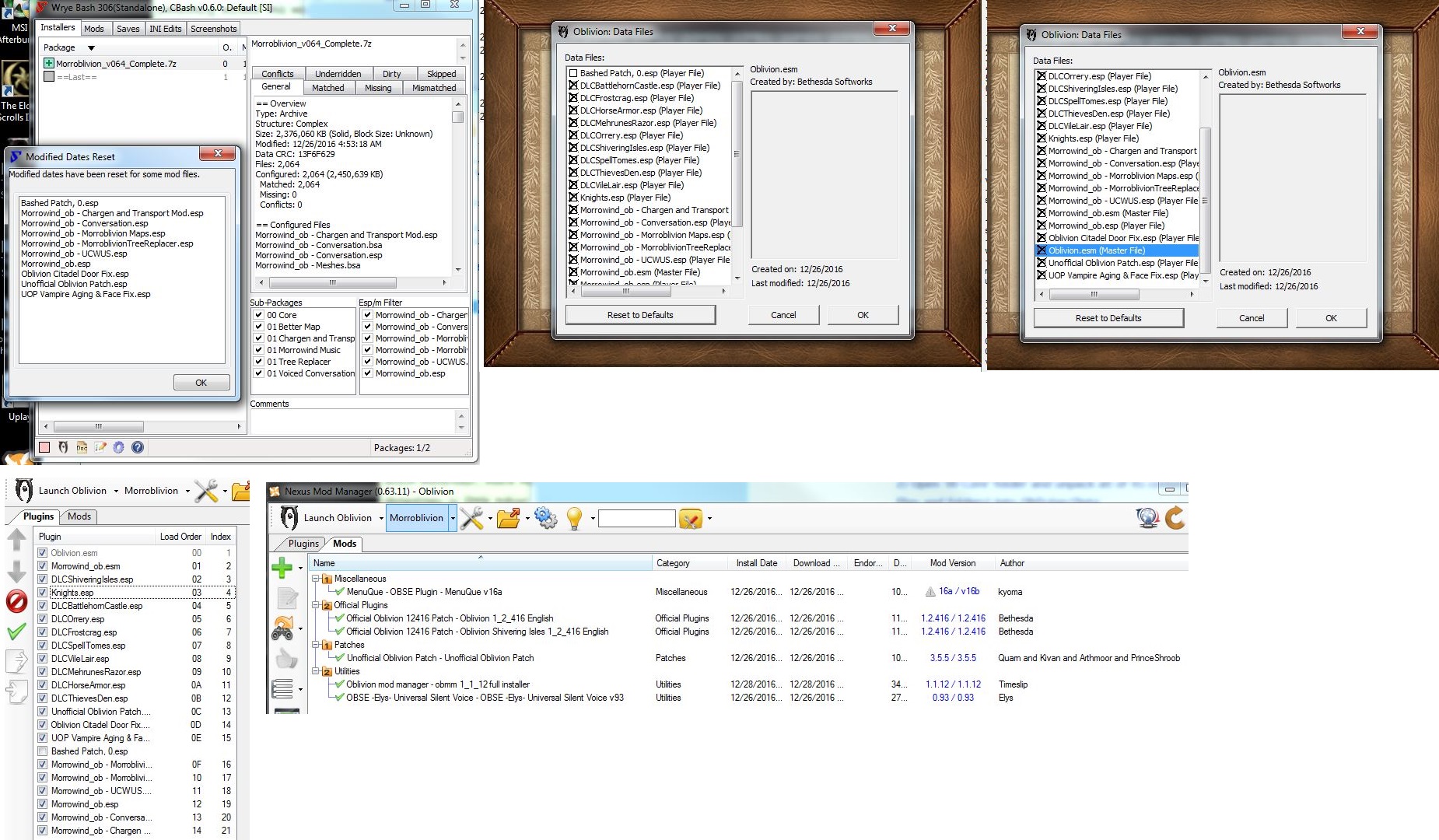
I can't get it to work, but I am new to modding. Here is a screenshot of the different variables (from my limited knowledge). Everything seemed to install correctly according to the instructions above. Script extender doesn't load up with the game, I'm not sure exactly how/when it is supposed to work so that could be the problem. When I start Oblivion it runs for just a couple seconds, I can see the Bethesda title start appearing and the sound is there but it crashes after a couple seconds.

Attachment Size
morroblivion_mod_overview.jpg 584.58 KB
Karma: 0 (0 votes)

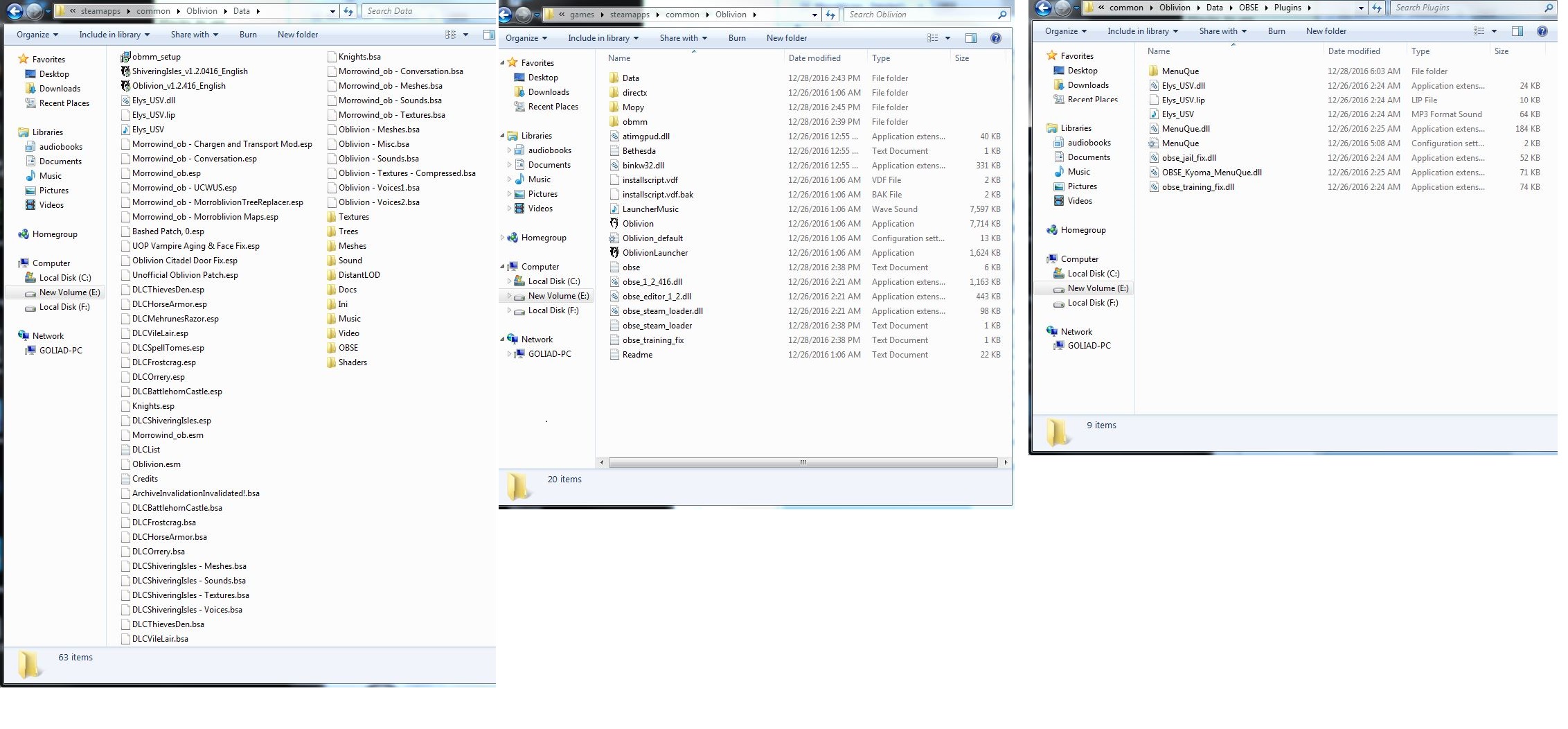
Can we see screenshots of your .../Oblivion folder, .../Oblivion/Data folder and .../Oblivion/Data/OBSE/Plugins folder?

Karma: 0 (0 votes)

Hello, I am assuming you are talking to me. Here are those folders. Thank you for helping!

Attachment Size
oblivion_folders.jpg 442.66 KB
Karma: 0 (0 votes)

Remember to sort the load order with BOSS. Install MessageLogger run the game and post the generated MessageLog.txt
Karma: 0 (0 votes)