Morroblivion Installation Instructions

Submitted by Daggers on

[insert image here]

A video installation guide for Morroblivion version 68 and newer is available here.

Welcome to the Morroblivion installation section. The written instructions below are primarily for setting up Morroblivion version 67 and older. For Morroblivion version 68 and newer, use the current Morroblivion Project Release page and the video guide linked above.

If you are experienced with TES modding, much of this will be familiar. If you are new to Oblivion modding, read the instructions carefully before installing.

Requirements

Notice: These requirements are also listed on the Morroblivion Project Release page.

Expand

What do I need to own?

You must own legitimate installations of The Elder Scrolls III: Morrowind Game of the Year Edition, including the Tribunal and Bloodmoon expansions, and The Elder Scrolls IV: Oblivion version 1.2.0416 with the Shivering Isles expansion. CD/DVD, Steam, and GOG versions are supported.

Important: These instructions are for the original The Elder Scrolls IV: Oblivion, not Oblivion Remastered.

xOBSE and Plugins
Install xOBSE separately. Installation instructions for xOBSE and most OBSE / xOBSE plugins are included in their archive folders or readme files. Follow those instructions carefully.

Recommended Tools

  • Wrye Bash - Recommended for installing legacy resource archives, managing installers, and creating a Bashed Patch when needed.
  • Wrye Bash Releases - Current release downloads.
  • LOOT - Recommended for automated load-order sorting and load-order warnings.

Installing Morroblivion Version 68 and Newer

Expand

Notice: Version 68 and newer use the current Morroblivion installer workflow. The legacy screenshot-based instructions below are useful for context, but they are outdated for v68 and newer.

  1. Download the current Morroblivion installer from the Morroblivion Project Release page.
  2. Extract the installer archive, then run the installer.
  3. The installer will detect your legal Morrowind and Oblivion installations before deployment.
  4. When prompted, select your Morrowind and Oblivion installation directories. Select the main game folders, not the Data folders.
  5. When prompted for the Morroblivion installation directory, select your Oblivion directory for a direct install, unless you are using a managed mod setup that requires a different staging directory.
  6. Install xOBSE separately, then install any OBSE / xOBSE plugins required by the Morroblivion options or add-ons you enable.
  7. Use Wrye Bash, LOOT, or another Oblivion-aware mod manager to review your plugin list and load order.
  8. Launch Oblivion through xOBSE after installation.

Patch Notice: Morroblivion version 68 currently does not use separate patch files. The associated v67 patches 1-3 are for version 67 only and are already included in v68.

Installing the Morroblivion Master - Version 67 and Older

Notice: This section is for Morroblivion version 67 and older. The installer text may differ slightly from the screenshots because the images are legacy examples.

Expand
  1. Download the master file installer for the version you are installing from the Project Release thread or its archive section. Extract the executable, launch it, and follow the on-screen prompts.
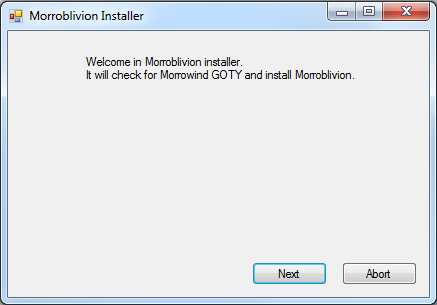
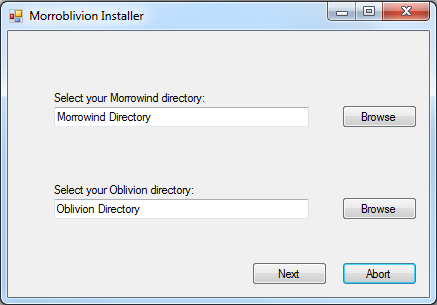
  2. Select your Morrowind and Oblivion directories. Use Browse if needed. Select the main game folders, not the Data folders.

    Example: Select C:\Oblivion, not C:\Oblivion\Data.

    Once the installer detects both games, select Next.
  3. [insert success image]

    When the installer reports Success, Morroblivion has been installed to your Oblivion Data folder. Verify that Morrowind_ob.esm is present in:

    Oblivion\Data\Morrowind_ob.esm

Installing Resources with Wrye Bash - Version 67 and Older

Expand

Download the resource archive for the version you are installing from the Project Release thread or its archive section.

  1. Download and install Wrye Bash. Wrye Bash is a mod-management tool used to manage Oblivion installers, plugins, and load-order workflows.

  2. Launch Wrye Bash and open the Installers tab to initialize Bash Installers for the first time.

  3. Wrye Bash usually creates an Oblivion Mods folder at the same directory level as your Oblivion folder.

    Example: If Oblivion is installed at C:\Oblivion, Wrye Bash may create:

    C:\Oblivion Mods\Bash Installers

    Place the Morroblivion resource archive into the Bash Installers folder. Do not manually unpack it first unless your setup specifically requires that.

  4. Return to the Installers tab in Wrye Bash. If the archive was placed correctly, it should appear in the package list on the left.

    Select the Morroblivion archive. The sub-packages will appear in the center pane. Always install 00 Core. Optional packages are prefixed with 01.

    Detailed descriptions of optional packages are available in the Project Release thread.
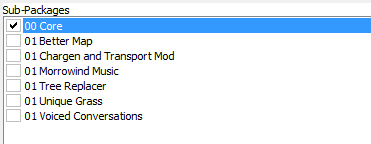
    Right-click the Morroblivion archive and select Install.

Troubleshooting: Missing textures, yellow placeholder objects, or falling through the starting ship usually means the 00 Core resources were not installed correctly or were not installed into the correct Oblivion Data path.

Installing Resources Manually - Version 67 and Older

Expand

Download the resource archive for the version you are installing from the Project Release thread or its archive section.

  1. Open or extract the Morroblivion resource archive. For legacy versions, you should see folders similar to the following:

    • 00 Core
    • 01 Chargen and Transport
    • 01 Morrowind Music
    • 01 Oblivion Trees - Morroblivion Tree Replacer
    • 01 Poster Map - Morroblivion Better Map
    • 01 Voiced Conversations
  2. Open the 00 Core folder and copy all of its contents into your Oblivion Data directory:

    Oblivion\Data

    Copy the contents of the folder, not the folder itself.

  3. Repeat the same process for any optional 01 folders you want to install. These folders are optional and should only be installed if you want the feature they provide.

Updating Morroblivion and Other Patches

Notice: This section applies to version 67 and older. For version 68 and newer, do not install v67 patch files over v68 unless a current release note specifically instructs you to do so.

Expand

Version 68 and Newer

Morroblivion version 68 currently does not have separate patch files. The v67 patches 1-3 are for version 67 only and are included in v68.

Version 67 and Older

  1. For Morroblivion v67, use the current patch guidance from the Project Release thread and the Dagger Galore a Patch for Morroblivion Nexus page.

  2. Dagger Galore is the accumulated Morroblivion patch package for v67. It includes worldspace improvements, quest fixes, object placement fixes, landscape fixes, and other corrections.

  3. Install the main file according to the Nexus page instructions. Only install optional files if the Nexus page indicates they are still required for your setup.

  4. Open or extract the archive into your Oblivion Data directory, or install it through Wrye Bash. This process follows the same general workflow described in the Installing Resources Manually and Installing Resources with Wrye Bash sections above.

Lighting Note: Dagger Galore v67 lists Morrowind Lighting Overhaul-related changes as merged. Check the Nexus Files tab for the latest main and optional file layout before installing additional lighting files.

Setting Up Load Order

Expand

Tip: Use Wrye Bash, LOOT, or another Oblivion-aware mod manager to manage your load order. The default Oblivion Launcher can enable plugins, but it should not be used as your primary load-order management tool.

Recommended: Use LOOT for automated sorting, then review Morroblivion-specific placement notes manually.

Important: If you are not using EngineBugFixes, Morrowind_ob.esm must load directly after Oblivion.esm. EngineBugFixes removes the strict technical requirement, but keeping Morrowind_ob.esm directly after Oblivion.esm remains a safe baseline.

If you are not using EngineBugFixes, your load order should begin like this:

  • Oblivion.esm
  • Morrowind_ob.esm
  • ... any other ESM or ESP files

General Morroblivion plugin order:

  • Oblivion.esm
  • Morrowind_ob.esm
  • Other ESM files
  • Other gameplay, worldspace, and compatibility plugins
  • Morrowind_ob.esp
  • Morrowind_ob - UCWUS.esp if installed
  • Morrowind_ob - Conversation.esp if installed
  • Morrowind_ob - MorroblivionTreeReplacer.esp if installed
  • Any Morroblivion map replacers

The Project Release thread contains additional guidelines and explanations for all included files under Load Order and File Details.
Karma: 1 (1 votes)
Last edited by Daggers on 20 May 2026 - 10:30.Updates to the HTML code newer and better formatted. - Daggers :)

Wow, this IS fancy! What with all the pictures and stuff.

But seriously, thank you. Very informative and in-depth.

Karma: 0 (0 votes)

Looks Good well Explaned  now Drop a Link Under ( Downloads ) and (FAQ) will top if Right Off

Thanks

Karma: 0 (0 votes)

I think those instructions will help a lot of people. Thank you for doing this, they seem pretty comprehensible.

Karma: 0 (0 votes)

These are great instructions.  Installation went quickly and without a hitch ......once I really took the warning seriously to not have STEAM files within Program Files.  once I had them safely ensconced outside of /Program files, everything worked very well.    I am still hearing Oblivion music though---probably didn't carefully read how/where to get the original Morrowind music...

Karma: 0 (0 votes)

I am still hearing Oblivion music though---probably didn't carefully read how/where to get the original Morrowind music...

It's included in the resource archive in the '01 Morrowind Music' sub-package.

However, if you install it, you'll get a mix of Morrowind and Oblivion music, because engine just grabs a random mp3 file from music folder.

If you want only Morrowind music, you'll need to manually remove Oblivion music tracks from Data\Music\Battle, Dungeon, Explore and Public subfolders. (Don't forget to backup them first!)

Karma: 0 (0 votes)

ok thanks.


Karma: 0 (0 votes)

thank you

Karma: 0 (0 votes)

3) WB will create 'Oblivion Mods' folder on the same level as your 'Oblivion' folder. (e.g. if you have Oblivion installed in C:\Oblivion, it will be C:\Oblivion Mods) Place the resource archive you downloaded earlier into Oblivion Mods/Bash Installers folder. What resource archive did I download earlier please? I'm having a bit of trouble, now its yellow clouds with text that say "WTF!! I'm missing texture" and falling through the ship. Thank you for your help!
Karma: 0 (0 votes)

Resources is the 2 gig Archive,,

Karma: 0 (0 votes)

Would your Morrowind/Oblivion directory look something like this:

C:\Program Files (x86)\Steam\SteamApps\common\Oblivion

Or this?:

C:\Program Files (x86)\Steam\SteamApps\common\Oblivion\Data

Karma: 0 (0 votes)

The first.

Karma: 0 (0 votes)

qwertyasdfgh

The first.

Ok, thanks!

Karma: 0 (0 votes)

Hi, I am stuck. I got it so it shows the resources on the left in the installers tab. But it doesnt do anything when I click it and doesnt show any sub packages.

Karma: 0 (0 votes)

Hi, I am stuck. I got it so it shows the resources on the left in the installers tab. But it doesnt do anything when I click it and doesnt show any sub packages.

Please post a screenshot of Installers window with resource archive selected.

Karma: 0 (0 votes)

Instead of double-clicking, try Right Click-> Install, on this archive.

Karma: 0 (0 votes)

It says Morroblivion_v061_Complete.rar, while resource archive is a 7z. Have you repacked it?

Karma: 0 (0 votes)

I just tried to reinstall into my C:\Games, but Steam insisted that was a bad idea. How long did it take you to move the game into your drive and was it a specific process?

Karma: 0 (0 votes)

anithinks

Instead of double-clicking, try Right Click-> Install, on this archive.

I tried that but it was greyed out as well

Karma: 0 (0 votes)

qwertyasdfgh

It says Morroblivion_v061_Complete.rar, while resource archive is a 7z. Have you repacked it?

I downloaded the v060 part files that Rox posted then added the v061 update and packed it into a .rar. I then put it in the bash installers and I even put the folder that was unpacked into the bash installers folder as well and it is greyed out but instead of the square it showed a diamond and it was called a 'project' where as the square was called an 'archive'.

Karma: 0 (0 votes)

I downloaded the v060 part files that Rox posted then added the v061 update and packed it into a .rar.

This is the source of your problem. Install the archives as they are provided.

Karma: 0 (0 votes)

Priority: low

Playing this game, I cannot begin to imagine how many hours of work it took. I'm very happy. Everything works great, with only a few bumps in the road that were easily fixed. On to my question:

I only have 1 missing mesh, and it's a wall hanging in the Morag Tong HQ. Odd, I know, to only have 1 (knock on wood). I followed the instructions as best I could and I have BOSS working out the load order. The only mod I have is minor (unlimited training) and shouldn't affect that for any reason. Is this a common mesh issue? Is there a way to fix this without reinstalling? Am I forced to deal with one mesh, in a single room that I hardly visit?

Karma: 0 (0 votes)

Alright, I see now. The mesh is in the archive, but it's in Morrowind nif format for some reason - that's why it wasn't caught by automatic utilities.

I'll make sure to replace it in the next update.

Karma: 0 (0 votes)

Thanks guys, very helpful!

Karma: 0 (0 votes)

Thanks so much!

Karma: 0 (0 votes)

Hi,
These instructions are great and any faults during the process were faults of my own. I've got through everything up to the Load Order done correctly. But the problem is, the Morrowind ESM does not show up in Wrye Bash. I don't know why but it doesn't exist even after several tries installing the Morroblivion Installer.exe. It is in my data file in my Oblivion directory by the way. Any idea what's wrong?

Karma: 0 (0 votes)

Hi I got just one question if anyone can help, and maybe I just need to look closely into instructions but will this mess up my current Oblivion and mods? I've got Morrowind GOTY and Oblivion Steam and got mods in Oblivion functioning nicely for years now and I just want to make sure it will stay that way

Karma: 0 (0 votes)

But the problem is, the Morrowind ESM does not show up in Wrye Bash. I don't know why but it doesn't exist even after several tries installing the Morroblivion Installer.exe. It is in my data file in my Oblivion directory by the way. Any idea what's wrong?

If it's in your Data folder, then it should be visible in WB. Are you sure it's not Morrowind_ob.esp? Do you have Windows Explorer set to show file extensions?

If it's missing, then something went wrong during Part II of installation. Does the Morroblivion Installer show any error messages?

will this mess up my current Oblivion and mods?

I don't see why it should. Morroblivion is just another Oblivion mod, only with large amount of content.

Karma: 0 (0 votes)

qwertyasdfgh
I don't see why it should. Morroblivion is just another Oblivion mod, only with large amount of content.

Thanks for the reply. I lied, I got more questions :D apologize if this next question is stupid but, will I still be able to play both Oblivion and Morroblivion separately when I choose to? I mean can I just disable Morroblivion and continue with my old Oblivion game? Is this all somewhere in instructions that I should read? Thanks

Karma: 0 (0 votes)

Apple0866

Hi,
These instructions are great and any faults during the process were faults of my own. I've got through everything up to the Load Order done correctly. But the problem is, the Morrowind ESM does not show up in Wrye Bash. I don't know why but it doesn't exist even after several tries installing the Morroblivion Installer.exe. It is in my data file in my Oblivion directory by the way. Any idea what's wrong?

you did run the installer  and point it at your Morrowind Directory then do the Same with your Oblivion Directory

Karma: 0 (0 votes)

will I still be able to play both Oblivion and Morroblivion separately when I choose to?

Um... yes, I guess. Morroblivion is not a separate game or anything - it is a mod which basically adds a new world. You can travel freely between Vvardenfell and Cyrodiil whenever you like.

If you uninstall it, you'll lose all Morrowind items and quest progress, but the base Oblivion game will still be the same.

Karma: 0 (0 votes)

qwertyasdfgh

If you uninstall it, you'll lose all Morrowind items and quest progress, but the base Oblivion game will still be the same.

Thanks, I understand now. Good luck with future releases.

Karma: 0 (0 votes)

I could not get Wrye Bash to work and installed the resource file manually. Since I could not use Wrye Bash, I am now having trouble figuring out how to establish the load order since I have very little experience with mods and mod managers. I do have Nexus mod manager from the previous steps, and I was wondering if it was possible to do it from there? I'd appreciate any help anyone could give me. Thanks!


Karma: 0 (0 votes)

NMM should be able to do it.

Don't know why you couldn't install WB though, it has an automated installer.

Karma: 0 (0 votes)

I see Morrowind_ob.esm in my Oblivion data folder, but it does not appear in my NMM load order list. I didn't have trouble installing WB, I just had trouble creating the Oblivion mods folder with it. It did not create for me when I went to the Installers tab. 

Karma: 0 (0 votes)

I see Morrowind_ob.esm in my Oblivion data folder, but it does not appear in my NMM load order list.

I don't use NMM so can't help here.

I didn't have trouble installing WB, I just had trouble creating the Oblivion mods folder with it. It did not create for me when I went to the Installers tab. 

You can try right-clicking on the header in Installers tab and checking if the 'Enabled' option there is active. Alternatively, you can create folders manually.

Also, if you have WB installed, why can't you set load order there?

Karma: 0 (0 votes)

I got it to work in WB, and I got the load order right I think (with Oblivion.esm first, and Morrowind_ob.esp second), however now when I try and open Oblivion it loads up, but then closes out right away. Any idea what the problem could be? 

Karma: 0 (0 votes)

If it crashes on start it's 99% a missing master. Please post your load order.

Karma: 0 (0 votes)

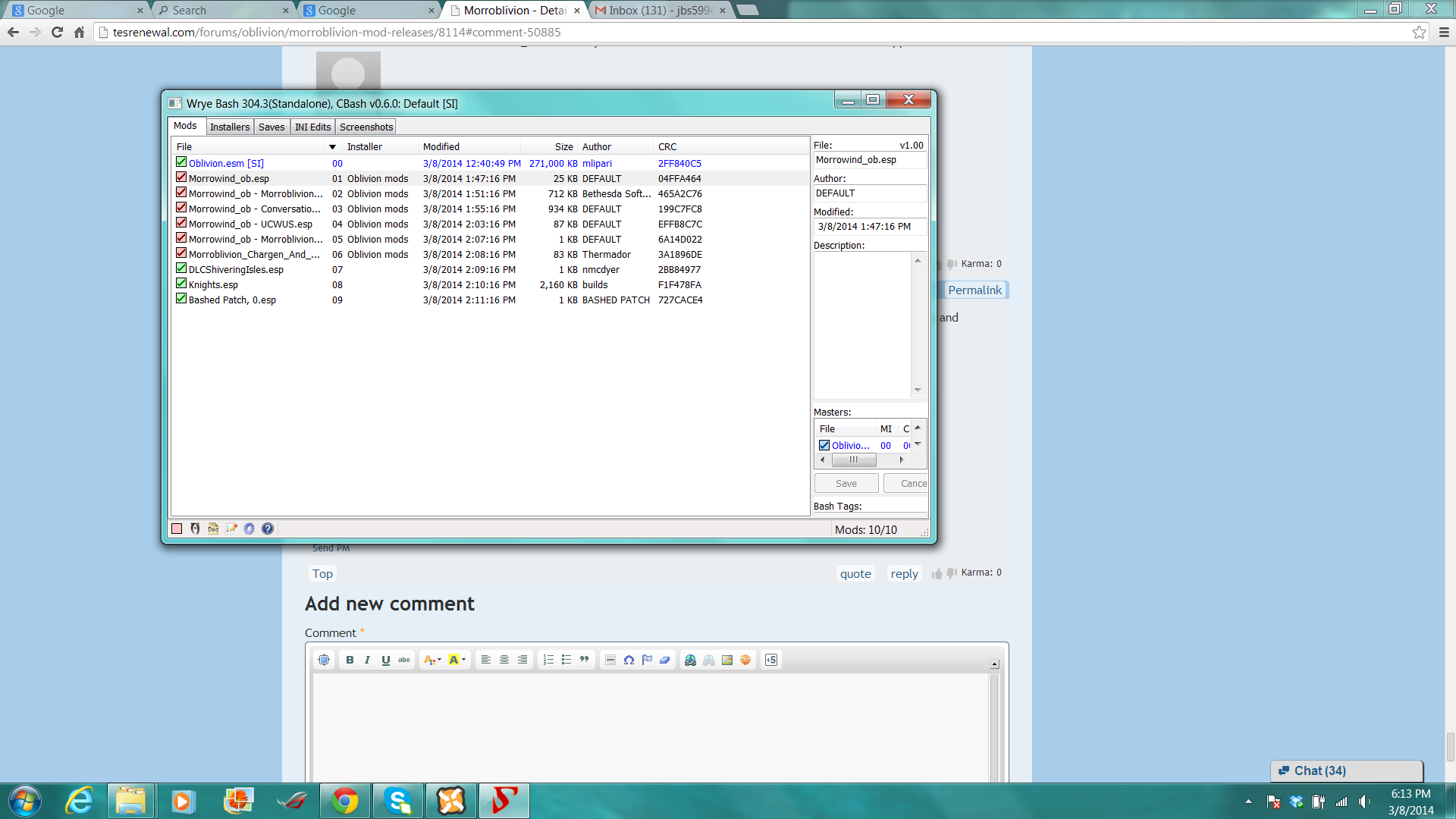
Yea it is a missing master, the check boxes are red next to them, and when I mouse over it, it says one or more missing masters for all of the Morrowind_ob content.

Oblivion.esm
Morrowind_ob.esp
Morrowind_ob - MorroblivionTreeReplacer.esp
Morrowind_ob - Conversation.esp
Morrowind_ob - UCWUS.esp
Morrowind_ob - Morroblivion Maps.esp
Morroblivion_Chargen_And_Transport_Mod_V10.esp
DLCShiveringIsles.esp
Knights.esp


Karma: 0 (0 votes)

You are missing Morrowind_ob.esm

Refer to Part II. Installing Morroblivion master file of this guide to install it.

Karma: 0 (0 votes)

I followed the steps in part II and it said success, but it still says one or more masters missing in the load order.

Karma: 0 (0 votes)

That's strange - if the installer worked you should have Morrowind_ob.esm in your Data folder. Try running it again.

Where do you have Oblivion installed?

Karma: 0 (0 votes)

I have Morrowind_ob.esm in my data folder. I have it installed under F:Steam\SteamApps\common

Karma: 0 (0 votes)

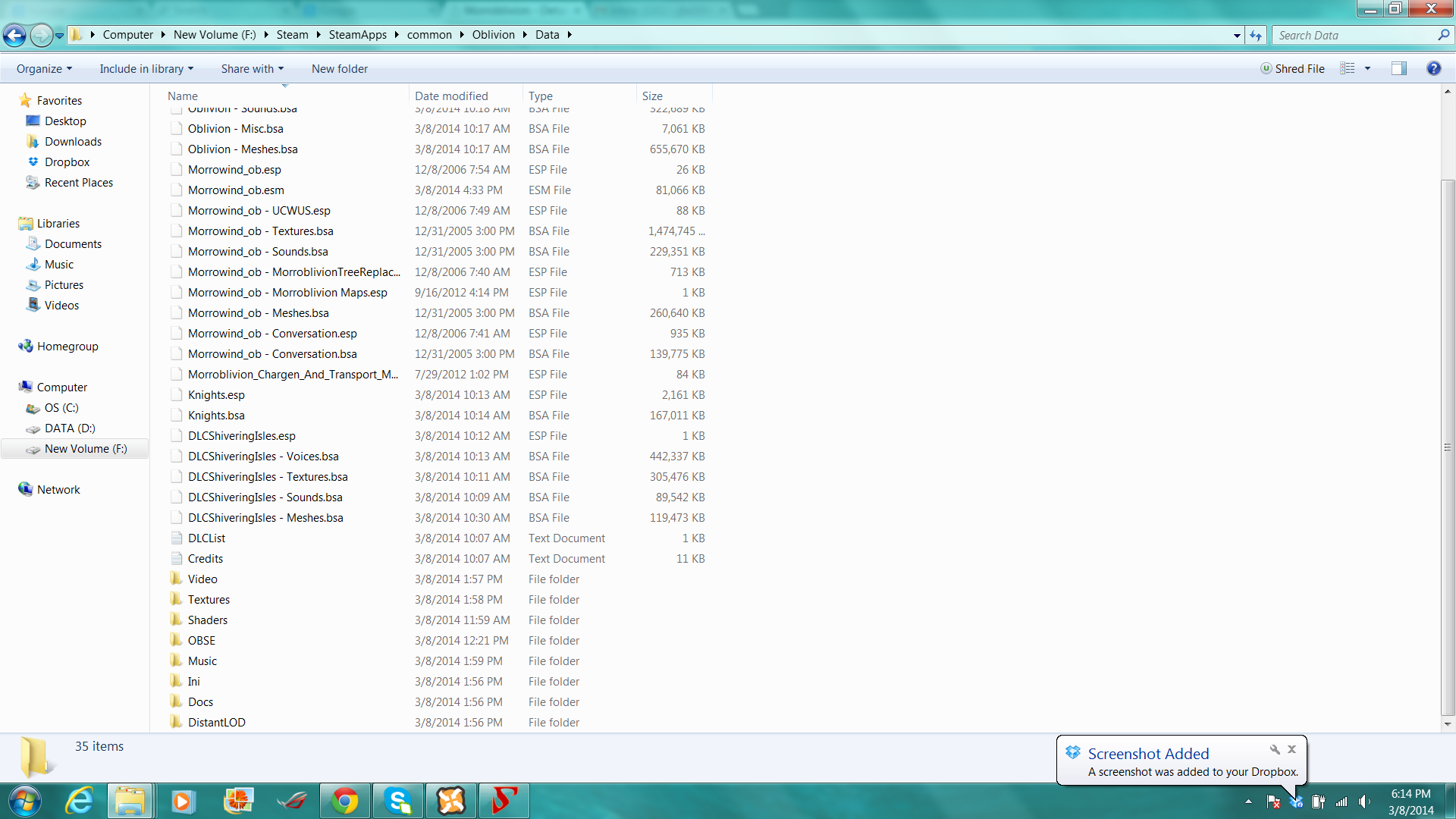
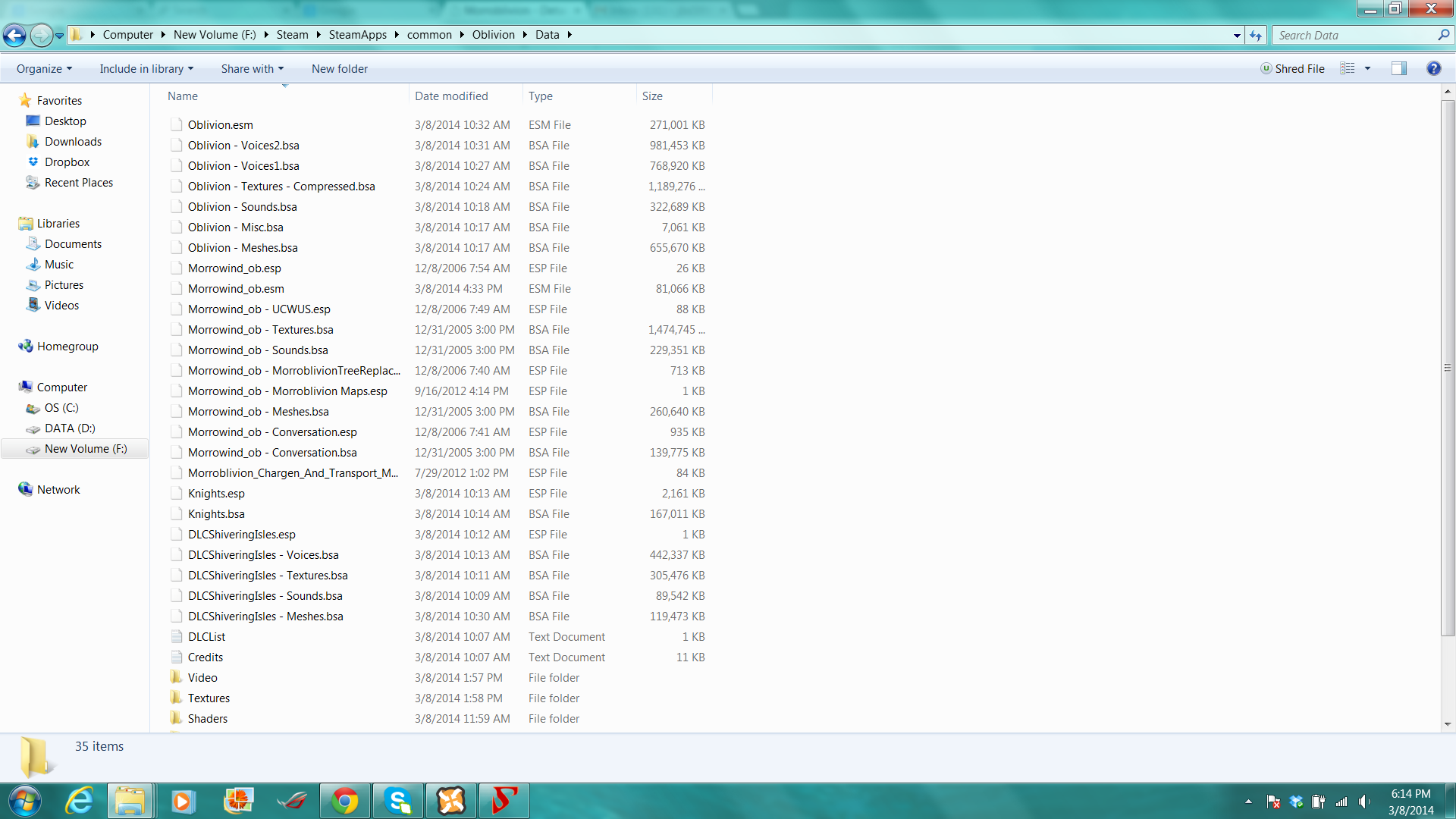
If its in the Data then it should also be in Wrye Bash. Can you post screenshots of WB window and Oblivion\Data folder?

Karma: 0 (0 votes)

Can you try opening the regular Oblivion Launcher and see if it detects Morrwind_ob.esm?

Karma: 0 (0 votes)

Hi there! I'm having a little trouble installing the Wrye Bash version of the v62 resource pack.

When I open Wrye Bash and select the resource pack there is no list of sub-packages that I can click on and individually install. I've tried re-copying the files to the bash installers folder as well as right clicking the package and selecting 'install' but all I get is a white box with a plus sign in the center with no visible changes besides. Have I done something wrong or is that the result that I am supposed to get?

Karma: 0 (0 votes)

Here are both, I had to split up my Oblivion data folder into two screenshots, most of the files are in 1.

I'm baffled here. Try restarting your PC, maybe it'll help [External image]

When I open Wrye Bash and select the resource pack there is no list of sub-packages that I can click on and individually install. I've tried re-copying the files to the bash installers folder as well as right clicking the package and selecting 'install' but all I get is a white box with a plus sign in the center with no visible changes besides. Have I done something wrong or is that the result that I am supposed to get?

No, it's not. Did you download the resource archive from the main post in Project Release thread or somewhere else? Or have you unpacked\repacked the downloaded archive?

Karma: 0 (0 votes)